The pattern tester#
Many settings of the server take a regular expression: blocked paths, file name filters that match a pattern, filters in jobs. The pattern tester lets you try an expression against sample text before you put it into a setting.
Open it with Test RegEx in the Logins and Advanced panel of Misc in Preferences.
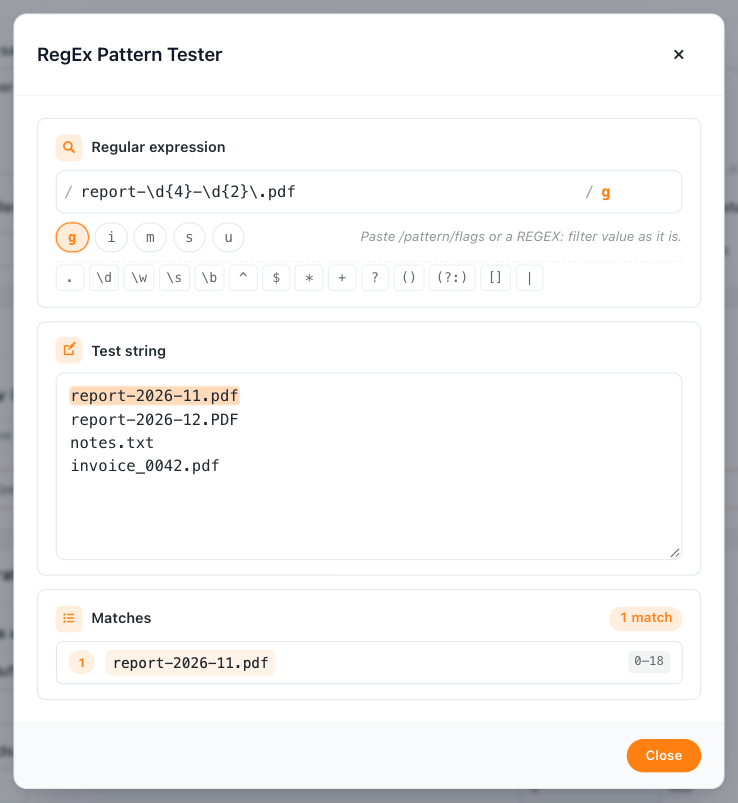
Everything happens in your browser: nothing is sent to the server and nothing is saved. Close closes the tester and forgets what you typed.
The three parts#
| Part | What it is |
|---|---|
| Regular expression | the expression to try, between the two slashes |
| Test string | the text to try it on: one or many lines |
| Matches | what the expression found, numbered, each with its place in the text. The matches are also marked in the test string. |
The matches change as you type. The badge beside Matches says how many there are, "No match", or what is missing: "Enter an expression." or "Type or paste a test string." An expression that is not valid shows its error under the box. At most 1000 matches are listed; the badge then reads "1000+".
Flags#
The round buttons under the expression switch its flags on and off. A flag that is on is shown after the closing slash.
| Flag | Means |
|---|---|
| g | global: find every match, not only the first. On when the tester opens. |
| i | ignore upper and lower case |
| m | multiline: ^ and $ match at the start and end of every line |
| s | dot all: . also matches line breaks |
| u | Unicode |
In the picture .PDF in the second line is not found because i is off.
The shortcut buttons#
The row of small buttons puts a piece of an expression in at the cursor. Hover over one to see what it means.
| Button | Means | Button | Means |
|---|---|---|---|
. |
any character | * |
0 or more of what is before it |
\d |
a digit | + |
1 or more |
\w |
a letter, digit or underscore | ? |
0 or 1 |
\s |
a space, tab or line break | () |
a group that is remembered |
\b |
the edge of a word | (?:) |
a group that is not remembered |
^ |
the start of a line | [] |
one of the characters inside |
$ |
the end of a line | | |
or |
Pasting an expression#
You can paste an expression as it is written elsewhere:
/pattern/flags, as in/\.pdf$/i: the flags go to the flag buttons.- a value that starts with
REGEX:, as some filter settings store it:REGEX:is left off.
From the tester to a setting#
- The tester finds a match anywhere in the text. Some settings want the expression to fit the whole value: a blocked path must match the whole path, from the first character to the last (Blocked Paths). For those, try your expression with
^in front and$behind, and m on when you test several lines at once. - The tester uses the regular expressions of your browser, the server those of Java. For everyday expressions the two agree. Where a setting matters, test it on the server too, with a harmless case.
- Not every pattern in the server is a regular expression. Many settings take simple patterns in which
*stands for any text and?for one character; the page of each setting says which it takes.