FTP, FTPS and FTPES ports#
A listener of the protocol FTP Access (FTP://) answers FTP clients, plain and with TLS. A listener of Implicit SSL FTP (FTP://) answers the older form in which TLS starts before anything is said. Both are made in IP / Servers.
| What clients call it | Listener | Usual port |
|---|---|---|
| FTP | FTP Access | 21 |
| FTPES, "explicit FTP over TLS", "AUTH TLS" | the same FTP Access listener | 21 |
| FTPS, "implicit FTP over TLS" | Implicit SSL FTP | 990 |
One FTP listener so serves both plain FTP and FTPES. Whether plain logins are still let in is a setting, below.
General#
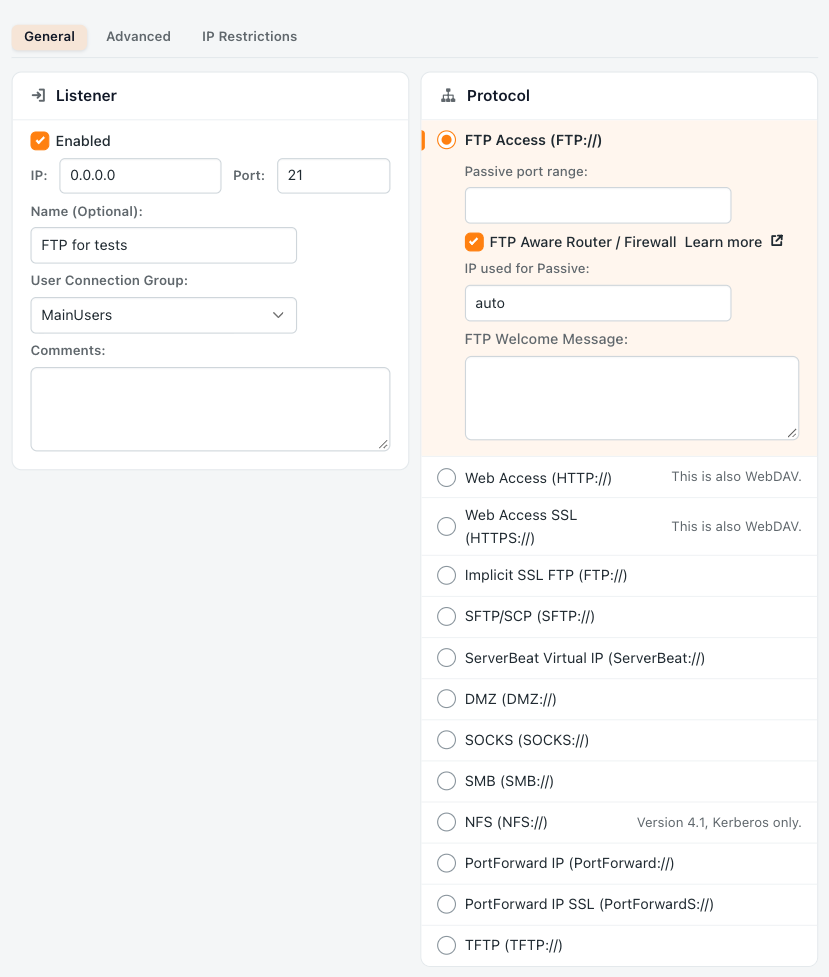
Beside the fields every listener has, an FTP listener has:
| Setting | What it does | New listener |
|---|---|---|
| Passive port range | the ports the server opens for listings and files in passive mode, such as 2000-2100. Open exactly these in the firewall, towards the server. Empty: any free port. |
empty |
| IP used for Passive | the address the server tells clients to connect to for data. auto lets the server find its public address. Otherwise the public address, or a host name; several addresses separated by commas are handed out in turn. |
auto |
| FTP Aware Router / Firewall | on: for plain FTP the server names its own local address, and trusts the router to replace it on the way out, as routers that understand FTP do. Off: the server names the public address itself. An encrypted session always gets the public address, because the router cannot read it. | off |
| FTP Welcome Message | text shown to a client when it connects, before the login | "Welcome to CrushMFT!" |
A client in the server's own network is always given the server's local address.
Advanced#
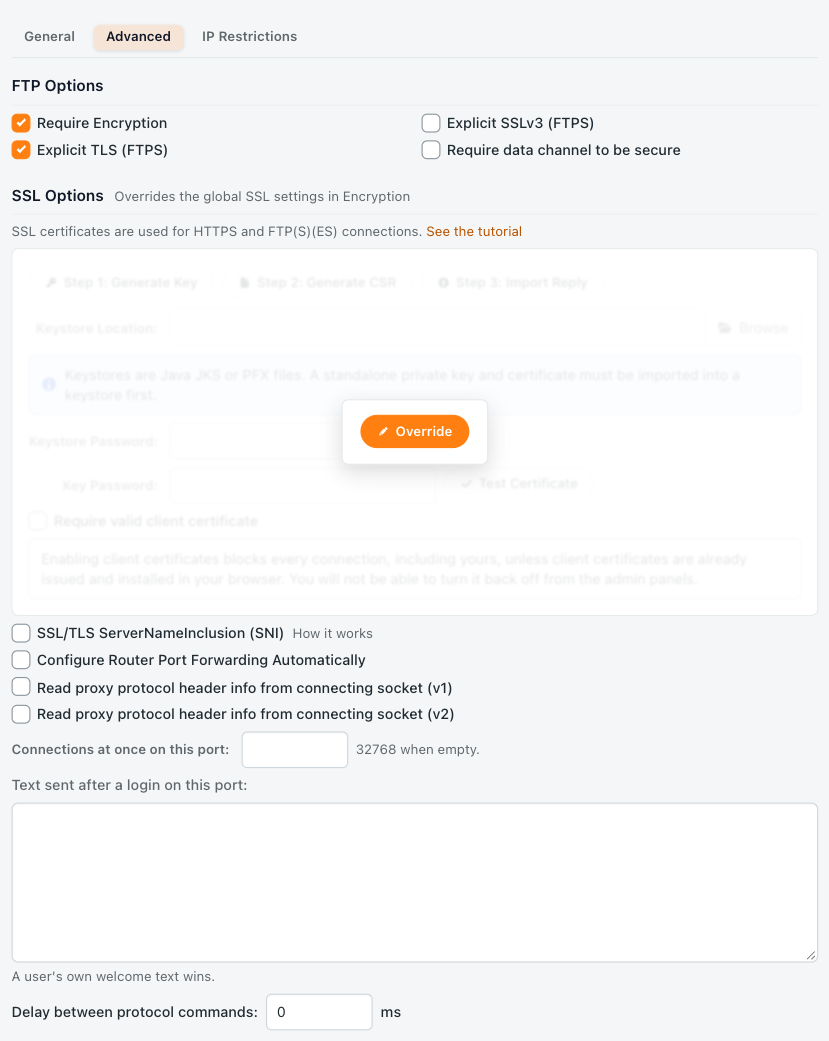
| Setting | What it does | New listener |
|---|---|---|
| Require Encryption | a login without TLS is refused. Plain FTP is then off on this port, and only FTPES clients get in. | off |
| Explicit TLS (FTPS), Explicit SSLv3 (FTPS) | the two commands by which a client may ask for encryption, AUTH TLS and AUTH SSL. Both lead to the TLS versions the server allows; leave both on. |
on |
| Require data channel to be secure | listings and files must be encrypted too. A client that protects only the login is refused its transfers. | off |
| SSL Options | a certificate for this port alone: see SSL on a port, SNI | the server's own |
| the four switches at the bottom | see IP / Servers |
Note
Plain FTP sends passwords and files unprotected. On a server that faces the internet, turn on Require Encryption and Require data channel to be secure, or do not offer FTP at all.
A single user can be held to encryption too: Require encryption in Protocols a user may use.
Passive mode and the firewall#
FTP uses one connection for commands and another for every listing and every file. In passive mode, which nearly all clients use, the server names a port and the client connects to it. For that to work from outside,
- set a Passive port range, not too small: a port per transfer that runs at the same time, with room;
- open that range in the firewall and forward it to the server, like the listener's own port;
- make sure the server names an address the client can reach: IP used for Passive.
"Login works, the listing hangs" means that one of the three is missing.
What the server speaks#
Passive and active mode, EPSV and EPRT for IPv6, MLSD and MLST listings, MODE Z compression, resuming, and CCC, by which a client can drop the encryption of the command channel after login so that an FTP-aware router can follow along.
Tried on the test server#
A listener on port 12121 with the passive range 12200-12210, and the command-line client curl:
| Tried | Answer |
|---|---|
| connect | 220-Welcome to CrushMFT! 220 CrushMFT Server Ready! |
| login | 331 Username OK. Need password. 230 Password OK. Connected. |
| list | the folders and files of the user |
| upload | 226 |
| explicit TLS | AUTH SSL → 234 Changing to secure mode..., TLS 1.3; PROT P → 200 PROT command OK. Using secure data connection. |
| passive | `229 Entering Extended Passive Mode ( |
A user with a quota is told what is left with each transfer: 150-Quota space available: 1.04 GB.
For the client's side, see Connecting with FTP clients.