App Gateway: web apps reached only through CrushMFT#
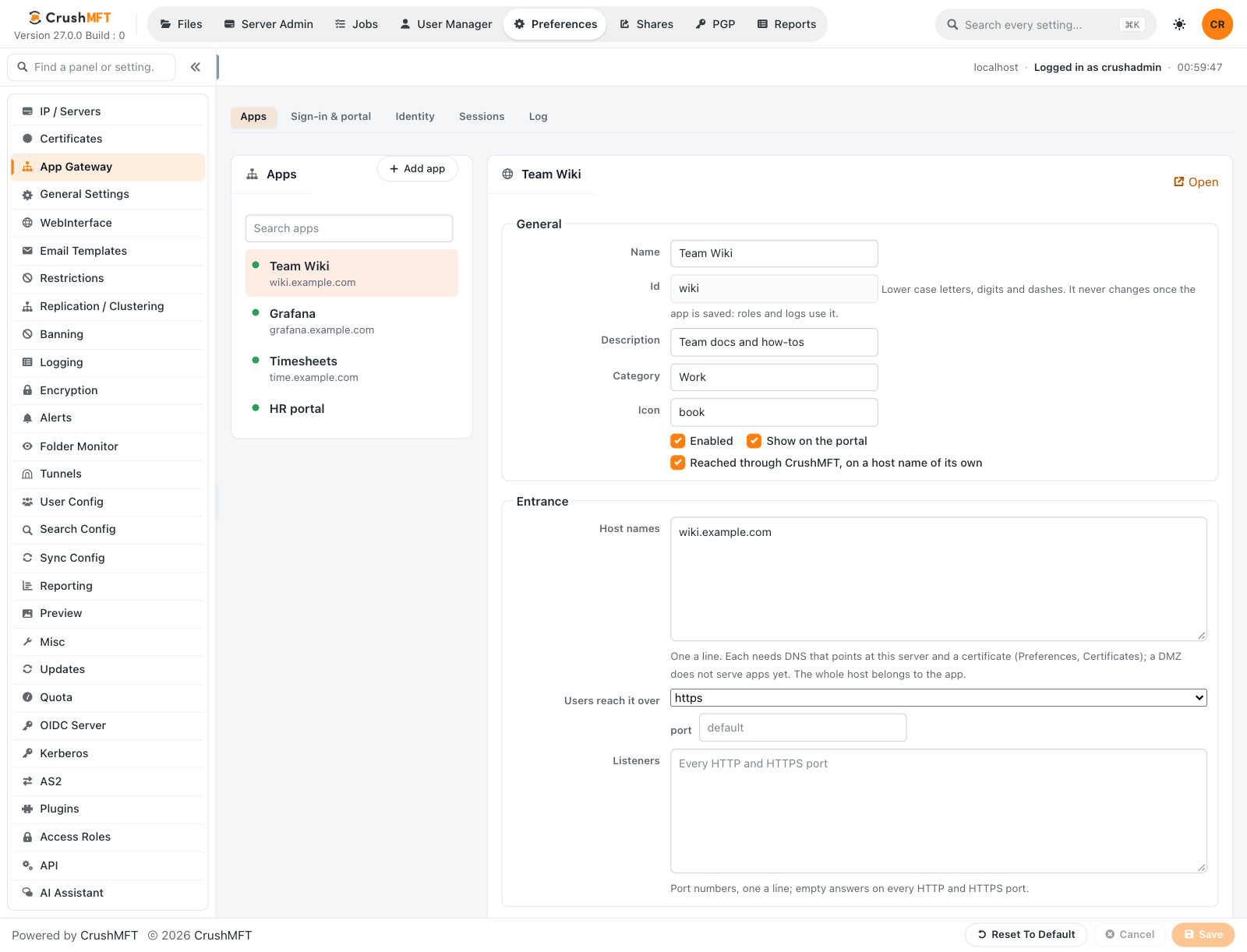
The App Gateway puts other web sites behind CrushMFT's sign-in. A wiki, a monitoring dashboard, an old intranet, an admin console: each gets a host name of its own that points at CrushMFT, and CrushMFT forwards a request to the inside site only after the person has signed in and their roles allow it. The inside site needs no login of its own, and nothing on the internet reaches it directly.
The same sign-in can also serve apps that are not forwarded at all: CrushMFT is an OpenID Connect provider and a SAML identity provider for them.
The App Gateway needs the Enterprise edition (the license feature app_gateway). Without it, the section in Preferences shows the license's message and every app's host answers "This app is not available".
How a request goes through#
An app answers on one or more host names, such as wiki.example.com. Point those names at CrushMFT in DNS and give CrushMFT a certificate for them (Certificates). Then:
- A browser opens
https://wiki.example.com/. CrushMFT sees the host name, finds the app, and looks for the app's own cookie (CrushMFTApp). - Without one, a page load is sent to the sign-in address (for example
https://files.example.com, set under Sign-in & portal). A script's request gets401instead, so a page that is open does not end up in a sign-in loop. - The person signs in at CrushMFT as usual: password, two-factor codes, single sign-on, whatever their account uses. The login page says "Sign in to continue to Team Wiki".
- CrushMFT checks that the person may use the app, then sends the browser back to
wiki.example.comwith a one-time code. The app's host trades the code for its cookie and the browser lands on the page it asked for. - From then on every request carries the cookie. CrushMFT checks it, removes its own cookies and anything that looks like its identity fields from the request, adds what the app is told about the person, and forwards the request to the inside address.
The cookie belongs to the app's host only. An app never sees CrushMFT's own session cookie, so a script in the app cannot act as the person in the WebInterface.
The code of step 4 works once, for one minute, and only in the browser that started the sign-in: the app's host leaves a short-lived state cookie in that browser and the code must match it.
Who may use an app#
People get apps from their roles:
- The role App User gives the app access permission (
gateway.app.use) for the apps listed on the user, the group or the inheritance parent that holds the role. The User Manager's Apps tab shows which apps a user has and which role gives each one, and gives or takes apps (see Users: the Apps tab). - A role of your own may hold
gateway.app.usefor a list of apps, or for all. - Full administrators may use every app.
Nothing else gives an app. An app that no role names is open to full administrators only.
On top of that, each app's Access settings apply to everyone, full administrators included: the networks a person must come from, the days and hours the app is open, a second factor, and how old the sign-in may be. A refused person sees "You may not use Team Wiki"; the reason goes to the audit.
The portal and the start page#
/WebInterface/Apps/index.html on the sign-in address is the portal: a tile for every app the person may open, grouped by category. A tile opens the app's own address, so the sign-in of step 2 happens without a second password.
A user's start page says where the login page goes when nothing else was asked for: the file manager (the default), the portal, or one app. It is set in the User Manager on the Apps tab, and is inherited like other user settings. See The apps portal.
Sessions and limits#
- An app has no session of its own beyond the CrushMFT session. When that ends (sign-out, time-out, an administrator ends it), the app's cookie stops working. Signing out of an app at
/.crushmft/logouton the app's host ends the CrushMFT session too. - An app may shorten the idle and absolute limits for itself (Session part of the app).
- Activity is what the person does: a page load, a form post, any method other than GET and HEAD. A dashboard that polls once a second does not keep the session alive.
- Connections per browser: the connections of one app session count against that session (64 by default, Sign-in & portal), not against the client's address. An office behind one address does not lock itself out at the per-address limit of the port.
- Sign in again after (Access part): when the CrushMFT sign-in is older than the app allows, the next page load of the app ends the CrushMFT session and asks the person to sign in again, then goes on to the app. Meant for an admin console behind the gateway.
- Second factor (Access part): the code of the person's authenticator app, once per CrushMFT session, before the app opens. An account without an authenticator cannot open that app.
Keeping the inside sites unreachable#
"Only through CrushMFT" is a fact of the network, which the gateway helps you make and check. Each of these is worth having on its own; What the app is told has the examples.
| Layer | What it does |
|---|---|
| The network | The inside site's firewall lets in only the CrushMFT server(s). Examples for Linux (nftables), Windows Firewall and a cloud security group are on the identity page. |
| A client certificate | CrushMFT shows a certificate from its certificate store to the inside site, and the site refuses every connection without it. |
| The signed assertion | CrushMFT signs a short-lived statement of who the person is; the site refuses a request without a valid one. |
| Test | Test from every server in the app's Destination part: every CrushMFT server of a cluster must reach the inside address, and each DMZ must not. |
Header fields alone (X-CrushMFT-User and the like) are safe only when nothing but CrushMFT can reach the site: anyone who reaches it directly can send the same fields. The editor shows a red line on header fields until the assertion or a client certificate is on, or a Test has shown that the DMZ cannot reach the site.
What happens when something is wrong#
| The person sees | Why |
|---|---|
| This app is not available | The app is turned off, the license has no App Gateway, or none of its inside addresses answers. A script gets 503 with Retry-After: 30. |
| Team Wiki did not answer | The inside site broke off the request (502). An inside site that requires a client certificate CrushMFT does not show refuses it this way. |
| You may not use Team Wiki | No role gives the person the app, or an Access condition refuses them now. |
| This sign-in link cannot be used | The code was used already, is older than a minute, or was started in another browser. Opening the app again starts a new sign-in. |
| Sign-in is not set up | No sign-in address yet (Sign-in & portal). |
| Team Wiki needs a second factor | The app asks for an authenticator code. Without an authenticator on the account the person cannot go on. |
Signing out#
When a person signs out of CrushMFT (the WebInterface's Logout in any of its apps, sign-out on an app's own host, /saml/logout, or an app sending them to /oidc/logout with no address of its own to return to), the CrushMFT session ends and with it every app session. The apps themselves keep their own sessions, so CrushMFT tells those it can:
- SAML apps of the session with a logout address get a signed LogoutRequest, one after another.
- Apps with a sign-out address (the app's Session part) have that address loaded in the Signed out page, so the browser visits it with the app's cookies and the app ends its session.
- OpenID Connect apps with a back-channel logout address get a logout token posted to it, whatever ended the session.
The Signed out page is used once and only when there is something to tell. A browser that blocks third-party cookies loads a sign-out address without the app's cookie (the sign-in address and the apps are different sites); an app reached through CrushMFT is closed all the same (its next request goes to the sign-in page), while an app that only signs its people in with OpenID Connect or SAML keeps its own session until its own time limit.
What is recorded#
- The audit (the Log tab of the section, the server log, and the audit record for refusals and changes): every app session that starts, every one that ends and why, every refusal with its reason, every change to an app or to the identity settings.
- The App access report (the Log tab, and App access in Reports, Security): who used which app when, from where, how many requests and how long, and the refusals, for any range of days, as a table or CSV. In Reports it can be scheduled and mailed like any report. The gateway keeps a file a day under
logs/app_gateway/for 90 days. - The dashboard of Server Admin shows an App Gateway card once an app exists: apps up, live app sessions, requests a minute and the inside sites' errors in the last hour. Its Sessions link opens the section's Sessions tab.
With a cluster, and with a DMZ#
- A cluster: an app session lives on the server that holds the person's CrushMFT session. When another server of the cluster gets one of its requests, it sends the request there, as it does for the WebInterface's own sessions. The app's network rule is checked by the server that got the request; the server that holds the session sees that server's address unless
allow_x_forwarded_hostis on. Test runs on every server. - A DMZ serves the apps without ever reaching their inside sites. The inside server tells each DMZ only the apps' host names and session limits: never an inside address, who is given an app, a key or a password. Point the app's host names, and the sign-in address, at the DMZ. The DMZ answers the sign-in and the second factor page and holds the app sessions; each request of an app goes to the inside server over the DMZ link, with the person and the app named. The inside server decides (who is given the app, the Access conditions), adds the identity fields and the signed assertion, and calls the inside site. The record (the Log tab, the App access report) is on the inside server, marked "through the DMZ". The inside server believes the person the DMZ names, as it does for the DMZ's file transfers.
- Through a DMZ, OpenID Connect and SAML apps are not served (they sign in on the inside server's own address), and the Sessions tab does not list the DMZ's app sessions: they end when the person signs out on the DMZ or by their time limits, and every request is still decided inside. Test asks each DMZ whether it can reach the inside address: it should not.
Related pages#
- The App Gateway section in Preferences, every setting
- What the app is told about the person: header fields, the signed assertion, Basic login, client certificates, firewall examples
- CrushMFT as an OpenID Connect provider
- CrushMFT as a SAML identity provider
- The apps portal, for the people who use the apps
- The App Gateway in the API: apps, settings, identity, grants, sessions, the log and the report