App Gateway (Preferences)#
Preferences, App Gateway sets up the web apps that people reach only through CrushMFT: their host names, their inside addresses, who may use them and what they are told about the person. What it is and how a request goes through: App Gateway.
Each change here is saved by its own button (Save app, Save sign-in settings, and so on); the page's Save has nothing to do. Changing apps needs the permission gateway.app.edit, which is held by full administrators (it decides who gets in, and an inside address is a place the server connects to). The section is locked when the license has no App Gateway (Enterprise).
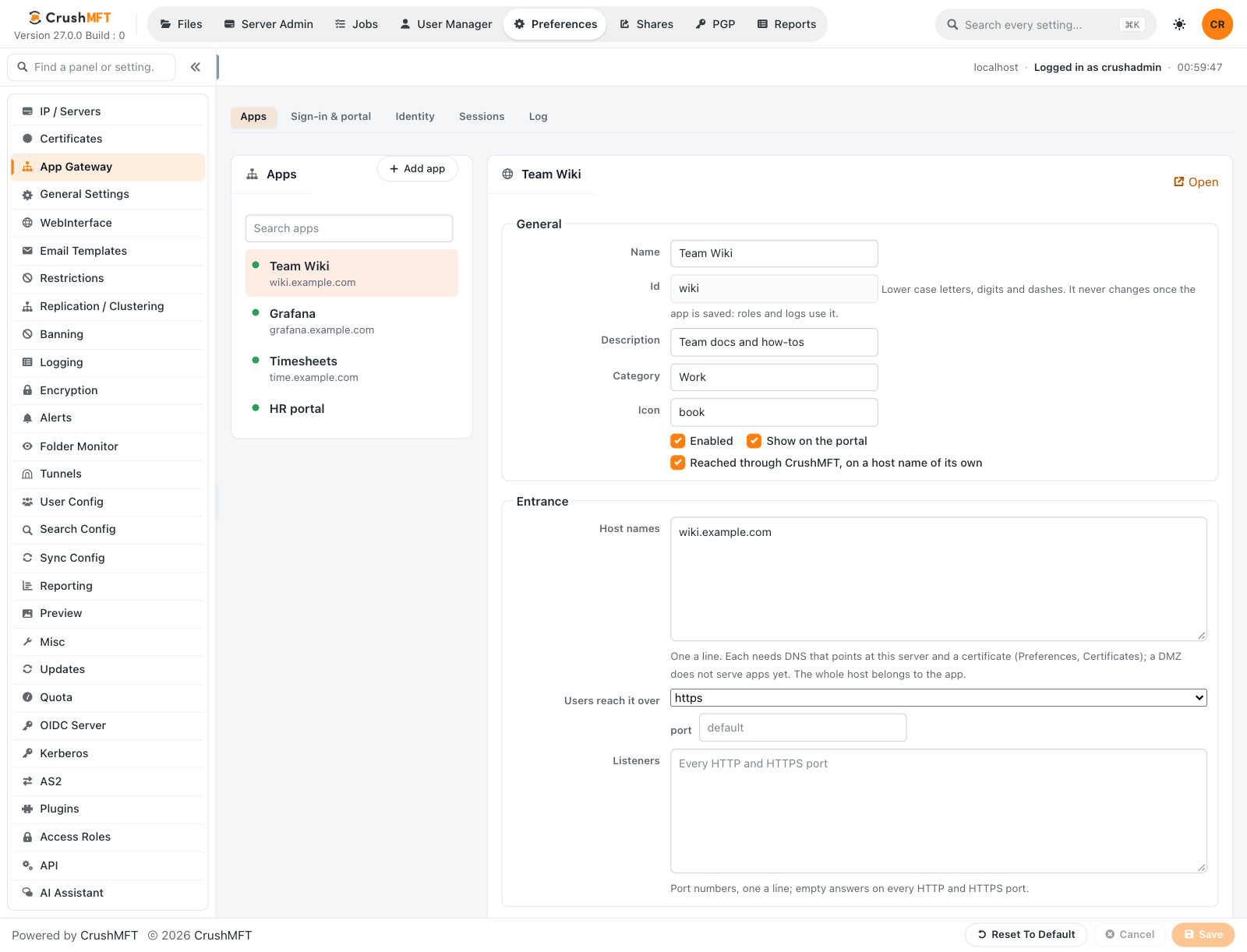
The tabs: Apps, Sign-in & portal, Identity, Sessions, Log.
Apps#
On the left, the apps, with Add app and a search. A dot shows the state: green on, grey turned off, red when every inside address is down or the last Test failed (the dot's tooltip says which). The number is the app's live sessions. Open at the top of the editor opens the app's own address in a new tab.
The editor has a part for each kind of setting. Save app keeps them; Revert puts back the saved ones; Delete app removes the app and ends its sessions (its host names then reach nothing).
General#
| Setting | What it does |
|---|---|
| Name | Shown on the portal, the login page ("Sign in to continue to …") and the gateway's own pages. At most 80 characters. |
| Id | Made from the name when the app is first saved; never changed afterwards. Roles, the logs and the report name the app by it. It is also the app's OpenID Connect client id. |
| Description | The line under the name on the portal's tile. |
| Category | Groups the tiles on the portal. |
| Icon | The name of an icon of the kit (book, bar-chart); without one the tile shows the name's first letter. |
| Enabled | Off: the host answers "This app is not available" and nothing is forwarded. |
| Show on the portal | Off: the app can still be opened, but has no tile. |
| Reached through CrushMFT, on a host name of its own | On (the default): the app has an entrance and an inside address. Off: the app only signs its people in here with OpenID Connect or SAML; the Entrance, Destination, Identity, Session and Advanced parts are hidden. |
| The app's address | For an app without an entrance: the address the portal's tile opens. |
Entrance#
| Setting | What it does |
|---|---|
| Host names | One a line. Each must point at this server in DNS and needs a certificate (Certificates). The whole host belongs to the app: nothing of CrushMFT's own site is served on it. Two apps cannot share a name, and an app cannot use the sign-in address's name. A DMZ does not serve apps yet. |
| Users reach it over, port | https or http, and the port when it is not the scheme's own: how the portal and the sign-in hand-off address the app. |
| Listeners | The ports, by number, that answer for the app; empty means every HTTP and HTTPS port. |
Destination#
| Setting | What it does |
|---|---|
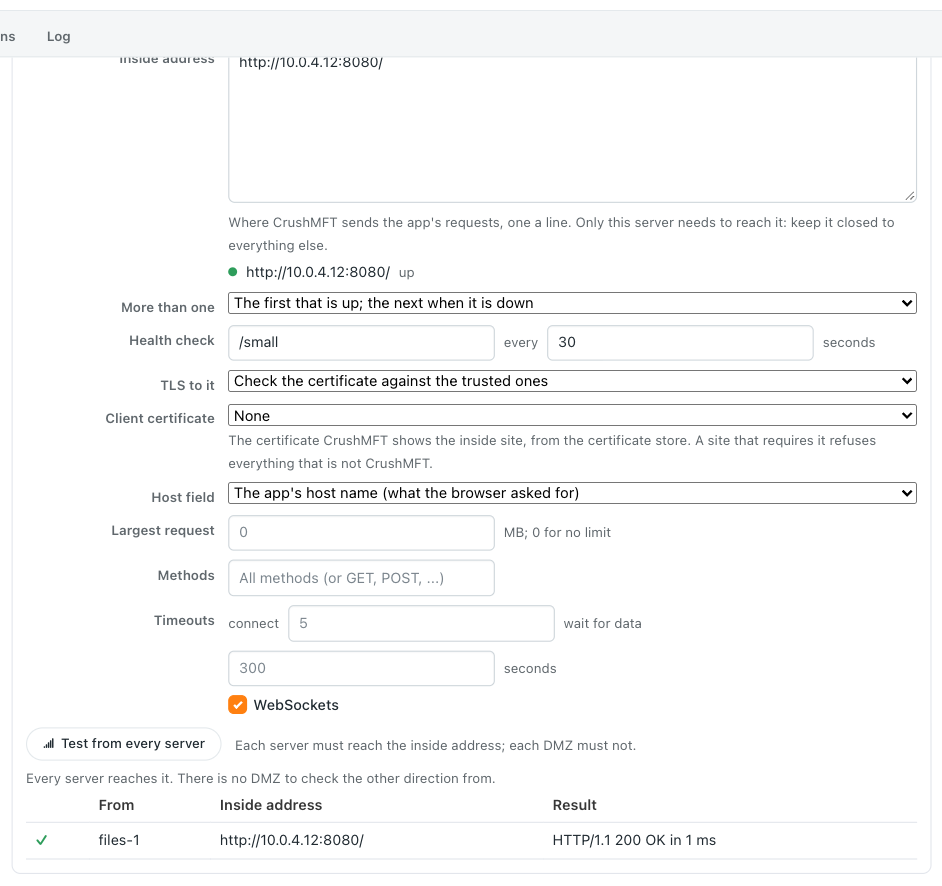
| Inside address | Where the requests go, such as http://10.0.4.12:8080/, one a line. Only this server needs to reach it. An address that is loopback, link-local, a cloud metadata address or this server itself can only be saved by a full administrator, and it is checked again each time CrushMFT connects (the address the name resolves to then). Under the field, each address's state now: up and how long it took to connect, or down and why. |
| More than one | The first that is up; the next when it is down (the default), or The one with the fewest requests in progress. An address that refuses a connection is skipped for 30 seconds, and a request that cannot connect tries the other addresses with the same path. |
| Health check | A path and an interval in seconds (5 or more). CrushMFT asks for the path; an answer below 500 counts as up. With a health check, a failed address stays out until a check passes. |
| TLS to it | Check the certificate against the trusted ones (Java's trusted authorities and the host name), or Pin the certificate it shows first (remembered in the pins of Certificate pinning, scope gateway). |
| Client certificate | A certificate with its key from the certificate store, shown to an inside site that asks for one. See What the app is told. |
| Host field | What the Host field of the forwarded request says: the app's host name (what the browser asked for, the default) or the inside address. |
| Largest request | In MB; a larger request body gets 413. 0 for no limit. |
| Methods | The HTTP methods allowed, such as GET, POST; empty allows all. Another gets 405. |
| Timeouts | connect (5 seconds) and wait for data (300 seconds): how long CrushMFT waits for the inside site. |
| WebSockets | On by default. Off: a WebSocket handshake gets 403. |
| Test from every server | Connects to each inside address from this server and every other server of the cluster, asks for the health check path (or /), and shows the answer, the time, the TLS version and the site's certificate; then asks each DMZ of this server whether it can open a connection to the inside address. Every server should reach it; no DMZ should. A Test of an app not yet saved needs the right to change apps. |
Access#
Who may use the app comes from roles (see Who gets an app). These conditions apply on top, to everybody, full administrators included.
| Setting | What it does |
|---|---|
| Networks | Addresses or networks the person must come from, such as 10.0.0.0/8, one a line; empty allows any. Names are not looked up. |
| Days | The days the app is open. |
| Hours | The hours of the day (0 to 23), such as 7,8,9,10,11,12,13,14,15,16,17; empty is every hour. The server's own clock. |
| A second factor | The code of the person's authenticator app, once per CrushMFT session, before the app opens (also before an OpenID Connect code or a SAML assertion). Five wrong codes end the session. An account without an authenticator cannot open the app. |
| Sign in again after | Minutes since the person signed in; 0 for never. When the sign-in is older, the next page load ends the CrushMFT session and the person signs in again, then goes on to the app. |
Identity#
What the inside site is told about the person: What the app is told has the details and examples.
| Setting | What it does |
|---|---|
| Tell the app who the user is, in header fields | On by default. Sends the fields ticked below. |
| Fields | User name, User id, Email, Full name, Groups, Roles. |
| Field names start with | X-CrushMFT- by default, so the fields are X-CrushMFT-User, X-CrushMFT-User-Id and so on. An app that expects X-Remote-User gets the prefix X-Remote-. Fields with the prefix (and every X-CrushMFT- field) are taken out of what the browser sent. |
| Basic login | Set…: one service account the app is signed in to with Authorization: Basic. The password is kept sealed and never shown again; an empty name removes it. |
| Send a signed assertion | X-CrushMFT-Assertion, a token signed by CrushMFT and valid 60 seconds. |
A red line shows while header fields go out with no assertion and no client certificate, until a Test has shown that no DMZ can reach the inside address.
OpenID Connect#
For an app that signs its people in with OpenID Connect: see CrushMFT as an OpenID Connect provider.
| Setting | What it does |
|---|---|
| The app signs its users in with CrushMFT | Makes the app a client of the provider. Its client id is the app's id. |
| A public client | For an app that runs in a browser or on a phone: no secret, PKCE required. |
| Redirect addresses | Where the app receives its code, one a line, matched exactly. https, or http only for localhost. |
| After sign-out | Addresses the app may send people to after signing out. |
| Back-channel logout | Where CrushMFT posts a logout token when the person's CrushMFT session ends. |
| Scopes it may get | profile, email, groups, roles (besides openid). |
| Its public keys | For an app that signs in with a key instead of a secret (private_key_jwt): its JWKS, RSA or P-256 keys. Checked when the app is saved. |
| Tokens live | Minutes, 60 by default. |
| New client secret | Makes a secret and shows it once, with Copy. Only a hash of it is kept; a new one replaces the old at once. |
SAML#
For an app that signs its people in with SAML: see CrushMFT as a SAML identity provider.
| Setting | What it does |
|---|---|
| The app signs its users in with CrushMFT (SAML 2.0) | Makes the app a service provider of the identity provider. |
| Its metadata | The app's metadata address (Read) or its XML pasted (Read the pasted metadata) fills in the fields below. Nothing is saved until Save app. The address's certificate is pinned like every outgoing connection: Certificate pinning. |
| Entity id | The app's entity id, as in its metadata. Two apps cannot have the same one. |
| Assertion consumer | Where the answer is posted, one a line, matched exactly; the first is used when the app names none. |
| Single logout | The app's logout address (HTTP-Redirect). |
| NameID | Persistent: the person's user id, which never changes; Email address; or The user name. |
| Attributes | field=Name, one a line. Fields: user, user_id, email, name, first_name, last_name, groups, roles. |
| Its signing certificate | The app's certificate in PEM form, RSA or EC. With one, the app's requests must be signed by it. |
| Encrypt the assertion | No (the default: the assertion goes over HTTPS, signed); AES-256-GCM, the key sent by RSA-OAEP with SHA-256; or AES-256-CBC, the key by RSA-OAEP-MGF1P, for older apps. Below it, the app's encryption certificate (RSA, PEM), which its metadata fills in. Encryption without the certificate is refused at Save app. |
| Sign the whole Response too | The assertion is always signed; this signs the Response around it as well. |
| The portal's tile signs in from here | IdP-initiated sign-in: the tile posts a sign-in to the app. Off, the tile opens the app, which asks. |
Session#
| Setting | What it does |
|---|---|
| Idle limit | Minutes without activity after which the app's session ends; 0 keeps the person's own limit. An app can only shorten it. |
| Longest session | Minutes after which the app's session ends whatever happens; 0 keeps the person's own. |
| The app's sign-out address | Loaded in the "Signed out" page when a person who used the app signs out of CrushMFT, so the app can end its own session: Signing out. |
Advanced#
| Setting | What it does |
|---|---|
| Drop a cookie Domain that names the inside host | On by default: a Set-Cookie from the app with a Domain (which names the inside host, and the browser would refuse) becomes a cookie of the app's host name. An app can never set CrushMFT's own cookies. |
| Log | Errors only (the default), Every request, or Nothing: lines in the server log for the app's requests. |
Who gets an app#
The User Manager's Apps tab of a user or group lists the apps the account may use and the role that gives each, and has the person's start page (the file manager, the portal, or one app). Ticking apps and Save apps gives the account the App User role with those apps. Giving apps needs gateway.grant.edit; nobody can give an app they cannot use themselves, or give apps to a full administrator unless they are one.
Sign-in & portal#
| Setting | What it does |
|---|---|
| Sign-in address | Where apps send people who have not signed in: this server's own address, scheme and host only, such as https://files.example.com. Also the issuer of the OpenID Connect provider and the base of the SAML addresses. Not an app's name. |
| Connections per browser | What one browser's app session may hold open (64). These connections do not count against the per-address limit of the port. |
| Title, Text above the tiles | The portal's heading and text. |
| A Files tile for users who have files | Shows a tile that opens the file manager. |
Identity#
| Part | What it holds |
|---|---|
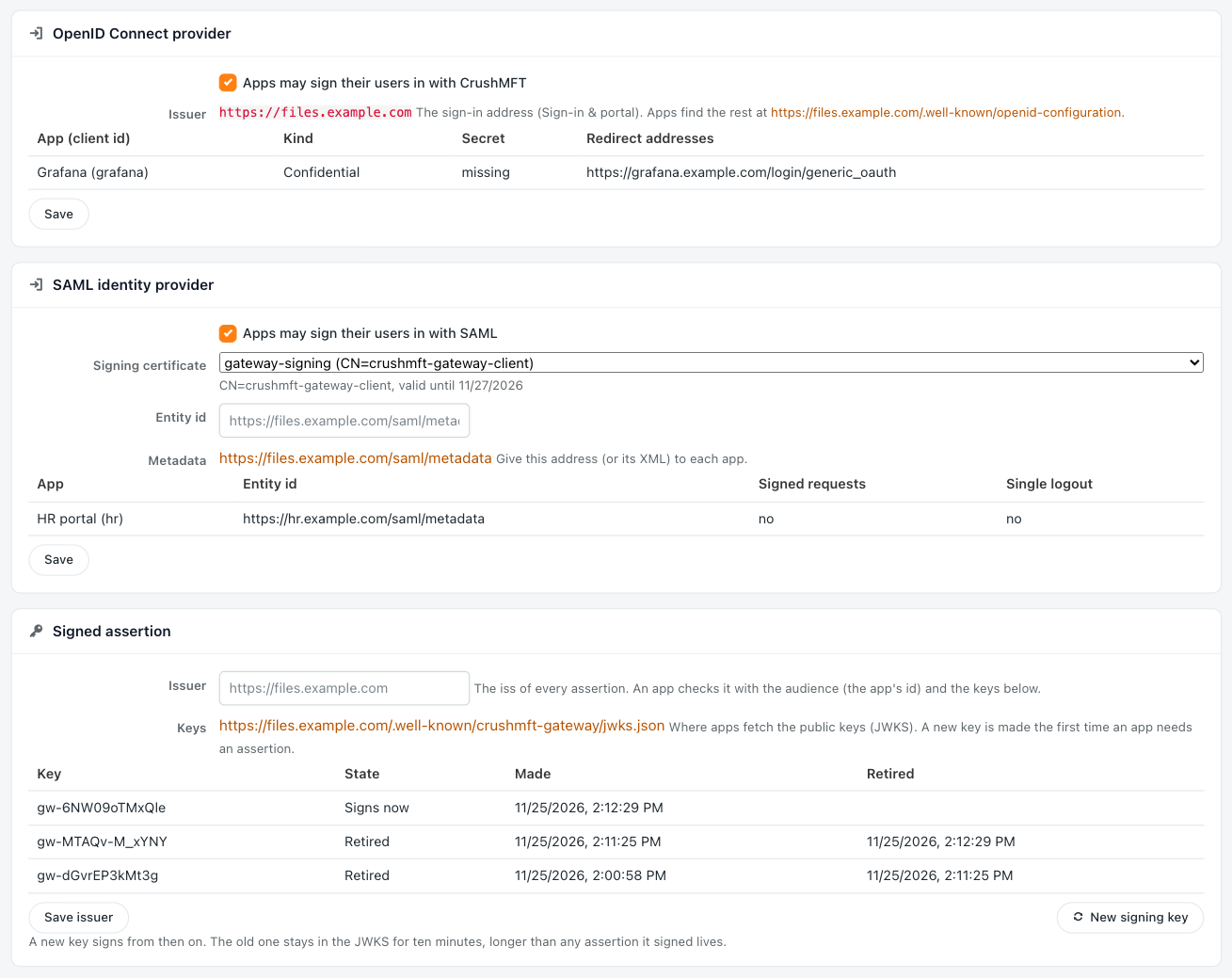
| OpenID Connect provider | Apps may sign their users in with CrushMFT; the issuer (the sign-in address) and its discovery address; the clients. |
| SAML identity provider | Apps may sign their users in with SAML; the signing certificate (a certificate with its key from the certificate store); the entity id (empty: the sign-in address with /saml/metadata); the metadata address to give to apps; the service providers. |
| Signed assertion | The issuer of the assertion (empty: the sign-in address); where apps find the keys (JWKS); the keys, which one signs now and which are retired; New signing key. A retired key stays published ten minutes, longer than any assertion it signed lives. |
Sessions#
Every live app session on this server: the person, the app, where from, when it started, its last activity, its connections, and End, which ends that app session (the person's CrushMFT session goes on). Needs gateway.sessions.view, and gateway.sessions.end to end one.
Log#
- Audit: the last 1000 lines on this server: sessions started and ended, refusals with their reason, changes. The server log has them all.
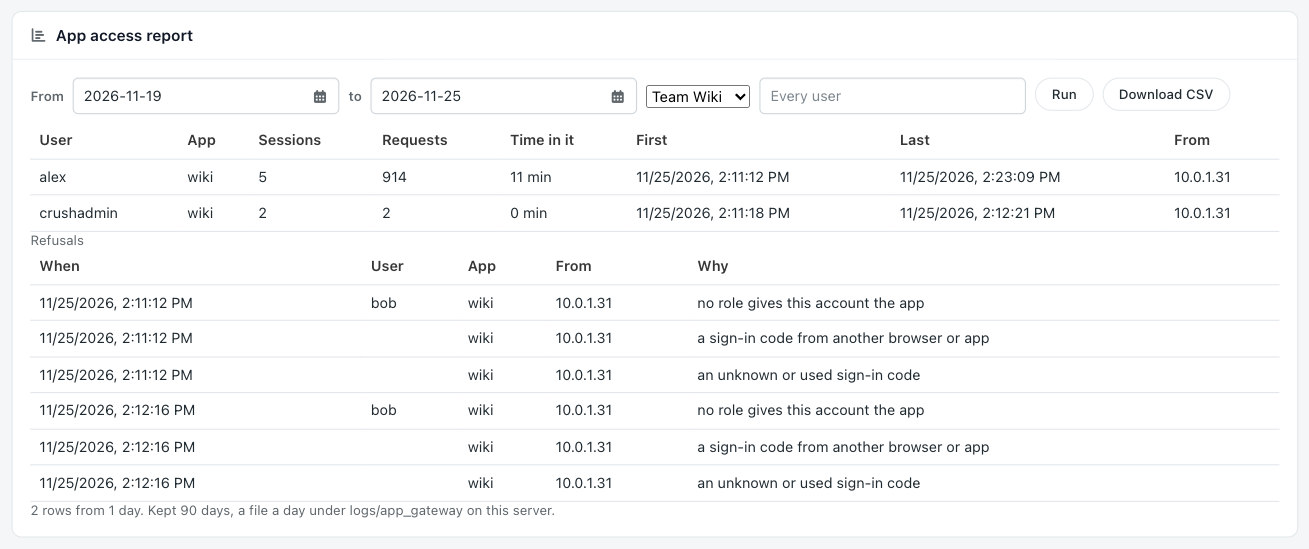
- App access report: for a range of days, one app or all, one person or all: sessions, requests, the time spent, the first and last use, the addresses; and the refusals. Download CSV saves what is shown. The gateway keeps a file a day under
logs/app_gateway/for 90 days (gateway_report_days). Needsgateway.log.view. The same record is the App access report in Reports, to schedule, chart and export there.