TLS on a port, SNI#
Every port that speaks TLS, which is HTTPS, FTPS, FTP with TLS, port forward over TLS and SMB over QUIC, shows clients a certificate. By default that is the server's certificate, chosen in Certificates. A port can have its own, and one port can show different certificates for different host names: Several names on one port.
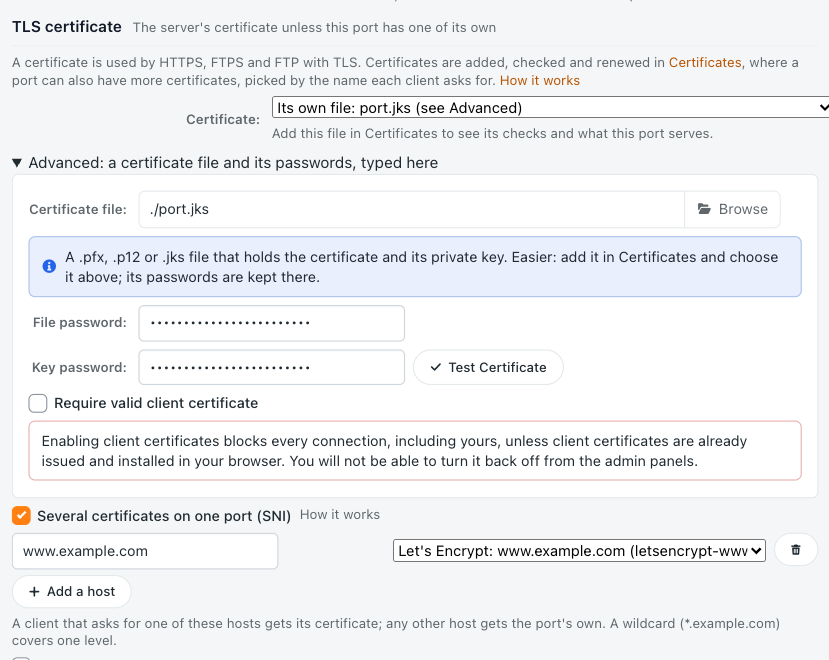
The settings are on the Advanced tab of the port in IP / Servers, under TLS certificate: "The server's certificate unless this port has one of its own".
The port's certificate#
Certificate lists The server's certificate and every certificate of the list in Certificates. Choose one, then Save the page. Its file and passwords come from the list: nothing to type.
A certificate of its own suits a port that is reached under another name than the rest of the server, such as an address for partners.
The save is checked: a certificate file that does not open with its passwords, has no private key or has ended is refused with the reason, and the page asks Save anyway?. Do not save saves nothing; Save anyway saves it unchecked, and the port serves the last certificate that worked until the file opens. The port then starts again in place with the new certificate. Unlike a change in Certificates, a save here is not put back by itself when you do not press Keep: check the port in Certificates, Where used, which says what it serves.
A port whose file is not in the list shows "Its own file: NAME (see Advanced)": "Add this file in Certificates to see its checks and what this port serves."
Advanced: a file and its passwords, typed here#
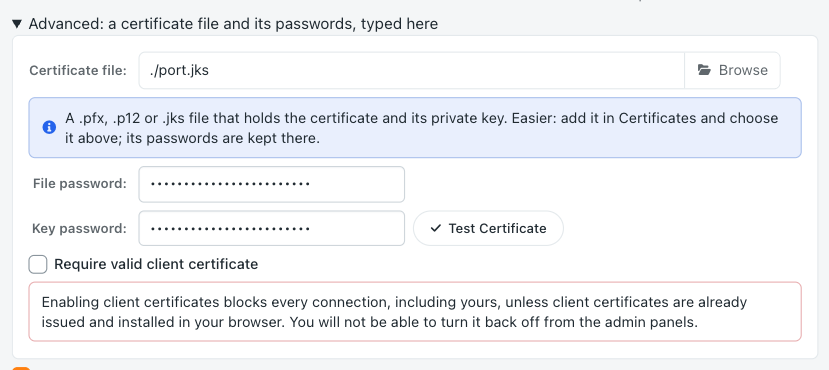
The older way, kept for servers set up before the list existed, and for a file you do not want in the list.
| Setting | What it is |
|---|---|
| Certificate file, Browse | "A .pfx, .p12 or .jks file that holds the certificate and its private key. Easier: add it in Certificates and choose it above; its passwords are kept there." |
| File password | the password of the file |
| Key password | the password of the key in it, if it has one of its own |
| Test Certificate | reads the file with the passwords and says what is in it, or what is wrong |
| Require valid client certificate | see below |
On a port that uses the server's certificate the block is covered until you press Override: the port then has settings of its own. A new key and its request for a certificate company are made in Certificates, Request from a company.
Client certificates#
Require valid client certificate: the port lets in only clients that show a certificate the port trusts. The connection is refused before any login.
Warning
"Enabling client certificates blocks every connection, including yours, unless client certificates are already issued and installed in your browser. You will not be able to turn it back off from the admin panels." Set it on a port of its own, never on the only web port, and keep another way in.
Which certificates the port trusts is listed, added to and taken from in Certificates, Chain & trusted, Trusted for logins (client certificates). How certificates are matched to users: Client certificates.
SNI: several certificates on one port#
The easy way needs nothing here: in Certificates, Where used, Add certificates for other names… gives the port more certificates, and each client gets the one for the name it asks for. See Several names on one port. The table below is the older way, and overrides those names.
With Several certificates on one port (SNI) on, the port looks at the host name the client asks for, before any certificate is shown, and answers with the certificate for that name. files.example.com and transfer.example.org can so share one address and one port, each with its own certificate.
Under the switch, a table: a host name and a certificate of the list per line. Add a host adds a line; the bin removes it. "A client that asks for one of these hosts gets its certificate; any other host gets the port's own. A wildcard (*.example.com) covers one level." Then Save the page.
| A client asks for | It gets |
|---|---|
| a name in the table | that line's certificate |
a name that a wildcard line covers, such as ftp.example.com for *.example.com |
that line's certificate. a.b.example.com is not covered by *.example.com. |
| a name with a file of its own, as below | that file |
| any other name, or none | the port's own certificate |
The certificates' passwords come from the list. A table that names a certificate that is not in the list, or one that does not open, is refused when saved. A certificate stays in the list while a table names it, and its card says for which host it is used.
A file per name, the older way#
A server set up before the table can keep its files: next to the port's own file, say main.jks, further files in the same folder, named with the host name, an underscore and the name of the port's file:
| File | Shown for |
|---|---|
main.jks |
any name without a file of its own |
files.example.com_main.jks |
files.example.com |
transfer.example.org_main.jks |
transfer.example.org |
All of them use the passwords set for the port. The table comes first; these files are looked at after it.
Things to know#
- A certificate file that changes on disk is put in use by the port within the interval set in Encryption, TLS (60 seconds unless changed), without a restart, once it opens. Renewed and replaced certificates in Certificates need nothing more.
- A certificate file that stops opening does not leave the port on the built-in certificate: it serves the last version that worked, and Certificates says so at the top. See When a certificate stops working.
- Which TLS versions and ciphers are accepted is set for the whole server: TLS settings, Ciphers.
- Certificates from Let's Encrypt: Let's Encrypt. The port Let's Encrypt calls is always 80 or 443 on the internet, whatever port this one has: Port 80 on the internet, any port on CrushMFT.
- Old FTP clients do not send a host name. For FTP with SNI, they get the port's own certificate.
- A DMZ server picks the certificate from its own copy of the list; the table on a DMZ's port was not tried for this page.