Troubleshoot an issue#
Troubleshoot an issue collects what support asks for in the first email, in one zip: what the user did according to the server's logs, a short debug capture while they try again, the usual reasons a login or a job fails, the user's and the job's settings, and the server's facts. You read every file of the zip before you download it. Names can be replaced by placeholders, and secrets are always taken out.
It is the Troubleshoot section of Server Admin. The Dashboard has a Troubleshoot an issue tile under Admin tools, and the search of the menu bar has it as an action. Only the Administrator sees it: a case reads every log, user and job, and raises the debug level of the whole server. No role can be given it (its permission, server.diagnostics.troubleshoot, is of tier 0: Roles).
Cases#
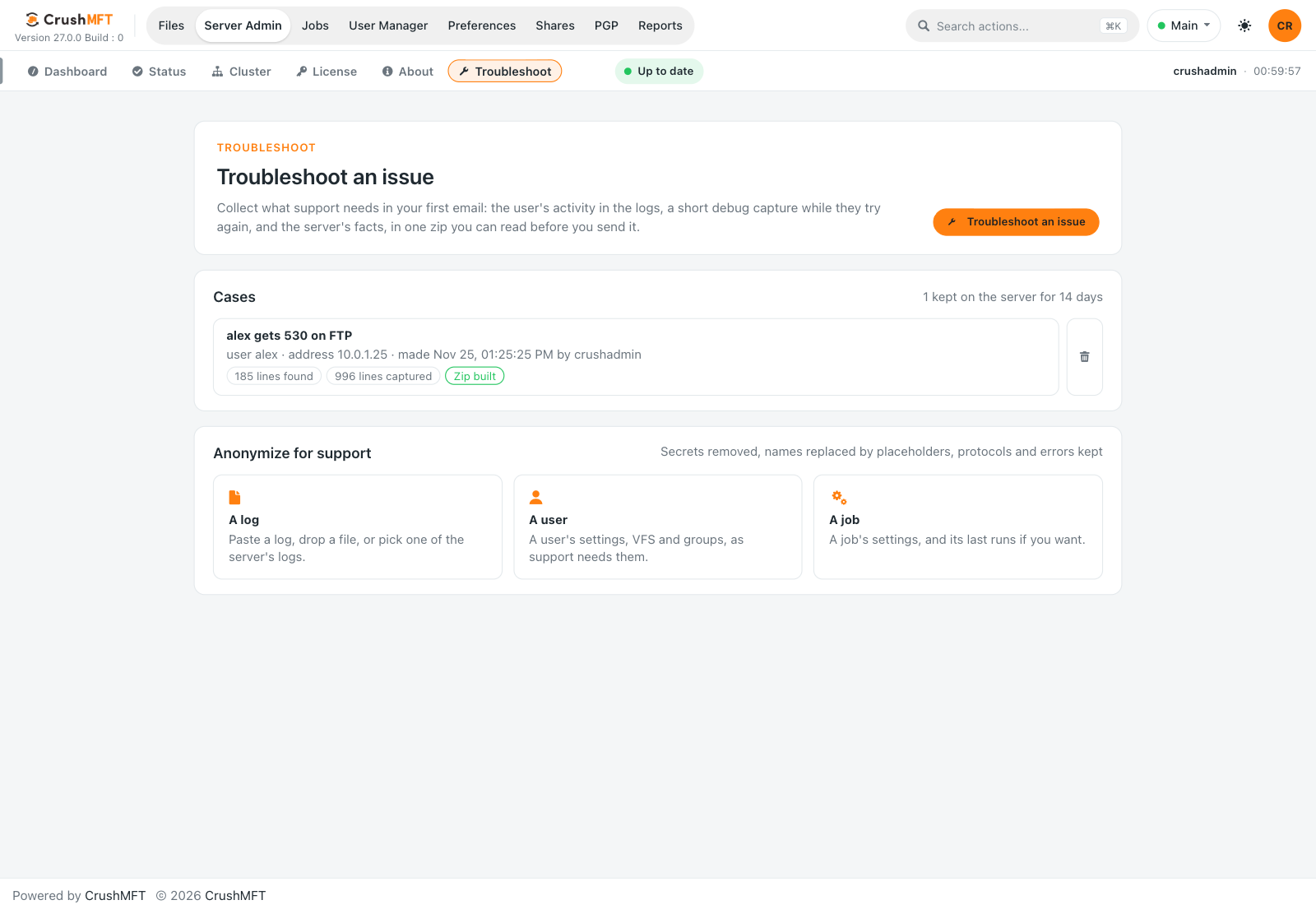
A case is one problem: what is wrong, who, when, what was found and captured, and its zip. Troubleshoot an issue starts a new one; a case in the list opens it again where you left it. The list says what each case has: the lines found, the lines captured, Capturing or Watching while that runs, Zip built.
The server keeps each case in a folder of its own, troubleshoot/<case>/ in its folder, and deletes it 14 days after it was made. The bin button deletes a case at once, with its logs, captures and zip.
A case has four steps. Each step can be opened again at any time; a step with a tick has been done.
1 Describe#
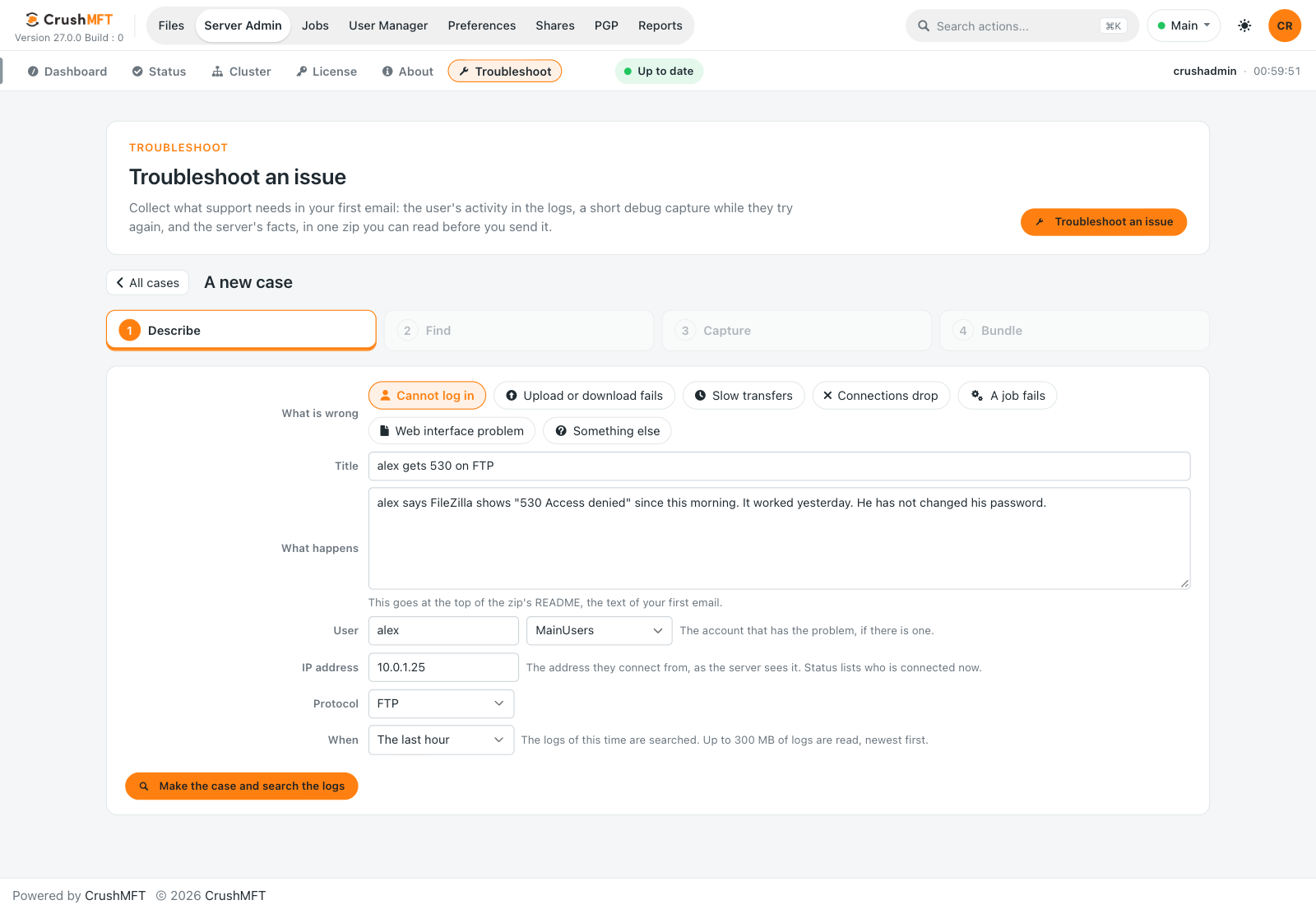
| Field | What it is |
|---|---|
| What is wrong | Cannot log in, Upload or download fails, Slow transfers, Connections drop, A job fails, Web interface problem, Something else. It is written at the top of the zip's README. |
| Title | a few words for the list. Optional. |
| What happens | what the user does and sees, the exact error message, since when, whether it worked before. It goes into the README, the text of your first email. |
| User | the account that has the problem, and its user connection group (Connection groups). The field suggests the names of the group. |
| IP address | the address the user connects from, as the server sees it. Connected users shows it for whoever is connected now. |
| Protocol | Any, FTP, FTPS, SFTP, HTTP, HTTPS, WebDAV, S3, AS2, SMB. With one chosen, the checks say whether the user may use it. |
| When | the time searched in the logs: the last 15 minutes, hour (the default), 4 hours, 24 hours, 3 days, or From and to… with two dates |
| Job | shown for A job fails: the job's settings and its last run logs go into the zip |
A case needs a user name or an address, which the logs are searched for; a job case may have neither. Make the case and search the logs saves it and goes on to Find. On a case that exists the buttons are Save and search the logs and Save.
2 Find#
The checks#
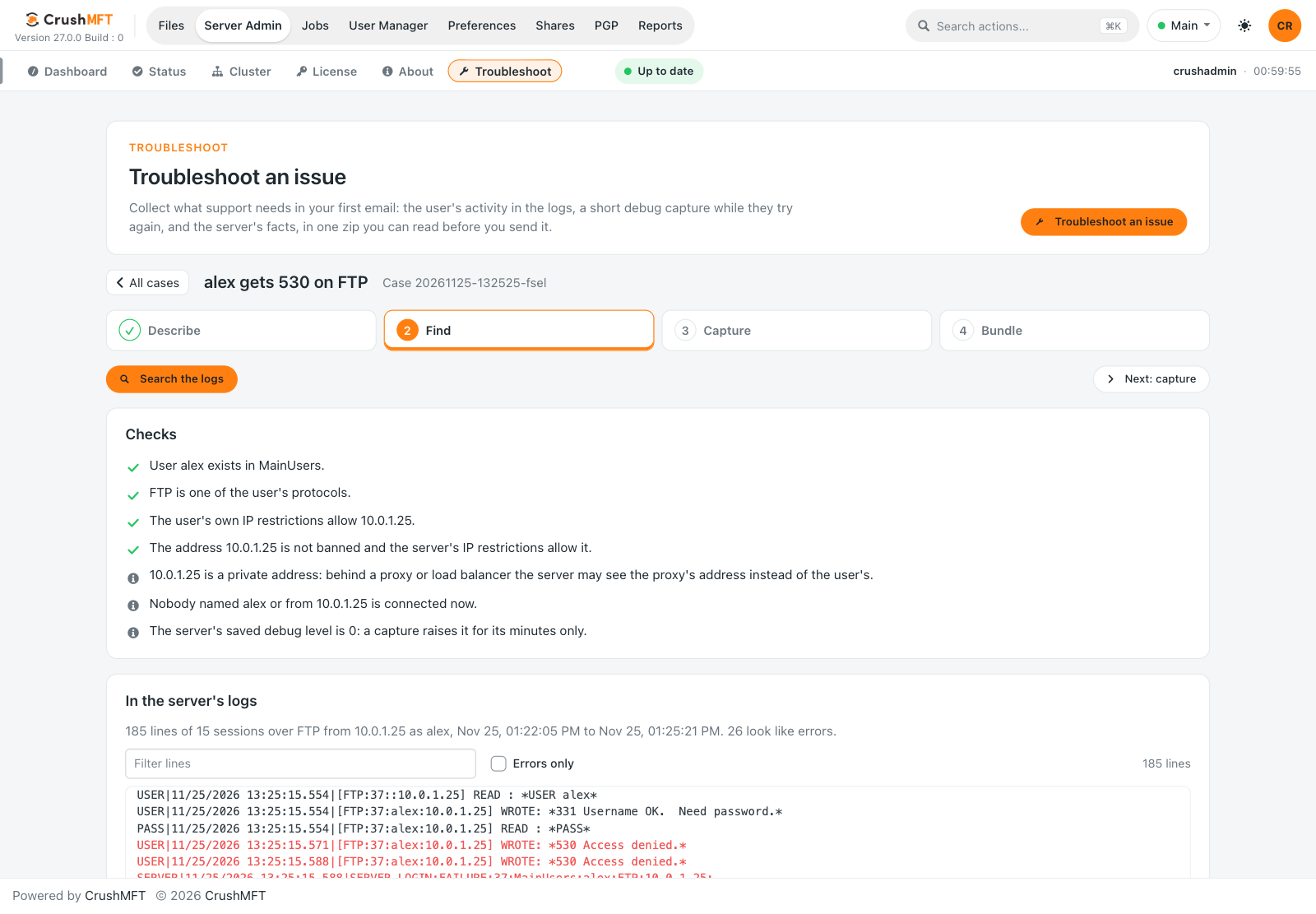
Each line is marked as fine, as a warning, as wrong, or as information. Wrong ones come first.
| Check | What it tells you |
|---|---|
| the user exists | in which user connection groups, and in which not. Missing in all of them is wrong: a login with that name fails, unless a plugin or the template account takes it. |
| disabled | the user's max logins is below 0: the user's settings |
| sessions at once | the user's own limit, when it has one: Restrictions |
| the account expires or expired | the user's expiry date |
| the password expires or expired | with an expired password the user is asked for a new one at login; an SFTP program must support that: Password expiry |
| the protocol | whether the user may use the case's protocol: Protocols |
| the user's own IP restrictions | whether they allow the case's address: IP restrictions |
| a second factor | the user signs in with one: Two-factor sign-in |
| the user name is blocked | for too many logins in a short time, or too many failed ones. Blocked usernames under Admin tools on the Dashboard lifts it. |
| the address is banned | for now (a temporary ban), or by the server's IP restrictions, with the reason: Banning. Banned IPs under Admin tools lifts a ban. |
| a private address | behind a proxy or a load balancer the server may see the proxy's address instead of the user's |
| connected now | the sessions of the user or the address at this moment |
| the job | for a job case: it exists, whether its schedule is enabled, and its newest three run logs with their error lines counted |
| the debug level | the level saved in Logging, and that a capture raises it for its minutes only |
The lines in the server's logs#
The search reads CrushMFT.log and the rolled logs in the logs folder that can hold lines of the time chosen, newest first: at most 300 MB, and it keeps the newest 5,000 lines it finds. A line belongs to the case when:
- its session part, such as
[FTP:42:alex:10.0.1.25], names the user or the address; - it holds the address as a whole address, or the user name after
user=,USER,username=or between colons; - it belongs to a session that matched by its session part in the same log: the lines of a session before its login carry no user name yet.
Your own requests in the admin pages are left out, unless you are the case's user. When you test from the address you work from yourself, the first lines of your browser's requests still show: they carry no user name.
The line above the list counts the lines, the sessions, the protocols, the addresses and user names seen, the first and last time, and how many lines look like errors. Filter lines keeps the lines that contain a text; Errors only keeps the lines that look like an error (an exception, a refusal, a reply such as 530 or 550, a time-out, a ban), which are shown in red. Search the logs searches again, for example after the user tried once more.
3 Capture#
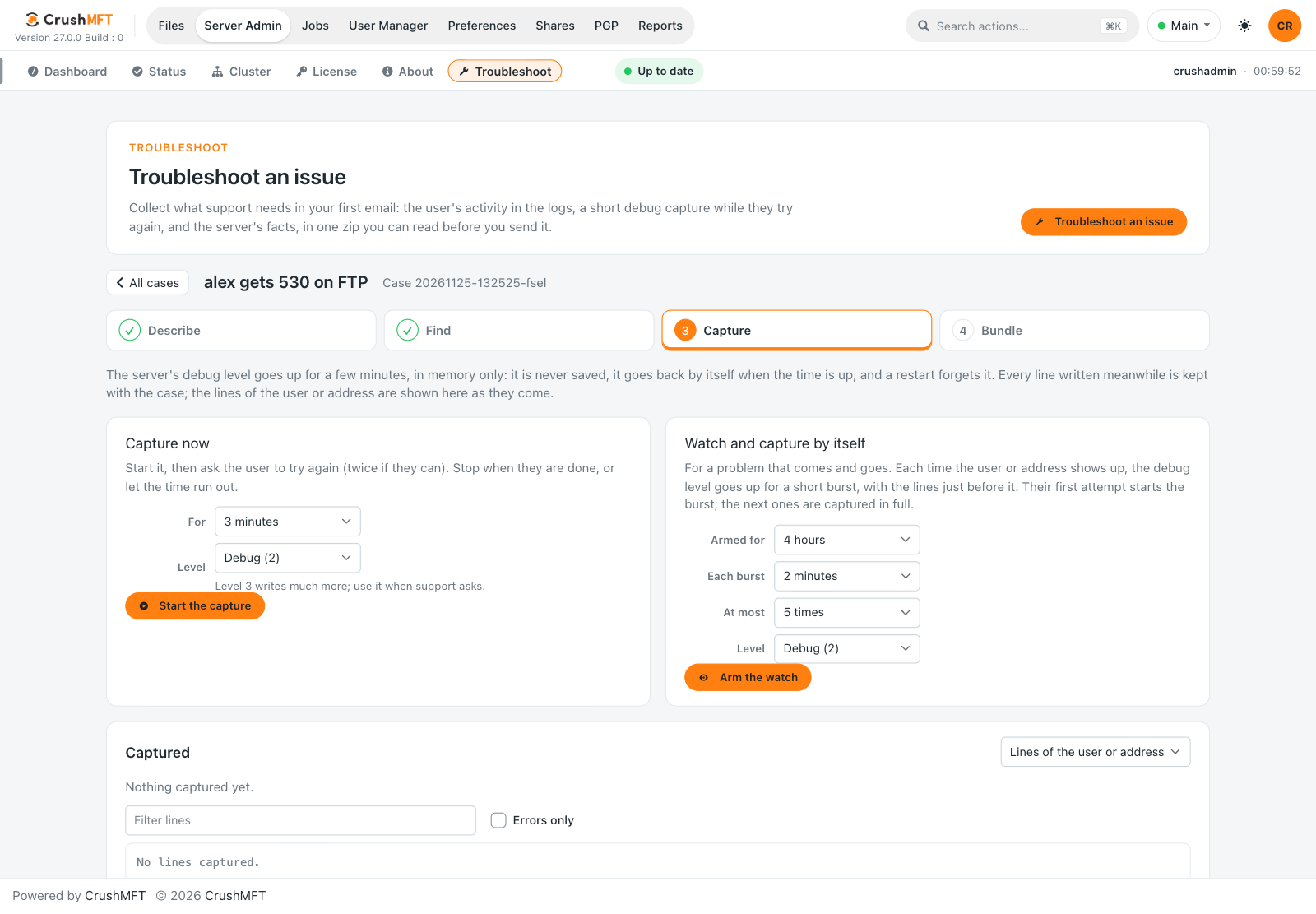
The debug level is what the server writes to its log: at 2 it writes much more about each step of a login or a transfer, which is what support usually needs. A capture raises it in memory only: it is never saved in the preferences, it goes back by itself, and a restart of the server forgets it. While it runs, every line the server writes is also kept with the case.
Capture now#
Start it, then ask the user to try again, twice if they can.
| Setting | What it is |
|---|---|
| For | 1, 2, 3 (the default), 5, 10 or 15 minutes |
| Level | Debug (2), or Everything (3), which writes much more: use it when support asks |
| Start the capture | raises the level at once |
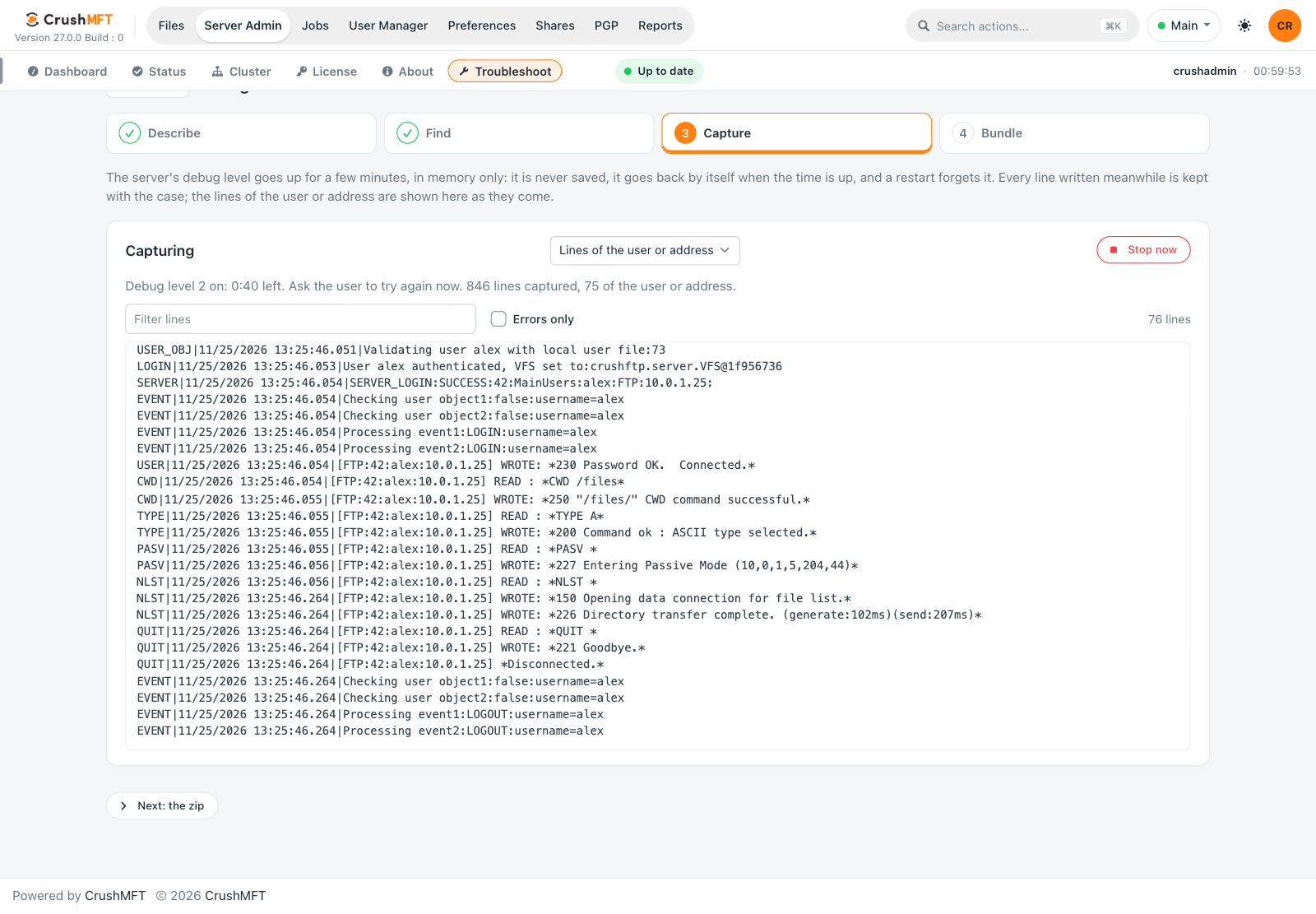
While it runs, the panel shows the time left, how many lines were captured, and the lines of the user or address as they come. The list above it switches between Lines of the user or address and Every line captured. Stop now ends it.
Watch and capture by itself#
For a problem that comes and goes, or a user you cannot ask to try now. The watch waits for the user or the address, and each time it shows up the level goes up for a short burst. A burst starts with the 2,000 lines written just before it.
| Setting | What it is |
|---|---|
| Armed for | 1, 2, 4 (the default), 8, 12 or 24 hours |
| Each burst | 1, 2 (the default), 3, 5 or 10 minutes |
| At most | once, 3, 5 (the default), 10 or 20 times |
| Level | as for Capture now |
| Arm the watch | the watch needs a user name or an address in the case |
The attempt that starts a burst was written at the level the server had then: its own debug lines are not in the capture. The attempts after it, within the burst, are captured in full. A watch keeps running when you close the page.
When a capture ends#
It ends when its time is up, when you stop it, when all bursts of a watch are used, when the captured lines reach 100 MB, when the case is deleted, or when the server stops. The case says why. The level is back to the saved one at once.
- One case at a time can capture or watch. Another case's capture is refused while one runs: "Case … holds the debug window (capture by crushadmin). Stop it first."
- While a capture runs or a watch is armed, a bar above every section of Server Admin says so, with the time left, Open and Stop.
- When the saved level is already as high as the capture's, nothing is raised; the lines are still kept with the case.
- In a cluster, the capture is made on the server you are signed in to.
- The server writes a line to its own log for each start, burst and end, such as
Troubleshoot: debug level 2 for 3 minute(s), case …, by crushadmin.
4 Bundle#
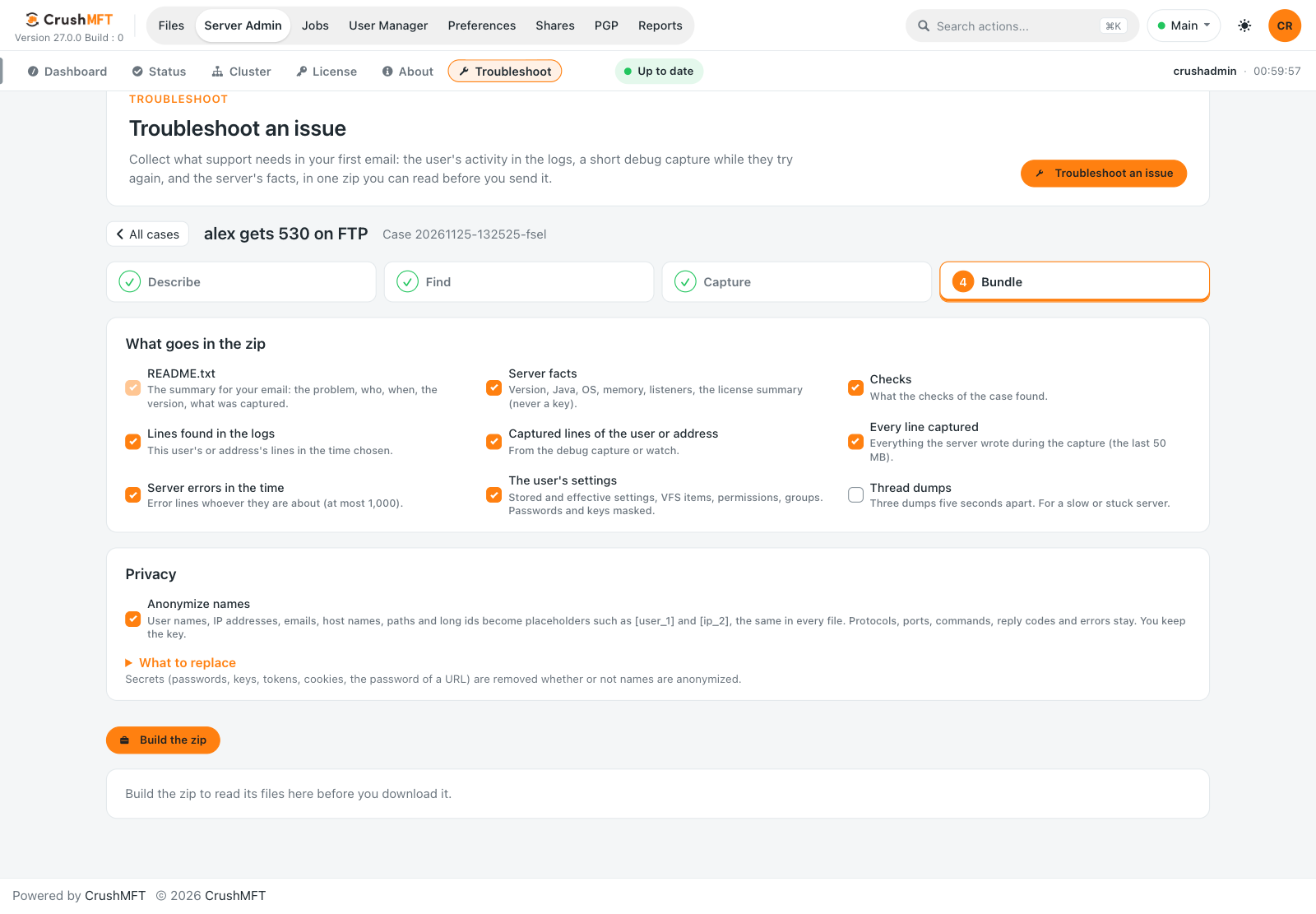
What goes in the zip#
| File | Holds | On at first |
|---|---|---|
README.txt |
the summary for your email: the problem, the title, who, the protocol, the job, the time, the version, what happens, what was found and captured, the checks that are wrong or warn, and the list of files | always |
server.txt |
the version and build, Java, the operating system, the processors, the memory, when the server started, the threads and sessions, the debug level saved, the listeners, and the license summary (never a key) | yes |
checks.txt |
the checks of the case | yes |
logs/found.log |
the lines found in the logs | yes |
logs/matched.log |
the captured lines of the user or address | yes |
logs/capture.log |
every line captured, the last 50 MB | yes |
logs/errors.log |
the error lines of the server's logs in the time of the case, whoever they are about, at most 1,000 | yes |
user/<name>.xml |
the user as stored and as it really is with what it inherits, its VFS items and permissions, its groups and the users it inherits from. Passwords and keys are masked; the address of a VFS item keeps its kind, host, port and path. Only with a user in the case. | yes |
job/<name>.xml |
the job's settings. Addresses the server keeps encrypted in the job file are shown as addresses, with their password masked. Only with a job in the case. | yes |
job/runs/run_1.log … |
the job's newest three run logs (<job name>_<id>.log in the job logs folder, the name with every character other than a letter or digit made _) |
yes |
threads.txt |
three thread dumps, five seconds apart: for a slow or stuck server (Thread dumps). Building the zip then takes about ten seconds. | no |
anonymized.txt |
with Anonymize names: what was replaced, by kind |
A log in the zip is cut to its last 20 MB (the capture to its last 50 MB), and a line longer than 8,000 characters is cut, with the number of characters left out written after it.
Privacy#
Secrets are always removed: passwords, keys, tokens, cookies, Authorization headers, private key blocks and the password in an address such as sftp://user:password@host. They read [secret].
Anonymize names is on at first. User names, IP addresses, emails, host names, paths and file names, and long ids become placeholders such as [user_1], [ip_2], [email_1], [host_1], /[path_3]/[file_2].pdf. A placeholder stands for the same value in every file of the zip, so support can follow [user_1] from the log to the user's settings. Protocols, ports, session numbers, commands, reply codes, error texts, task kinds and the names of settings stay. The address 127.0.0.1 and localhost stay too: they name no one.
What to replace turns each kind off on its own (User names, IP addresses, Email addresses, Host names, Paths and file names, Long ids and random strings), and has two fields:
| Field | What it is |
|---|---|
| Also hide | words such as a company or a project name, separated by commas: each becomes [word_n] |
| Keep | domains or hosts support should see, separated by commas: example.com keeps example.com and every name that ends in .example.com |
The zip#
Build the zip makes it on the server. Its files are listed on the left; the one picked is shown on the right (its first 512 KB), with Copy.
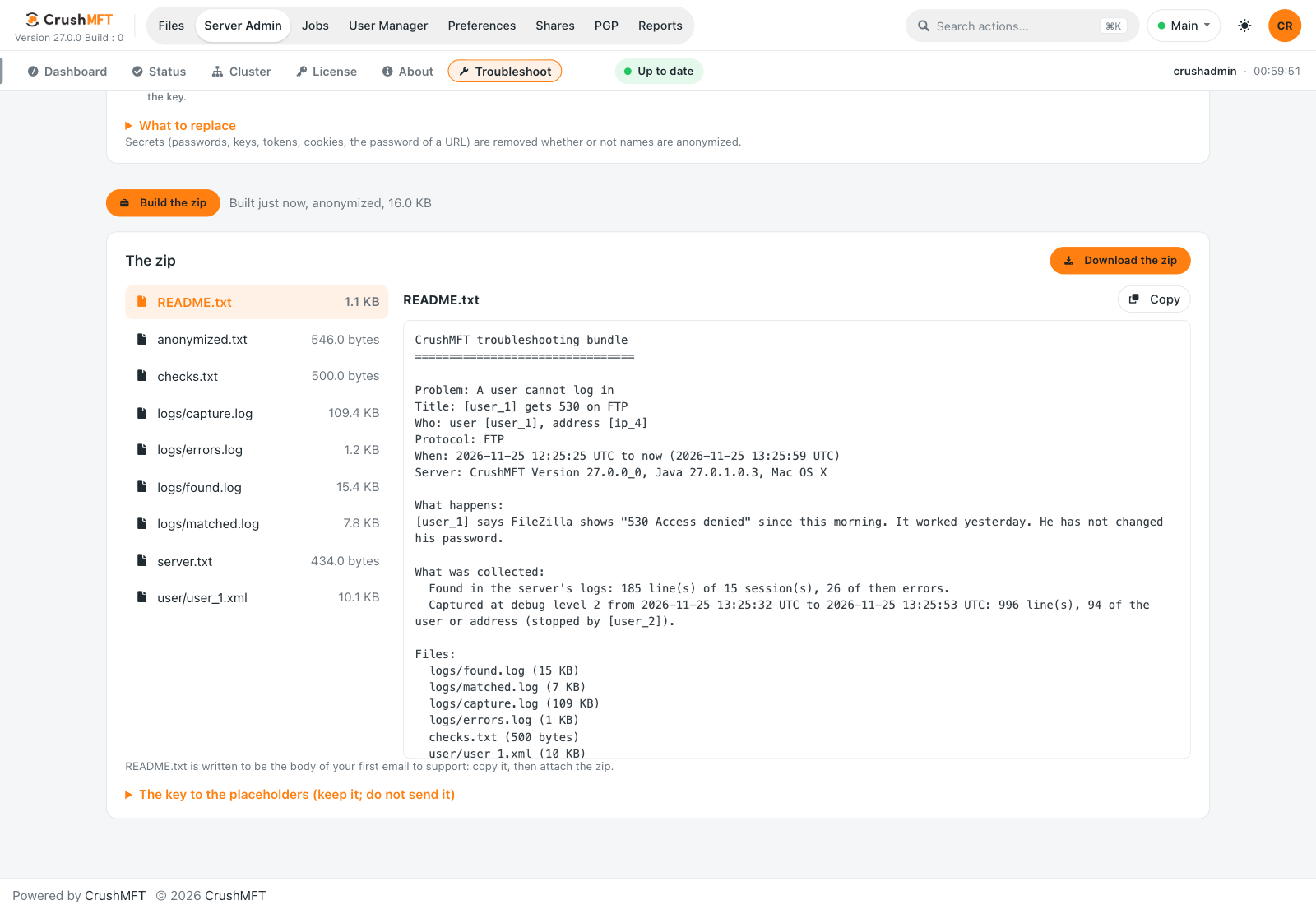
README.txt is written to be the body of your first email to support: copy it into the email, then attach the zip. Download the zip gives it as crushmft_troubleshoot_<server>_<date>_<case>.zip (with names anonymized the server's name in it is server).
The key to the placeholders lists each placeholder with the value it stands for. It is kept with the case and never put in the zip. Keep it; do not send it: when support answers "[user_1] cannot reach [host_2]", the key says who and what. Download the key saves it as a file.
Building again replaces the zip and the key of the case.
Anonymize for support#
The three tiles under the cases clean one thing on its own, with the same rules as the zip: a log you want to attach to an email or a ticket, a user's settings, a job.
| Tool | Takes |
|---|---|
| A log | From: A log of this server (the current log, the rolled ones and the job logs, newest first; a log over 50 MB is cut to its last 50 MB), Pasted text (up to 5 MB), or A file from this computer (up to 50 MB; it is sent to this server only, in pieces, cleaned there and deleted) |
| A user | Connection group and User: the user's settings, VFS items, permissions and groups, as in the zip |
| A job | Job, and Add its last three run logs |
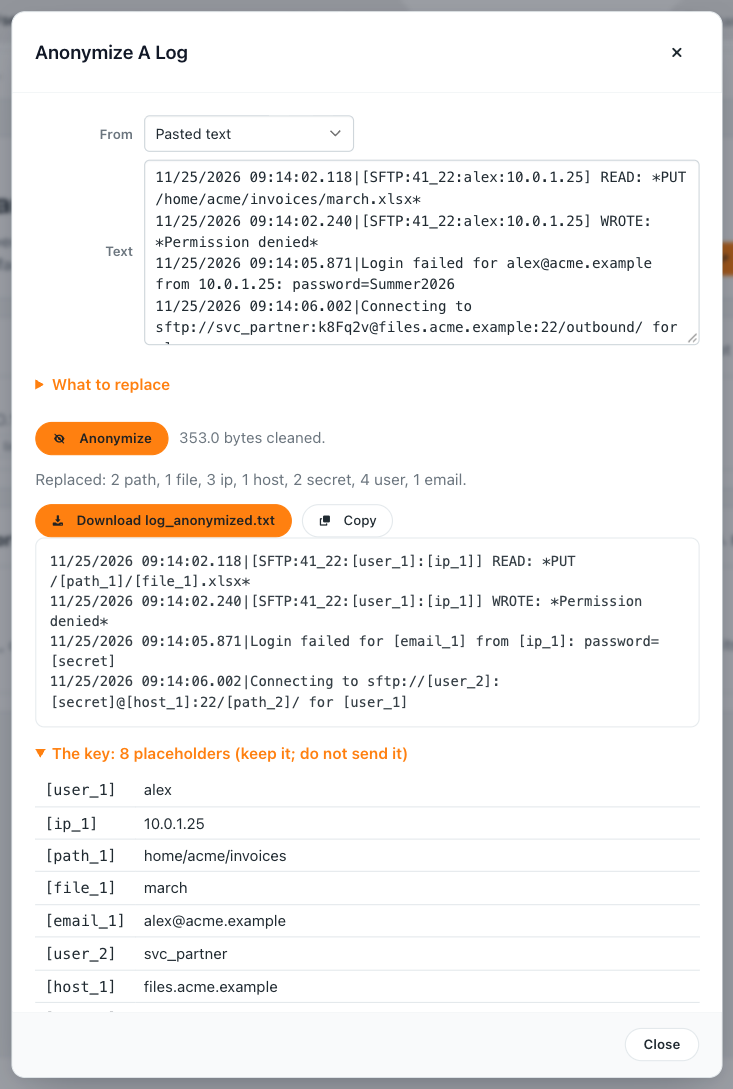
What to replace has the same choices as in the zip. Anonymize shows:
- what was replaced, by kind (for example "2 path, 1 file, 3 ip, 1 host, 2 secret, 4 user, 1 email");
- Download with the file's name (such as
log_anonymized.txt), and Copy; - the cleaned text, its first 512 KB;
- The key: each placeholder and its value, with Download the key.
The server keeps an output for a day, for its download. The text you paste or the file you send is not written to the server's log: the log only says how many characters came.
What it does not catch#
The cleaner knows the shapes of names, addresses and paths, and every user name the log itself shows in its session parts and USER commands. A name that has none of these shapes, such as a customer's name in the middle of a sentence or a file name outside a path, stays: put such words in Also hide, and read the result before you send it. See also What a log may hold.
What the server writes in its own log#
Every step leaves a line in the server's log that names who did it: a case made, searched or deleted, a capture or watch started and ended, each burst, a zip built, a zip or key downloaded, an anonymizer run. The answers of these pages are not written to the log, so a capture does not take in its own page's lines.
Not tried for this page#
Written from CrushMFT design 90 and a scratch server, where a case was made for a user who failed to log in over FTP from an address of their own, searched, captured for a minute while the user logged in again, and its zip built and read; the log anonymizer was run on pasted text. Tried on the scratch server but not shown here: a watch opened by a login and ended after its burst, the zip without anonymizing, the user anonymizer, a server log and a 1.4 MB file sent in pieces; a job case for a job whose copy to an FTP server fails (the checks, the zip with the job, its run logs and three thread dumps), the job anonymizer with and without run logs. Not tried: a cluster.