Key store files#
Most certificates are best kept by CrushMFT (How CrushMFT keeps certificates). A PFX, JKS, JCEKS or BCFKS file that you keep managing yourself works too: certbot renews it, your IT team replaces it, a script writes it. CrushMFT keeps its password, watches it, and lets you change what is inside it, as a key store tool would.
Adding one#
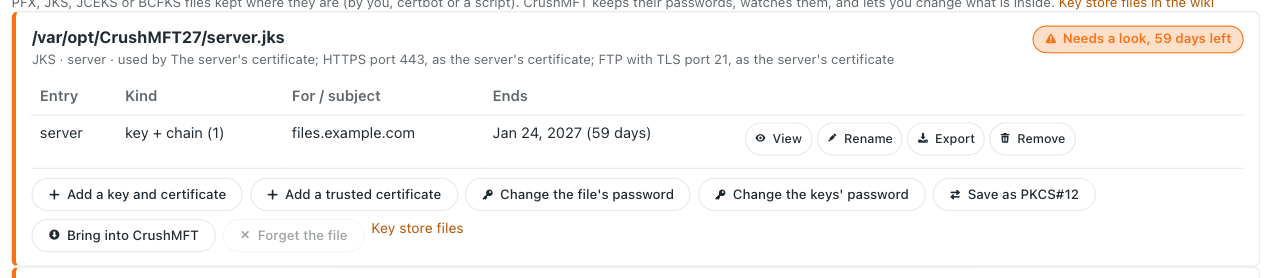
Key store files, Open a key store file (or Certificates, More, Open a key store file on this server): the path on the server (Browse), its password, and the keys' password only when they have one of their own. A file the settings already name is listed under "In your settings, not in the list yet": Add to the list takes its passwords from the settings.
What is inside#
A table of entries: name (alias), kind (key and chain, or trusted certificate), for which names, until when.
| Button | Does |
|---|---|
| View | the certificate in the Certificates tab |
| Fix chain | completes its chain in the file (Chains) |
| Rename | the entry's name in the file. Refused while a port is set to that entry by its name |
| Export | the certificate and its chain as PEM, never the key |
| Remove | the entry out of the file. Refused for the last key of a file in use |
| Add a key and certificate | drop the files: they are read as on the Certificates tab, and added into this file as an entry of its own |
| Add a trusted certificate | a CA's certificate, as a trusted entry |
| Change the file's password | a new password for the file; its keys get it too when they had the file's. Every setting that names the file gets it in the same step, so the ports open it after a restart |
| Change the keys' password | one new password for every key of the file (ports open all keys of a file with one password) |
| Make the keys' password the file's | offered when the keys have a password of their own: most programs expect them to be the same |
| Save as PKCS#12 | a JKS or JCEKS file saved as .p12 beside it, with the same password; the settings use the new file, the old one is left alone |
| Bring into CrushMFT | each key of the file becomes a certificate kept by CrushMFT, its chain completed; the file is not changed. Choose the new certificates in Where used |
| Forget the file | out of the list; the file stays. Refused while it is in use |
Every change writes the file beside the old one and moves it over it; the old one is kept under backup/keystores/. The change is checked first: the file must still open, and the key the ports use must still belong to its certificate. The ports that use the file take the new version within a minute, and the other servers of a cluster get it.
certbot and other tools#
A file that changes on disk (certbot's deploy hook converting to PKCS#12, a copy from another machine) is checked and put in use within the interval of Encryption, TLS, Reload a changed key store. A file that does not pass is not used: the ports keep what they had, and the log and the Certificates page say why.
A file at a URL (S3, SMB) is read from there; it cannot be edited from the page.
The keystore tool of AS2 and user settings#
AS2 keys are not served by a port, so they are not in the list. The Certificate Files button of an AS2 task, and the keystore buttons of a user's AS2 settings, open a keystore tool for them: it looks into any keystore file on the server machine and changes it at once, with nothing to save.
| Control | Does |
|---|---|
| Generate a new keystore | a new keystore with a new private key and a self-signed certificate; its location and password are filled in |
| Keystore location, Keystore password, Show what is inside | opens a JKS or PFX file and lists its entries: alias, Private when it holds a key, expiry; click one for its subject, its further names, issuer, key and serial |
| Add a private key | a private key with its certificate, from a file on the server machine: an alias, the file, its password |
| Add a trusted certificate | a certificate without a key, such as a partner's or your authority's middle certificate |
| Rename, Export, Remove | the selected entry: another alias; the certificate as certificate-export.zip; out of the file |
Warning
Remove cannot be undone, and a private key that is removed is gone. Copy the keystore file before you change it.
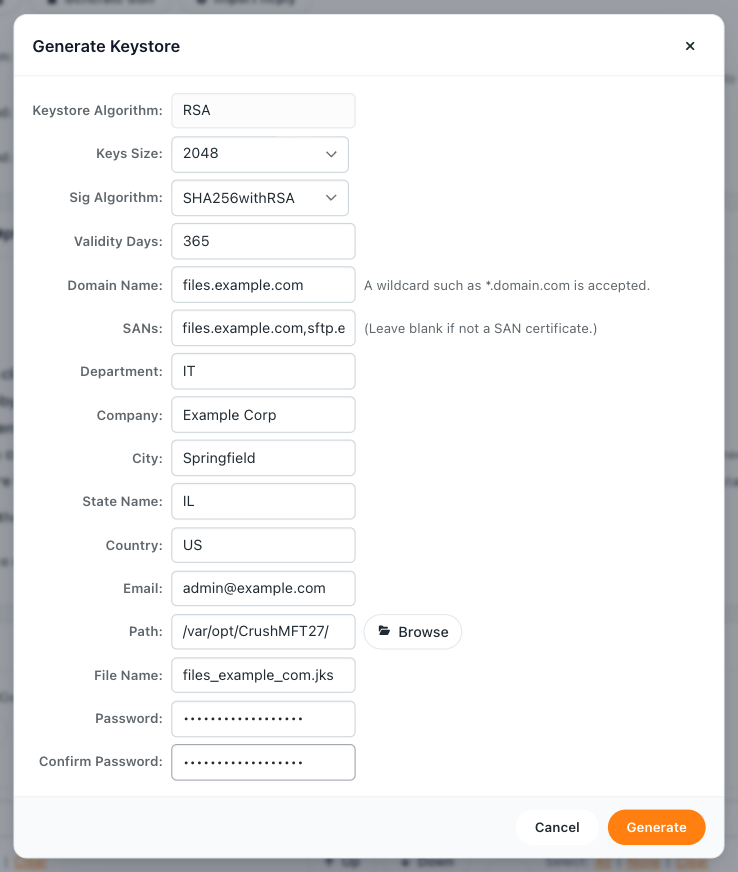
Generate a new keystore asks:
| Field | What it is | Default |
|---|---|---|
| Keystore Algorithm | RSA | RSA |
| Keys Size | 1024, 2048 or 4096 bits. Do not go below 2048. | 2048 |
| Sig Algorithm | SHA256withRSA or stronger; not SHA1 | SHA256withRSA |
| Validity Days | how long the certificate is valid | 365 |
| Domain Name, SANs | the name, and further names separated by commas | |
| Department, Company, City, State Name, Country, Email | who the certificate is for. Country is the two-letter code. | |
| Path, File Name | where the keystore is written on the server machine | the domain name with .jks |
| Password, Confirm Password | the password for the new keystore and its key |
From two files to a keystore#
When you have a private key and a certificate as separate files, as Apache and many certificate authorities give them:
- For a certificate a port serves, drop both on Add certificate files in Certificates: CrushMFT builds and keeps the keystore itself.
- For a keystore of your own (AS2): Generate a new keystore or open one, Add a private key with the key file, then Add a trusted certificate for each middle certificate, and Show what is inside to check there is one entry marked Private with the right names.