Let's Encrypt#
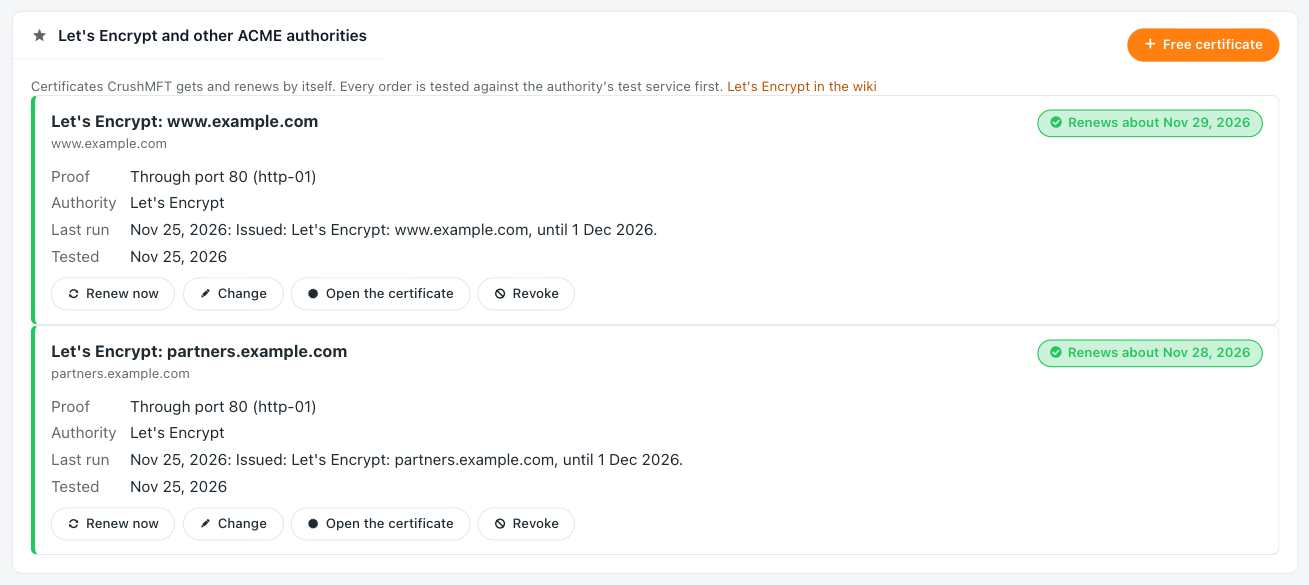
CrushMFT gets certificates from Let's Encrypt (and other ACME authorities) for free, and renews them by itself. It is built in: no plugin, nothing to install. It is in Preferences, Certificates: Free certificate, or the Let's Encrypt tab.
The short way#
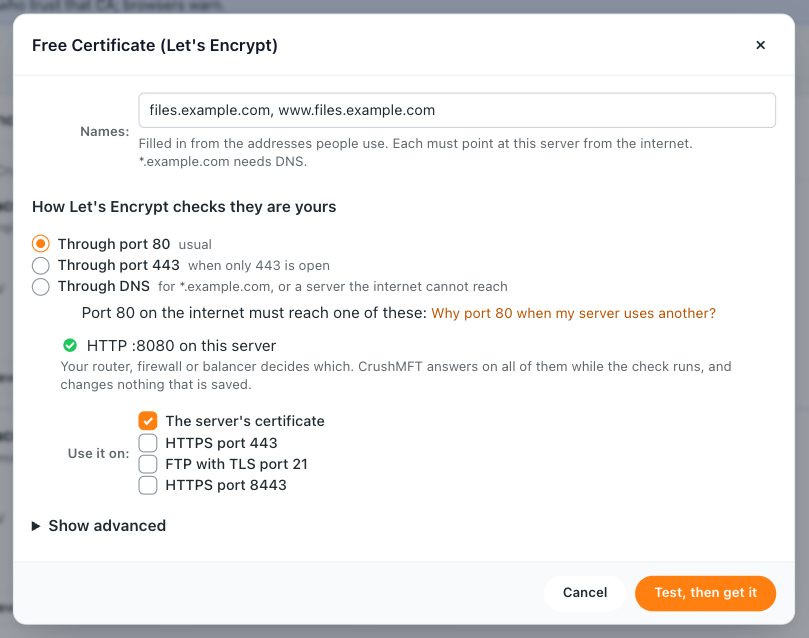
- Make sure each name points at your server (its DNS A record), and port 80 of the name reaches CrushMFT. The port inside may be any number: Port 80 on the internet, any port on CrushMFT.
- Free certificate: the names, Through port 80, and Use it on (the server's certificate, or ports).
- Test, then get it, and watch the steps.
How Let's Encrypt checks the names are yours#
| Way | The authority | Needs |
|---|---|---|
| Through port 80 (http-01) | calls http://NAME/.well-known/acme-challenge/… |
port 80 of the name forwarded to an HTTP port of CrushMFT or its DMZ |
| Through port 443 (tls-alpn-01) | connects to port 443 of the name with a special protocol | port 443 forwarded to an HTTPS port, with nothing in between that ends TLS |
| Through DNS (dns-01) | reads a TXT record of the name | a DNS record set by hand, by your DNS provider's API, or by a job: Let's Encrypt by DNS |
Every HTTP port (port 80's way) or TLS port (port 443's way) of every server and DMZ answers while the check runs, from memory: nothing is written, no setting is saved, no port is restarted, and other clients on port 443 keep getting the real certificate. The form lists the ports that can answer.
A name for all sub domains (*.example.com) is proven only through DNS. An IP address only through port 80 or 443.
What happens, step by step#
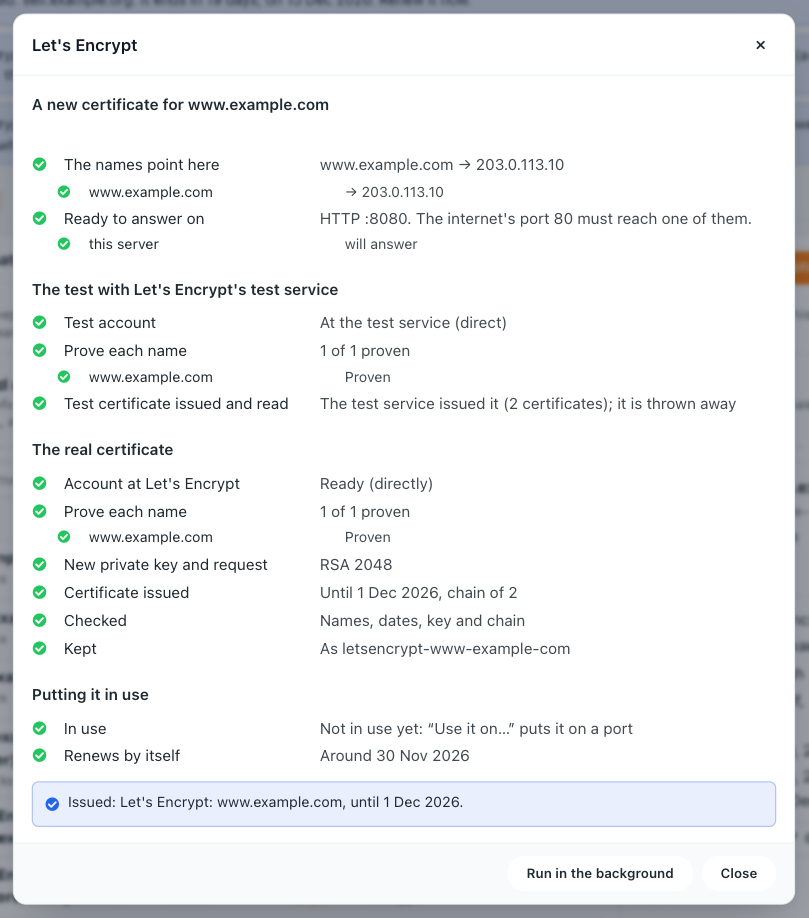
The order is a run of steps, shown as they happen; Run in the background closes the window and the run goes on (its steps are in the Let's Encrypt tab and in the certificate's Renewal tab).
| Step | Is |
|---|---|
| The names point here | each name has an address; a wildcard is only by DNS; CAA records allow the authority |
| Ready to answer on | every place that can answer was told, and this server answered its own test of it |
| The test with the test service | the whole order against the authority's test service: a certificate that is thrown away. Why the test comes first |
| Account | made the first time, then reused; CrushMFT keeps its key |
| Prove each name | one line per name, with what the authority reached |
| New private key and request | RSA 2048 unless you choose another |
| Certificate issued, Checked, Kept | the certificate, its chain, kept by CrushMFT (a new version of the certificate it renews) |
| In use | put in use where you said, checked on every port, then Keep |
| Renews by itself | when: below |
A step that fails stops the run and says what happened, why, the next step, and links to the case in Troubleshooting.
Renewing by itself#
Every 15 minutes the server that runs scheduled work (in a cluster, the ServerBeat master) looks at each certificate Let's Encrypt renews. It renews when the authority says it is time (its renewal information, ARI), or else when a third of the certificate's life is left (30 days of 90), or Renew when … days are left if you set it, whichever comes first, and never later than a week before the end. A failed renewal tries again later, with the test first; each failure raises the TLS Certificate alert. Let's Encrypt itself no longer mails before a certificate ends: CrushMFT's alert does.
The renewed certificate is a new version of the same certificate: every port, server and DMZ that serves it takes it within a minute, without a restart.
Show advanced#
| Field | Is |
|---|---|
| Authority | Let's Encrypt, Google Trust Services, ZeroSSL, Buypass, SSL.com, or another (its directory URL): Other authorities |
| the account's contact at the authority | |
| Key | RSA 2048 (works everywhere), RSA 3072, EC P-256, EC P-384; FIPS mode: 3072 at least |
| Profile | where the authority offers profiles (shortlived, tlsserver) |
| EAB key id, EAB HMAC key | for authorities that tie the ACME account to an account you have with them |
| Reach the authority | directly, through the proxy set for updates, or through a DMZ: Calls to the authority |
| Renew when | days left; empty: as the authority suggests, or a third of the life |
| Ask the authority when to renew (ARI) | on |
| After each renewal | a job, given the certificate's name, names and file |
| Internet's port 80/443 reaches | optional: only to name the right port when something goes wrong |
| Skip the test this time | Testing and limits |
Other authorities#
ACME is a standard: Google Trust Services, ZeroSSL, Buypass and SSL.com speak it too, and so do private authorities (step-ca, Smallstep, Boulder). Choose one under Authority, or Another ACME authority with its directory URL (https://…/directory) and, when it has one, its test directory. An authority without a test service is tested by proving the names at the real service without asking for a certificate. ZeroSSL, Google and SSL.com need an EAB key id and HMAC key from your account with them. The TLS certificate of a private authority is trusted when its root is among Chain certificates.
The Let's Encrypt tab#
Each certificate an authority renews, with its proof, authority, last run and when it was tested: Renew now, Change (the settings; the next run is tested again since they changed), Open the certificate, Revoke (a stolen key: browsers refuse it from then on; renewing by itself is off until you get a new one). The runs going on now. Accounts: one per authority and email; New account key if the account's key may have been copied.
From CrushFTP 11#
The CrushFTP 11 LetsEncrypt plugin is not used by CrushMFT 27. At the first start after the move, each LetsEncrypt plugin entry with names and a key store becomes a certificate renewed by CrushMFT (its file added to the list where it is), with its way of proof, authority, renewal timing and jobs; its account key moves in so the authority sees the same account. The plugin's entries are turned off, nothing is deleted, and a notice in the Let's Encrypt tab says so once.
Rules of thumb#
- Port 80 (or 443) must stay open for every renewal, not only the first.
- Several servers behind one name: Let's Encrypt in a cluster. DMZ servers: Let's Encrypt with a DMZ.
- A certificate from Let's Encrypt is trusted by every browser and by Java: no chain to fix.
Not tried for this page#
A real order from Let's Encrypt or another authority, and FIPS mode. Tried against Pebble, Let's Encrypt's own test authority: through port 80 with the HTTPS redirect on, through port 443 while other clients connect, DNS by hand for a wildcard, the test first and skipping it, a renewal by itself, the move from the LetsEncrypt plugin, a DMZ answering the proof, and a cluster. The pictures are from that test server.