Certificates#
Every port that speaks TLS (HTTPS, FTPS, FTP with TLS, port forward over TLS) shows its clients a certificate. Certificates, the section of Preferences right after IP / Servers, is where CrushMFT keeps them: their private keys, their chains, their passwords, and when they end. It works like a certificate utility: you see every certificate, its names and its chain, and you fix, renew, replace or remove it with a button next to the problem.
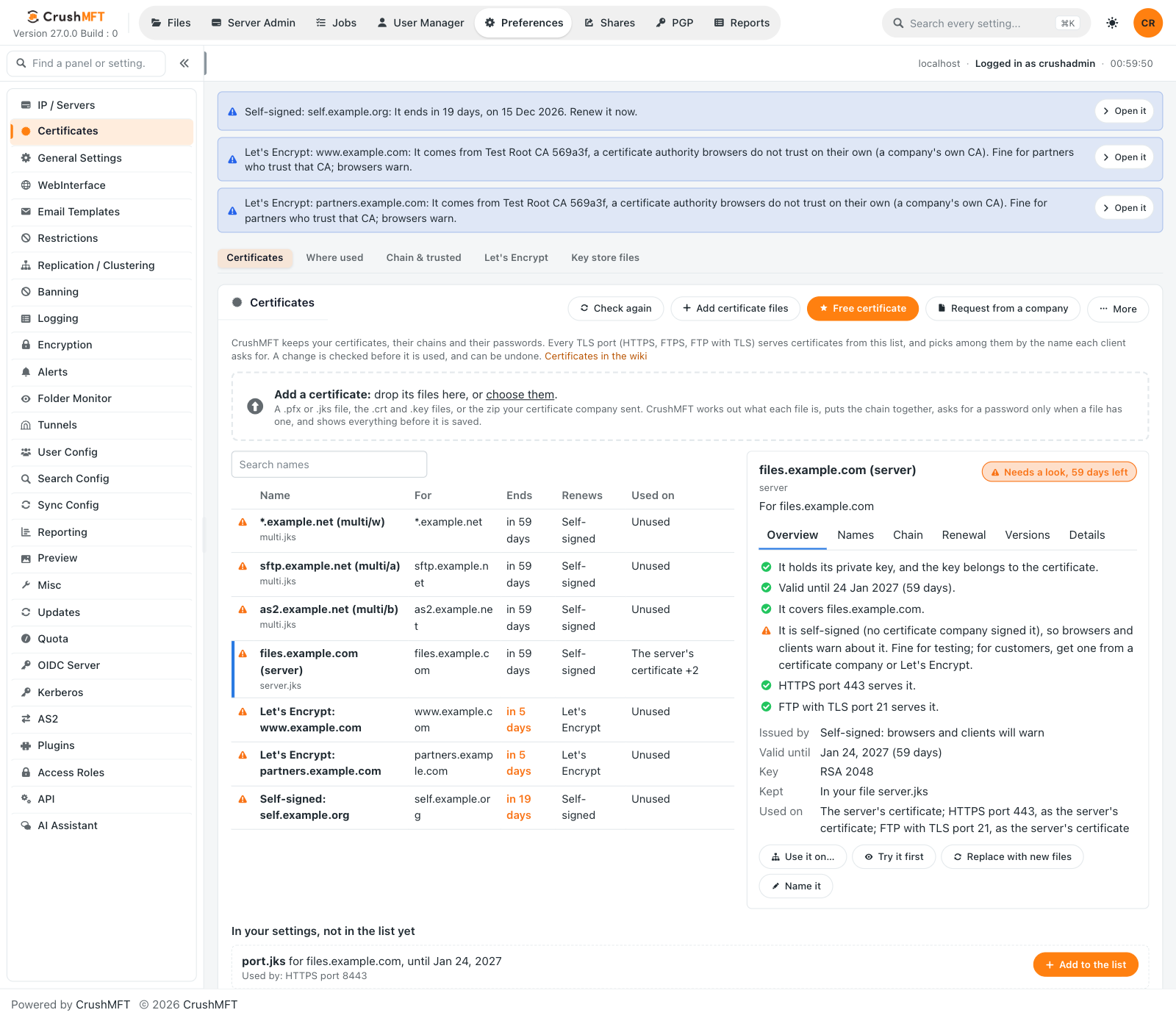
Nothing here waits for Save. Each button acts at once, and the server checks each change before it keeps it. A change of what a port serves is put back by itself unless you press Keep.
The section has five tabs:
| Tab | For |
|---|---|
| Certificates | the list, one certificate in detail, adding certificate files, a free certificate, a request for a certificate company |
| Where used | which certificate each port serves, and the others it picks by name (Several names on one port) |
| Chain & trusted | CrushMFT's chain certificates, and the certificates each port trusts for client certificates |
| Let's Encrypt | certificates CrushMFT gets and renews by itself (Let's Encrypt) |
| Key store files | PFX and JKS files you keep managing yourself (Key store files) |
Needs you#
At the top, above the tabs, the section says what needs someone, most urgent first, each with Open it: a certificate that ended or ends soon and that nothing renews, a port serving the built-in certificate or an older copy, a chain that does not reach a root clients trust, a certificate a port serves that does not cover the addresses people use. A certificate that Let's Encrypt renews by itself is not listed for its date, and a self-signed certificate you made on purpose is not listed for being self-signed.
When CrushMFT does not know the addresses people type to reach the server, it asks once: Type them goes to The addresses people use.
The list#
One row per certificate. A file that holds three certificates (a JKS with three keys, say) is three rows, each with its own names, dates and chain.
| Column | Shows |
|---|---|
| Name | what you called it, else its name in the list; for your own files, the file under it |
| For | the first name it is for, and how many more |
| Ends | the date, or "in 12 days" when less than two months are left; amber under 30 days, red when it has ended |
| Renews | Let's Encrypt, Request out (a request is with a certificate company), Self-signed, Your file, or By hand |
| Used on | the ports that serve it, or Unused |
Search names finds a certificate by any of its names. Click a row to see it beside the list.
One certificate#
| Tab | Shows | Buttons |
|---|---|---|
| Overview | the checks in words, who issued it, until when, the key, where it is kept, where it is used | Use it on…, Try it first, Replace with new files, Name it |
| Names | every name it is for (wildcards say what they cover), whether each of the addresses people use is covered, which ports pick it for which name | Add names |
| Chain | the chain as a tree: the certificate, its middle certificates, the root, each with its dates and whether it is sent | Fix chain, Fetch missing, Add a chain certificate, Check again (Chains) |
| Renewal | for Let's Encrypt: its settings, the next renewal and every run with its steps; for a certificate company: the request that is out; otherwise how to renew it | Renew now, Change, Stop renewing; Renew with Let's Encrypt, Request from my certificate company |
| Versions | the last three versions a port served | Put this one back |
| Details | subject, issuer, serial, SHA-256 fingerprint, signature, key, file | Certificate (PEM), (DER), (P7B): the certificate and its chain without the key; Copy with its key (PFX) (A copy for another server); Remove |
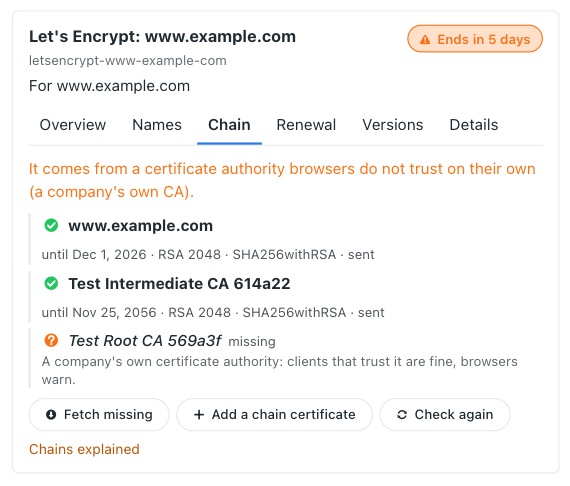
Use it on… offers the server's certificate, a port's own certificate, or a port that serves it as well, to clients that ask for its names. A change of the server's or a port's certificate goes through try, apply, verify and keep.
Adding certificates#
The buttons above the list:
| Button | Does |
|---|---|
| Check again | reads the certificates and what every port serves once more |
| Add certificate files | the same as clicking the box below |
| Free certificate | a certificate from Let's Encrypt: Let's Encrypt |
| Request from a company | a new private key and a request (CSR) for the names you type, to send to a certificate company |
| More, Make a self-signed certificate | for testing, or for partners who trust it by its fingerprint |
| More, Open a key store file on this server | a PFX or JKS file you keep managing yourself: Key store files |
Add a certificate: drop its files here, or choose them. Drop what you were given: a .pfx or .jks file, the .crt and .key files, or the zip your certificate company sent. CrushMFT works out what each file is from its contents, puts the chain together (from the files, from its own chain certificates, from Java's roots, and from the address the certificate company gives in the certificate), and asks for a password only when a file has one, by the file's name. Nothing is saved before you choose:
- Save as a new certificate: kept by CrushMFT, in a file of its own with a password CrushMFT makes. You never need that password.
- Replace NAME: offered when the names match a certificate in the list; it becomes its new version, and the ports that serve it take it within a minute, once it is checked.
- Finish the request of NAME: the certificate company's answer to a request made here; the file they send is enough.
- Keep all N: a file with several certificates, all kept at once.
A file with a red check (ended, not valid yet, the key of another certificate) is not written over a certificate the ports serve.
A request for a certificate company#
Request from a company (or Renew, Request from my certificate company and Add names on a certificate) makes a new private key and its request (CSR). Copy or Download the request and give it to your certificate company. Until their certificate comes back, the certificate's row says Request out, and the ports keep serving what they serve. Drop the file they send on the box: CrushMFT matches it to the key it made. Cancel the request deletes the new key.
Where used#
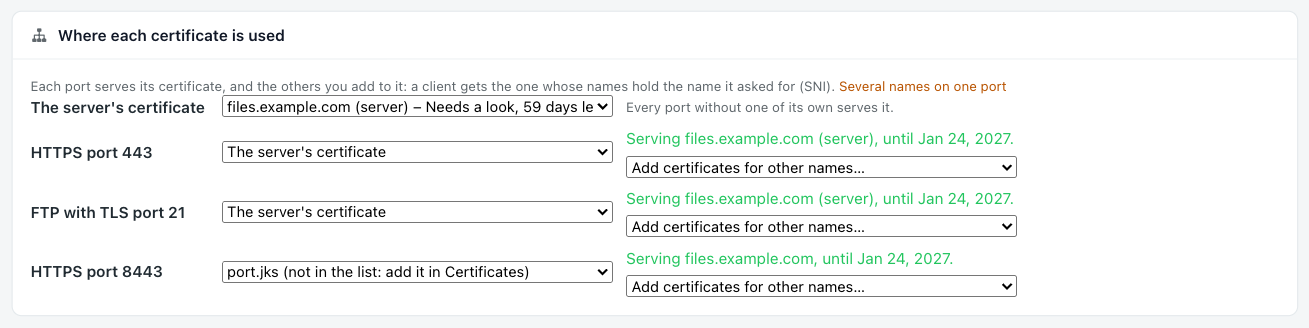
One row for the server's certificate (every port without one of its own serves it) and one per TLS port: the certificate it serves, what it serves now (read by the server itself, as a client reads it), and Add certificates for other names…: certificates the port serves as well, each to the clients that ask for one of its names. See Several names on one port.
Below, The other servers and the DMZs: what each server of the cluster and each linked DMZ serves, read on its own side.
Changing what a port serves#
A change of the server's or a port's certificate asks first, then the server checks the certificate, starts the ports that serve it again (about a second), and reads each of them until it serves the certificate expected, for up to 15 seconds. If one does not, everything goes back at once. Then the page loads again on a new connection, which proves your browser still reaches the server, and asks Keep or Put it back now. Without either, everything goes back by itself after two minutes (tls_keep_window_secs, 30 seconds at the least), so a change cannot lock you out.
A change on the port's own page in IP / Servers, or of the file in Encryption, TLS, is checked the same way when it is saved, but it is not kept or put back: TLS on a port.
Try it first#
Try it first serves a certificate on a port of its own for 10 minutes, while no other port changes. The server connects to it itself, once with each of the addresses people use, and says what a client would see; the links open the same port in your browser. Stop now ends it early. The port is a free one unless tls_try_port names one.
Advanced#
A summary of what applies to every TLS port: the TLS versions the ports offer, the versions CrushMFT uses as a client, the ciphers turned off, whether every port asks for client certificates, and how soon a changed key store file is used. They are changed in Encryption, TLS: TLS settings and Ciphers. A port can still name a key store file and its passwords itself: IP / Servers, the port, TLS certificate, Advanced.
Chain & trusted#
Chain certificates#
The middle and root certificates of certificate companies that CrushMFT keeps to complete chains, each with where it is used. Add chain certificates takes the bundle or chain file your certificate company sent. See Chains.
Client certificates#
Trusted for logins (client certificates): for each port that asks for client certificates, the certificates it trusts, with who issued each, or "(a CA: every certificate it issues)", and its end date.
| Button | Does |
|---|---|
| Add certificates | the CA that issues your client certificates, or a client's own certificate; the port takes them up within a minute |
| Take out | no longer trusted on the port: clients with certificates from it are refused |
A port that trusts nothing refuses every client certificate. With no port asking, the card says how to make one ask. That, and logging users in by their certificate: Client certificates.
Let's Encrypt#
The tab lists the certificates CrushMFT gets and renews by itself, the runs going on now, and the accounts at the authorities. See Let's Encrypt.
Key store files#
PFX, JKS, JCEKS or BCFKS files you keep managing yourself, entry by entry. See Key store files.
The addresses people use#
What do people type to reach this server? The names, separated by commas. Every certificate is checked against them: a name a certificate does not cover gets a warning on its card. Filled in first from the address of the page, and saved with Save.
A copy for another server#
Copy with its key (PFX) downloads the certificate with its private key, under a password you choose (12 characters or more, 14 in FIPS mode). For Windows Server 2016 and older makes it with the encryption those read. Only full administrators can, and each copy is in the log and raises the TLS Certificate alert.
When a certificate stops working#
A certificate file that does not open any more (a wrong password, cut short) never takes a port down: the port keeps the last copy that worked, and after a restart it serves that copy (and a red notice at the top says so). See How CrushMFT keeps certificates.
Alerts#
The TLS Certificate alert (Preferences, Alerts) is raised 30, 14, 7 and 1 days before a certificate ends, when a port serves a kept copy or the built-in certificate, when a private key is copied out, when a renewal by Let's Encrypt fails, and when someone orders without the test or revokes a certificate.
Who can do what#
| Can | Who |
|---|---|
| Look at the section | an administrator with Preferences view or edit |
| Add, replace, renew, remove, change what a port serves, fix chains, edit entries | Preferences edit |
| Add a file by its path, change a file's or its keys' password, save it as PKCS#12, bring it into CrushMFT, copy a private key out, order from Let's Encrypt | full administrators |
In a cluster, with DMZ servers#
The list, the settings and the files go to every server of the cluster: a certificate is the same on all of them. A DMZ keeps nothing of its own: its server sends it the files its ports name and puts a new version in use there without a restart. See Let's Encrypt in a cluster and Let's Encrypt with a DMZ.
The API#
The same work through the REST API: the operations tls.* under /keys/tls (tls.acme.* for Let's Encrypt), and GET /tls/served, GET /tls/scan and GET /tls/versions for what each port serves, every key store file the settings name, and the kept versions. A save of a certificate setting that does not open is refused with 422 tls_refused. See Keys and certificates and Errors.
Settings#
| Setting | In | Is |
|---|---|---|
ssl_keystores |
the preferences | the list of certificates and key store files |
tls_acme |
the preferences | what Let's Encrypt renews, and the accounts |
tls_more_certificates |
a port | the certificates a port serves as well, by name |
tls_alias |
a port | the entry of its key store file a port serves when no name matches |
sni_certificates |
a port | host = certificate pairs that override the names |
tls_public_hostnames |
the preferences | the addresses people use |
tls_keep_window_secs |
the preferences | how long a change waits for Keep: 120 seconds, 30 at the least |
tls_try_port |
the preferences | the port of Try it first; 0: a free one |
Not tried for this page#
FIPS mode, Windows paths, and a real order from Let's Encrypt: the pictures are of a test server with Pebble, Let's Encrypt's own test authority, which is why its certificates say "Needs a look" (a root browsers do not trust) and end in a few days.