JMS (Java Message Service)#
About Java Message Service: https://en.wikipedia.org/wiki/Jakarta_Messaging
Supported protocol: AMQPS (https://en.wikipedia.org/wiki/Advanced_Message_Queuing_Protocol)
!!! After 10.4.0_24+: Dependency jar files must be downloaded (unzip) and placed in your CrushFTP ▸ plugins ▸ lib folder. Restart is required to load the new JMS-related dependency jars. Download: jms_dependency.zip
1. Solace JMS AMQPS Integration#
About Solace JMS : https://docs.solace.com/API/AMQP/Why-AMQP.htm
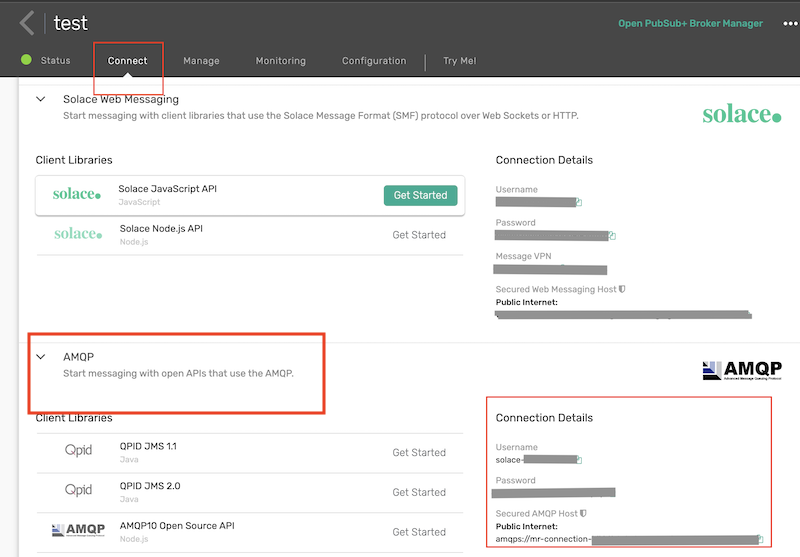
Get the AMQPS URL, user name, and password for JMSTask's JNDI config from the Solace Broker Management.
2. JMSTask configuration:#
2.1 JNDI config: Variable replacement is supported.#
About Java Naming and Directory Interface: https://en.wikipedia.org/wiki/Java_Naming_and_Directory_Interface
It stores the connection settings and required destinations (Topic and Queue).
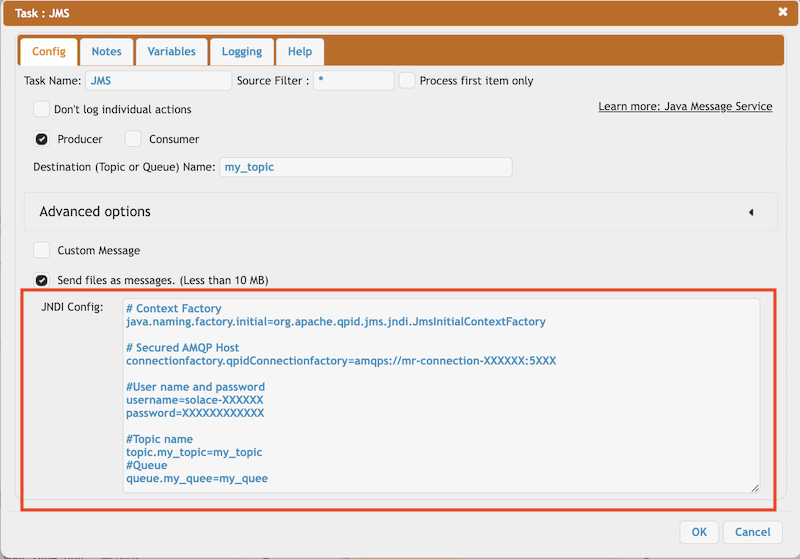
Configuration example:
# Context Factory
java.naming.factory.initial=org.apache.qpid.jms.jndi.JmsInitialContextFactory

# Secured AMQP Host
connectionfactory.qpidConnectionfactory=amqps://mr-connection-XXXXd:56XX

#User name and password
username=solace-XXXX
password=rsaXXXXXX
#Topic name
topic.my_topic_name=my_topic_name
queue.my_queue=my_queue
2.2 Producer Mode:#
Sends messages to the given destination topic or queue.
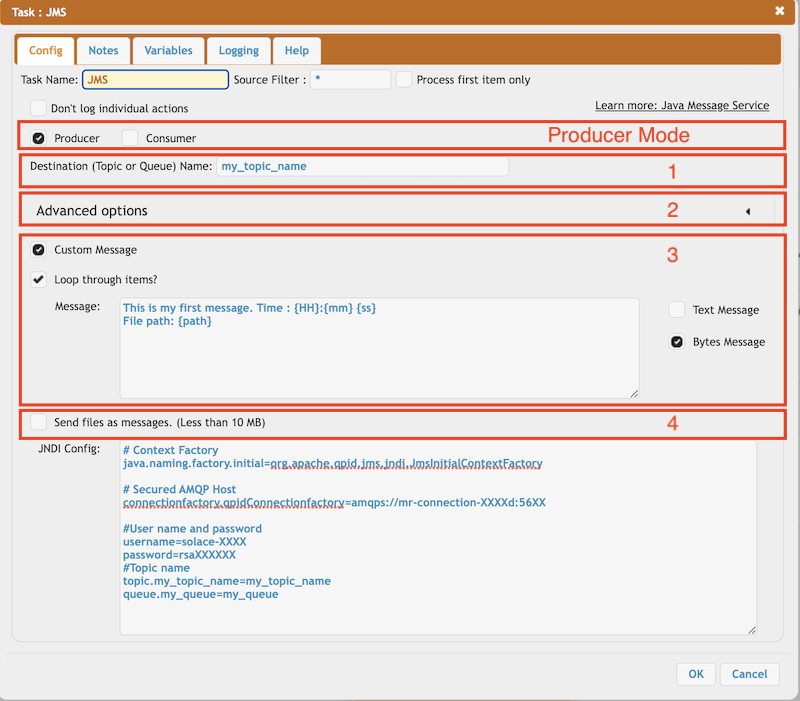
1. Destination name: Name of the Topic or Queue configured on JNDI config. Variable replacement is supported (CrushTaskVariables).
2. Advanced Options:
Persistent: Delivery mode Persistent means the message is not lost when a messaging provider goes down for any reason and comes up again.
Time to live: When the message is published, the specified time to live is added to the current time to give the expiration time
Priority: There are 10 priority levels, 0 to 9. As per the JMS standard, a message with priority 0-4 is the normal priority, and 5-9 is considered an expedited priority.
3. Message Type: Custom Message: Send a custom message to the destination as text or binary. Variable replacement is also supported. You can loop through incoming files and send as many custom messages with file-related pieces of information like name, path, or URL.
4. Message Type: Send files: It sends the file content in binary mode. Max file size allowed: 10 MB.
2.3 Consumer Mode:#
Receive messages from the given destination topic or queue.
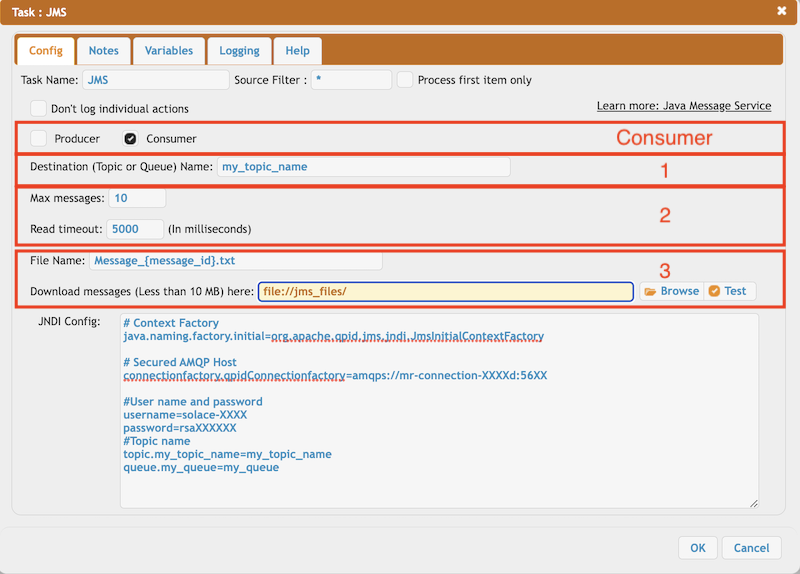
1. Destination name: Name of the Topic or Queue configured on JNDI config. Variable replacement is supported (CrushTaskVariables).
2. Message settings: Limit the number of messages, and control the read timeout of message reading.
3. Store settings: It saves the message (less than 10MB) as a file to the given location. Provide the file name and make it unique to avoid overwriting. Variable replacement is supported.
Message-related variables:
{message_id}, {message_priority}, {message_expiration}, {message_type}, {message_correlation_id}, {message_reply_to}