Enterprise Licenses Only
#
SAMLSSO PluginThis plugin is for advanced users in an organization using SAML. While this config is generic (from Okta) in its description to all SAML providers, see the Microsoft ADFS config example for specifics on ADFS. *SAMLSSO_ADFS* Another example is *SAMLSSO_AZURE* config example.
Okta calls their generic config 'SAML Service Provider'.
For a generic config, you can get these items from the 'config.xml' (Keycloak for example):
#
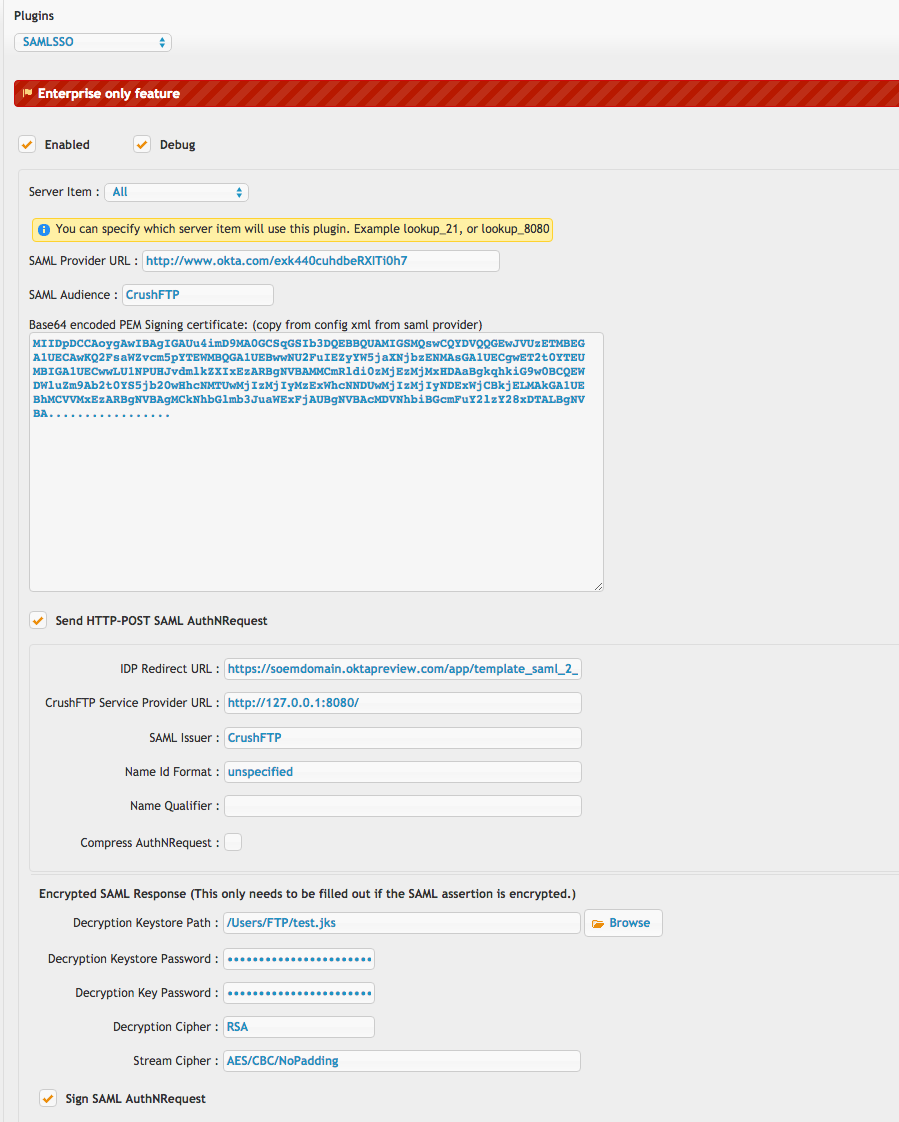
CrushFTP:Redirect URL = HTTP-POST URL
CrushFTP:SAML Provider URL = EntityID
CrushFTP:SAML Issuer = ClientID (or ApplicationID)
CrushFTP:Signing certificate = X.509 Certificate
For configuring through a DMZ, both the DMZ instance and internal instance to have identical configurations. If you are using the groups attribute in SAML to specify group memberships, add them into the LDAP roles area using the same group name SAML returns. Set the cache timeout to be "-1" and it will skip connecting to the LDAP configured server info. (Which is what you want if using SAML groups.) If you don't have LDAP and don't have groups being passed through, you can add the special group name "-ALL_ROLES-" and it will allow all logins from SAML.
If you are configuring multiple SAML auth options...or differentiating an auth through DMZ versus internal, use the SSO_SAML Sub Name config to differentiate between them. Entering something like "_PUBLIC" this causes your URLs to adjust to reflect this. Instead of "u=SSO_SAML" you use "u=SSO_SAML_PUBLIC". And in the case of the IDP, your URL that has "&p=none" becomes "&p=none_PUBLIC". This helps CrushFTP route the attempt to the correct plugin instance.
This plugin can be linked together with the WebApplication plugin for a scenario where your LDAP does not apply to your SAML logins. *SAMLSSO_WebApplication*
1)
#
The top half controls the connection parameters to the SAML provider server.We provide an example screenshot for an OKTA account. Both HTTP POST and redirect modes are supported.
2)
#
The lower half controls what to do with the resulting user that is validated once they are redirected back to your CrushFTP server. This mainly contains configuration items related to LDAP. An LDAP server is required for looking of role associations for the user that SAML validated.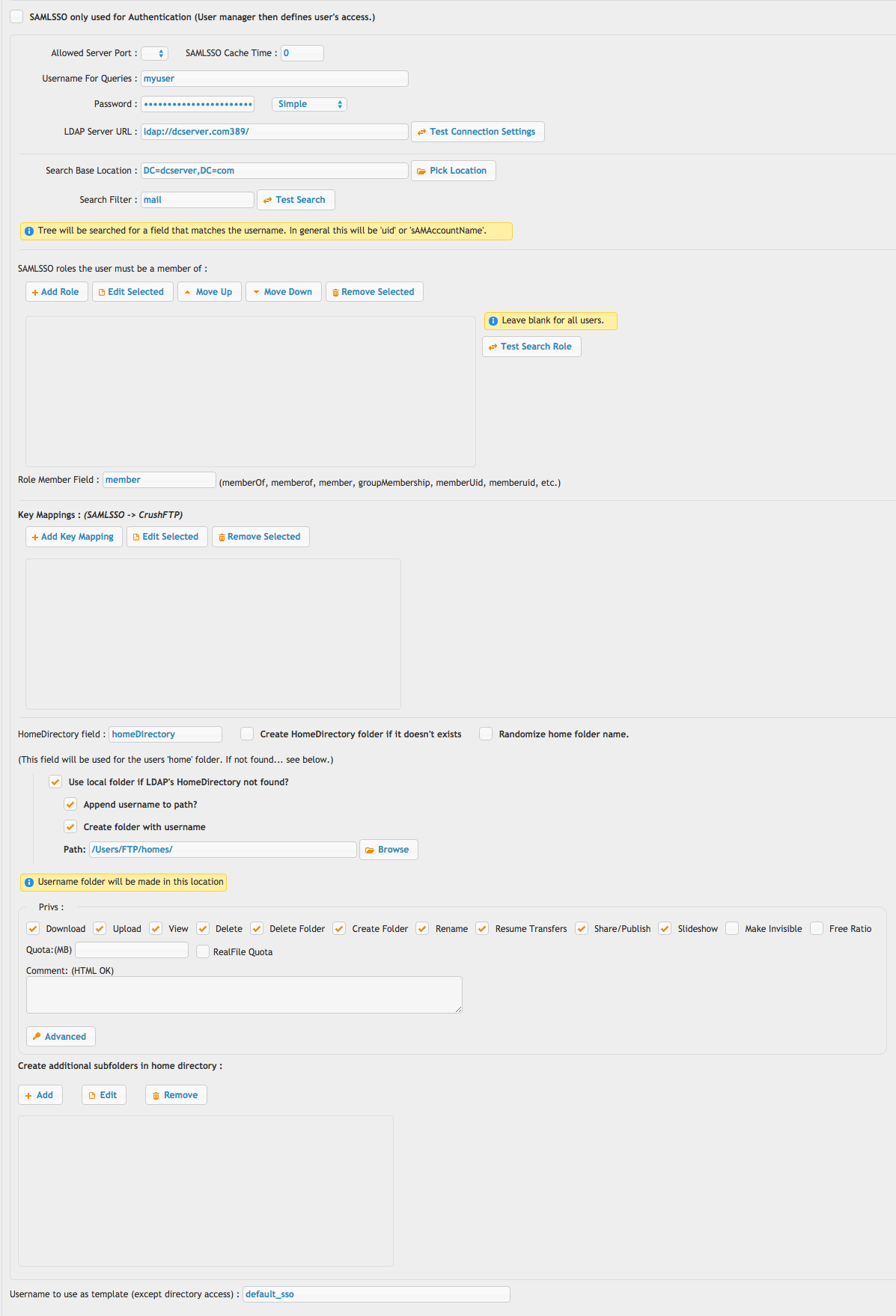
3)
#
The final item is using a Url like this to make CrushFTP redirect a user to the SAML provider.http://domain.com/?u=SSO_SAML&p=redirectThis could be placed on your login page, or even use javascript to auto redirect the user to that URL.
Be certain the Preferences, Misc tab has the remember invalid usernames configured to 0 seconds or your SAML login will get rejected since CrushFTP caches the username as being invalid and doesn't even ask the plugin.
Also be sure prefs.XML has "http_redirect_base" set to a blank value, or your actual URL, or else the redirection will be blocked.
Add new attachment
Only authorized users are allowed to upload new attachments.
List of attachments
«
This page (revision-26) was last changed on 04-Feb-2026 04:46 by Ben Spink
G’day (anonymous guest)
Log in
CrushFTP11 | What's New


- WebInterface
- Server Admin
- User Manager
- Client Apps
- CrushBalance Load Balancer
- High Availability
- Self Registration
- Preferences
- Email Templates
- Restrictions
- Replication
- Banning
- Logging
- Encryption
- Alerts
- Folder Monitor
- Tunnels
- Syncs
- User Config
- Search Config
- Preview
- Misc
- Plugins
- Manage Shares
- PGP
- Telnet
- FAQ
- API
- Linux Install
- Virtual Linux Server
- Server Variables
- Google Authenticator and Microsoft Authenticator
- AS2 EDI
JSPWiki