POP3 / IMAP Task
#
This task allows you to scan a mail server finding matching emails based on subjects or senders, and pull out attachments from them. You can optionally delete the messages after your done too. These attachments can then be processed with CrushTask in additional methods. This task type is only allowed for Enterprise licenses.
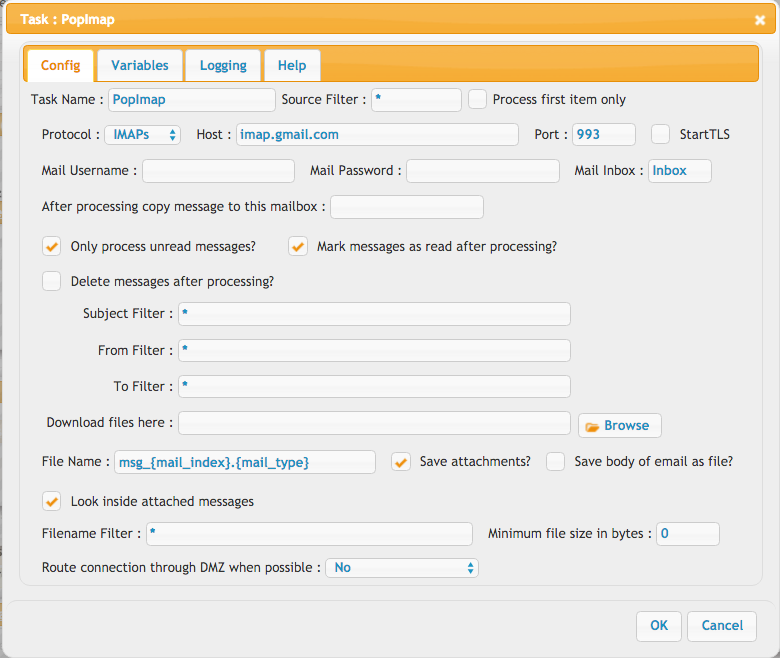
More options:
1. Configure Microsoft IMAP: Microsoft IMAP Link

2. Microsoft Graph REST API: Instead of using the IMAP protocol, you can retrieve mail messages through the Microsoft Graph REST API. See the Microsoft Mails Task for more details.
3. Configure Google IMAP: Google IMAP Link
Here is a list of other possible variables:
Standard:
    From: {from}
    Mail index: {mail_index}
    Mail_type: {mail_type}
    From prefix: {from_prefix}
these only work if body and/or attachment is saved to file:
    URL: {url}
    FileName: {name}
    File Path: {path}
    Modified: {modified}
Client info extracted from the email header(Version 11.4.5 Build : 21+):
    Origin IP tracing: {header_source_ip}
    Full delivery path: {header_received}
    Client IP (where supported): {header_x_originating_ip}
    Proxy/gateway client IP: {header_x_forwarded_for}
    Unique message identity: {header_message_id}
    Bounce destination: {header_return_path}
    Reply redirect: {header_reply_to}
    Send timestamp: {header_date}
    Sending client fingerprint: {header_x_mailer}
    Body format / MIME structure: {header_content_type}
CrushFTP Mail Simple Query
#
It provides a standardized, cross-task filtering language within CrushFTP, based on KQL (Keyword Query Language) syntax. Its fundamental purpose is to offer users a unified, easily readable method for filtering mails.
a.) Unified Syntax: It allows users to consistently use syntax like key:value* and the pipe operator (|) for OR conditions, and (!) for negation, which is compatible with other CrushFTP task filters.
b.) Backend Execution: The engine takes the generalized filter and converts it into the most appropriate query understood by the remote service (Jakarta Mail Search).
✅ IMAP (or IMAPS): The search is executed server-side. Jakarta Mail sends a SEARCH command to the mail server (e.g., Exchange, Gmail), and the server does the heavy lifting. It only returns the matching message IDs. This is very fast and efficient.
🛑 Important POP3 (or POP3S): The POP3 protocol does not support server-side searching. To execute the search, Jakarta Mail must download the headers (and sometimes the full body) of every single message in the inbox to your local memory, and then apply the filters client-side. If a mailbox has 50,000 emails, a simple search will be extremely slow and consume a massive amount of RAM.
General examples:
from:value1*|*value2* subject:value3*
from:value1*|*value2* subject:value3* | subject:!value4*
Concrete Examples:
1. Basic Filtering:
Find emails from a specific sender with a specific word in the subject.
from:partner@domain.com subject:invoice
2. Date Filtering:
The system supports specific date formats: yyyy-MM-dd or full ISO timestamps like yyyy-MM-dd'T'HH:mm:ss'Z'.
after:2026-04-30 before:2026-06-01
3. Inline OR Filtering (Same Field):
You can search for multiple possible matches within the same field using the pipe | symbol without spaces.
Find emails from either John OR Jane:
from:john@domain.com|jane@domain.com
Find emails containing "error", "fail", OR "warning" in the subject:
subject:error|fail|warning
4. Top-Level OR Filtering (Different Fields):
To trigger an OR condition across entirely different rules, use | (with spaces on both sides).
Find emails that are EITHER from the boss OR have the word "urgent" in the subject:
from:boss@company.com | subject:urgent
5. Negation (Exclusion):
Use the exclamation mark ! right after the colon to exclude specific matches.
Find emails from a domain, but exclude a specific person:
from:domain.com from:!marketing@domain.com
Find emails that are NOT read and do NOT have "spam" in the subject:
is:unread subject:!spam
Supported "is": flags: read, unread, flagged, answered, deleted, draft
6. Size and Header Filtering:
Find emails larger than 5MB (size is in bytes):
larger:5242880
Filter by custom email headers. The parser expects header-<headername>:.
Find emails processed by a specific mailer or marked with a specific priority:
header-x-mailer:Microsoft|Outlook header-x-priority:1
7. Complex Combined Filter:
Find unread emails from a specific company, sent after January 1st, 2026, where the subject contains "contract" or "agreement", excluding auto-replies.
is:unread from:partnercompany.com after:2026-01-01 subject:contract|agreement subject:!Automatic
Add new attachment
Only authorized users are allowed to upload new attachments.
«
This page (revision-25) was last changed on 19-Jun-2026 03:56 by krivacsz
G’day (anonymous guest)
Log in
CrushFTP11 | What's New
- WebInterface
- Server Admin
- User Manager
- Client Apps
- CrushBalance Load Balancer
- High Availability
- Self Registration
- Preferences
- Email Templates
- Restrictions
- Replication
- Banning
- Logging
- Encryption
- Alerts
- Folder Monitor
- Tunnels
- Syncs
- User Config
- Search Config
- Preview
- Misc
- Plugins
- Manage Shares
- PGP
- Telnet
- FAQ
- API
- Linux Install
- Virtual Linux Server
- Server Variables
- Google Authenticator and Microsoft Authenticator
- AS2 EDI
JSPWiki