Open the Microsoft Entra Admin Center (formerly Azure AD) to manage your app registration: Microsoft Entra Admin Center Link

Navigation: Go to App registrations. Click on New registration.
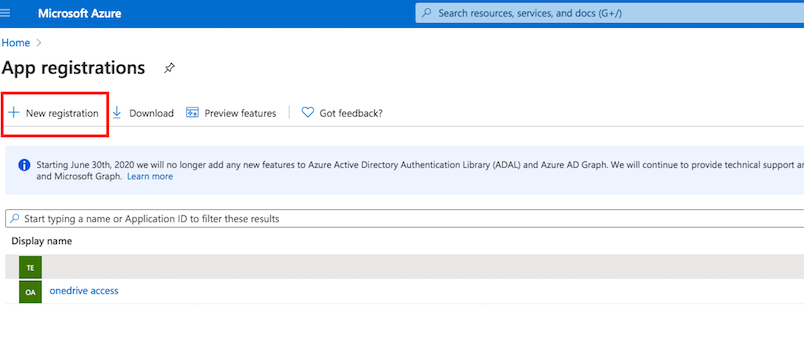
In the Redirect URI section, for Platform configuration, select Web. The Redirect URL must end with SSO_OIDC/.
http://localhost:9090/SSO_OIDC/
or
https://your.crushftp.domain.com/SSO_OIDC/
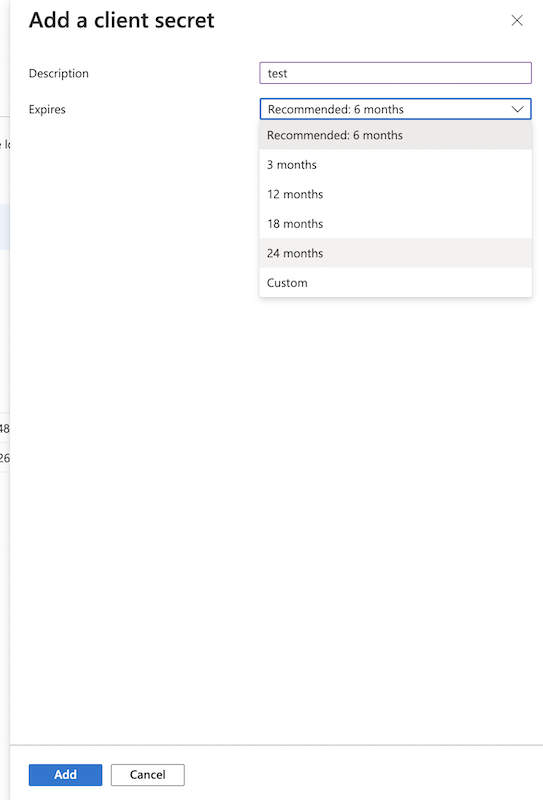
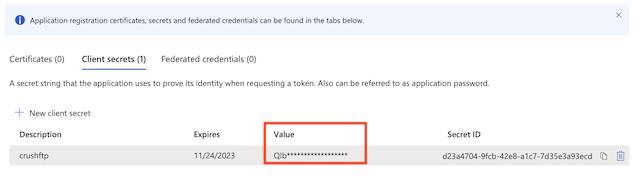
Secret key: A new client secret must be created. Go to Certificates & secrets, and generate a new client secret by clicking on New client secret. Ensure you copy over the value immediately!
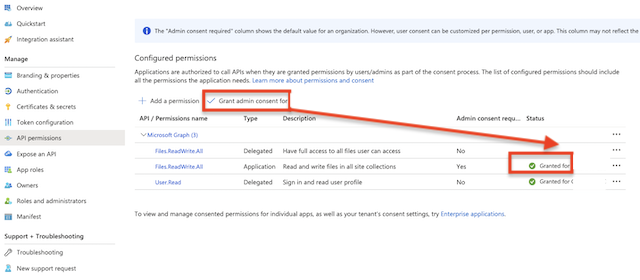
Configure the API Permissions:
Ensure the application has the following Delegated Permissions assigned:
a.) User.Read: This permission allows an application to access basic profile information (Like: Name,Email address,User ID (object ID), User principal name (UPN), Tenant ID) of the signed-in user.
Grant Admin consent for the newly added permission.
Get Client ID and Tenant ID from App registration -> Overview.
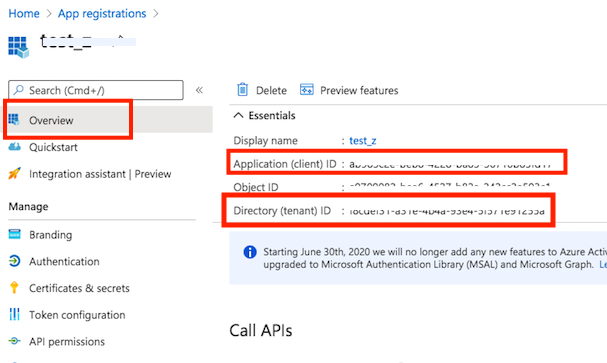
Retrieving Group Information from Microsoft Azure AD:
#
With Microsoft Entra ID (formerly Azure AD), there are two ways to handle group memberships. Please review the options below and configure the method that best fits your Azure application setup:
1. Group Claims in the Authorization Token
#
You can add the groups claim to the authorization token. Including group claims in tokens allows applications to determine a user’s group memberships immediately upon login, without the need for additional API calls.
🛑 Important Constraint: When a user is a member of more than 200 groups (for Azure AD/Microsoft Entra ID tokens), the groups claim will not be included in the token. Instead, the token will contain a "Group Overage Claim".
Open Microsoft Entra Admin Center (formerly Azure AD) to manage your App registrations: Microsoft Entra Admin Center Link
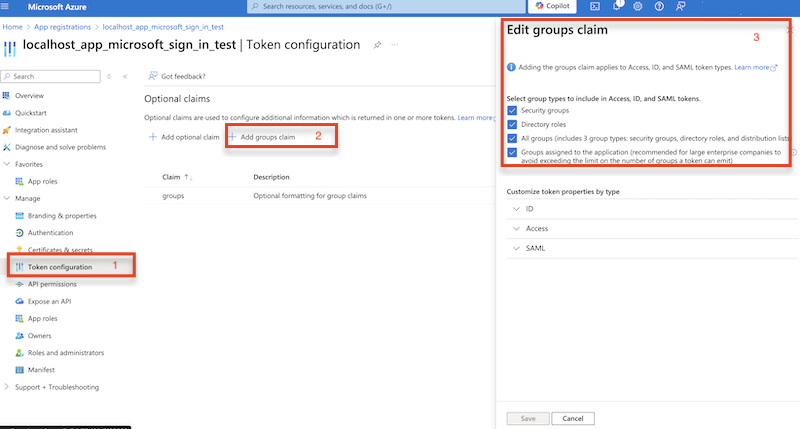
Under Customize token properties by type, select one of the following formats:
- Group ID (Default)
- sAMAccountName (Group Display Name)
- NetBIOSDomain\sAMAccountName
- DNSDomain\sAMAccountName
At CrushOIDC Roles use IDP attribute name: groups
For example, when Group ID (Default) is configured:
groups=0788XXX123 : temp_OIDC_azure_user
For example, when sAMAccountName (Group Display Name) is configured:
groups=Azure_CrushFTP_Group : temp_OIDC_azure_user
or
groups=*Microsoft_CrushFTP*
or
groups=REGEX:.*CrushFTP$
2. Additional API Call to Microsoft Graph#
If group claims are not included in the authorization token — or if a user is a member of more than 200 groups — a specific User Endpoint is required to make Microsoft Graph calls and retrieve group information for the authenticated user.
User Endpoint: Configure the user endpoint of the CrushOIDC plugin to this specific URL:
https://graph.microsoft.com/v1.0/me
🛑 Important: If your environment uses a Proxy or a strict Firewall, you must authorize outbound traffic to the following Microsoft Graph endpoint:
• graph.microsoft.com
In this scenario, an additional API call is made to this endpoint to fetch the user's group membership details.
🛑 Important Requirement: Your Azure App registration must include the Group.Read.All (Delegated type) permission to enable access to this group information.
Open Microsoft Entra Admin Center (formerly Azure AD) to manage your App registrations: Microsoft Entra Admin Center Link
Please configure the following API permissions at App registartions:
- Click on Add a permission.
- Select Microsoft Graph.
- Choose Delegated permissions.
Search for and select the GroupMember.Read.All permission.
About this permission: This permission allows the application to read the members of all groups in the directory. List the users, devices, service principals, and other groups that are members of: Microsoft 365 groups, Security groups, Distribution groups. It requires an admin to consent—ordinary users cannot approve it.
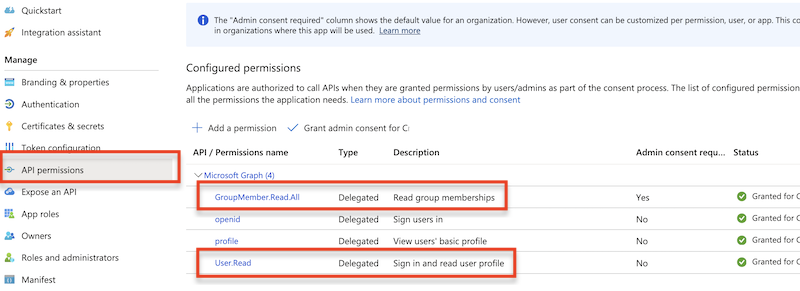
🛑 Important: It requires an Admin to consent as non-admin users cannot approve it.
At CrushOIDC Roles use IDP attribute name:group, microsoft_groups or microsoft_group_ids
Like:
microsoft_groups=Azure_CrushFTP_Group : temp_OIDC_azure_user
or
microsoft_groups=*Microsoft_CrushFTP*
or
microsoft_groups=REGEX:.*CrushFTP$
Like:
microsoft_group_ids=0788XXX123 : temp_OIDC_azure_user
Copy and securely store the Client ID and Client Secret as these will be required for the CrushOIDC plugin configuration.
!!!Continue on: CrushOIDC
Add new attachment
Only authorized users are allowed to upload new attachments.
List of attachments
| Kind | Attachment Name | Size | Version | Date Modified | Author | Change note |
|---|---|---|---|---|---|---|
png |
app_reg_config_permissions.png | 112.1 kB | 1 | 06-Feb-2024 04:25 | krivacsz | |
png |
microsoft_group_info.png | 126.0 kB | 1 | 25-Jul-2024 08:04 | krivacsz |


«
This page (revision-66) was last changed on 19-Mar-2026 06:11 by krivacsz
G’day (anonymous guest)
Log in
CrushFTP11 | What's New
- WebInterface
- Server Admin
- User Manager
- Client Apps
- CrushBalance Load Balancer
- High Availability
- Self Registration
- Preferences
- Email Templates
- Restrictions
- Replication
- Banning
- Logging
- Encryption
- Alerts
- Folder Monitor
- Tunnels
- Syncs
- User Config
- Search Config
- Preview
- Misc
- Plugins
- Manage Shares
- PGP
- Telnet
- FAQ
- API
- Linux Install
- Virtual Linux Server
- Server Variables
- Google Authenticator and Microsoft Authenticator
- AS2 EDI
JSPWiki