LetsEncrypt High Availability
When you run multiple servers to ensure zero downtime (High Availability), managing automated SSL/TLS certificates via Let's Encrypt requires special cluster-wide coordination. A Let's Encrypt HA setup ensures that automated certificate renewals happen seamlessly across all your servers without causing security errors or downtime.
More info at: High Availability
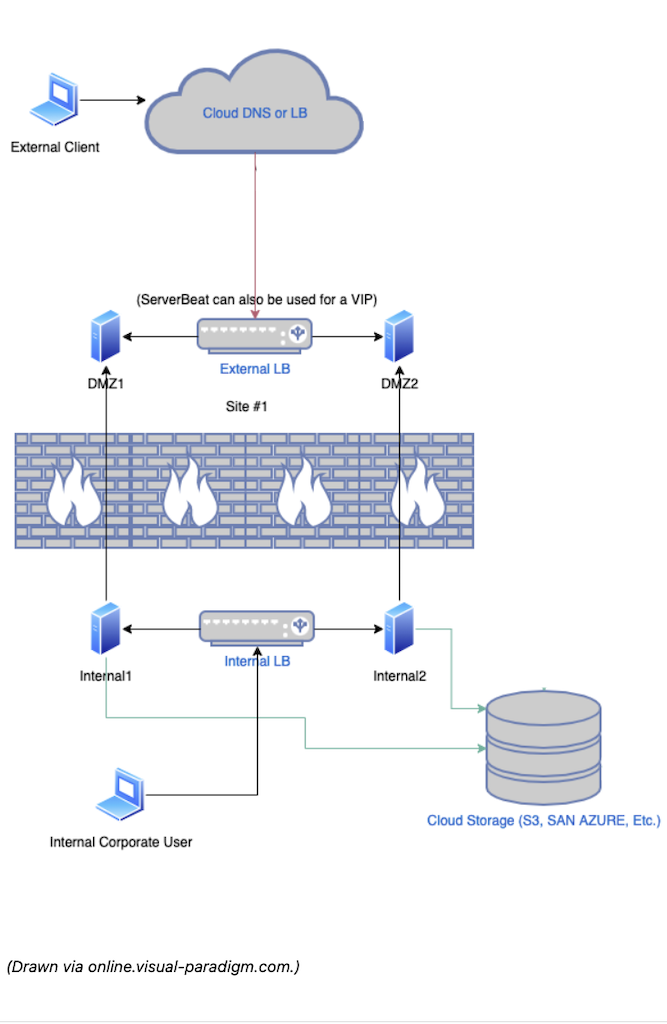
In a server cluster, this process typically involves two main functions:
a.) Shared Validation (Challenge Routing): To issue or renew a certificate, Let's Encrypt sends a verification challenge to your domain over port 80 or 443. In an HA setup with a load balancer, the cluster must ensure that no matter which server node receives this incoming verification request, it can successfully answer the challenge to prove domain ownership.
b.) Keystore Synchronization & Cluster-Wide Reloading: When a node successfully downloads the renewed certificate (saved as a Java Keystore or .jks file), it automatically synchronizes this updated file across the entire cluster using its built-in replication. By simply enabling the Replicate? flag in the plugin settings, the server automatically broadcasts the raw keystore bytes to all other active nodes in the cluster via Shared Session Replication. The receiving nodes will automatically write the new .jks file to their local disk, load it into memory, push it to any configured DMZ instances, and seamlessly restart their secure ports.
Configuring for Internal Servers with a Publicly Available Domain in an HA Cluster
#
When your internal servers have their own publicly available domains.
🛑 Verify the Server Instance: Double-check the Server Instance field in the plugin configuration. It must not point to any DMZ instance. For internal servers, this field should typically be left blank (which defaults to the main server) to ensure the validation challenge is handled locally and not misrouted.
Enable Cluster Replication: Check the Replicate? flag.
This will cover Keystore Synchronization and ensure Cluster-Wide Reloading across all nodes.
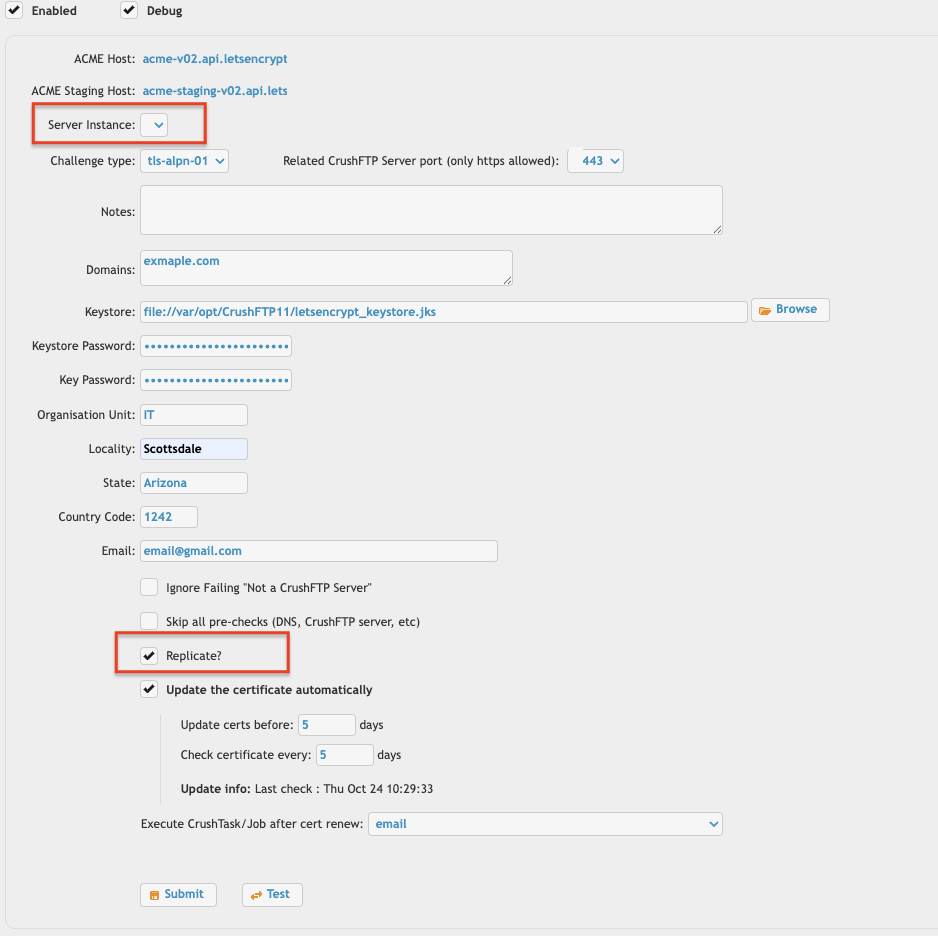
For details regarding other settings, see the main Let's Encrypt plugin page: LetsEncrypt plugin
Configuring for DMZ Servers with a Publicly Available Domain in an HA Cluster
#
🛑 Configure on Internal Servers Only: It is very important that you do not configure the Let's Encrypt plugin directly on the DMZ instances. All Let's Encrypt configurations must be established on the internal server.
Target the DMZ intance: On your internal server, create a separate Let's Encrypt plugin configuration for the corresponding DMZ instance in your cluster. Use the Server Instance dropdown in each plugin configuration to point to a specific DMZ.
Enable Cluster Replication: Check the Replicate? flag.
This will cover Keystore Synchronization and ensure Cluster-Wide Reloading across all nodes.
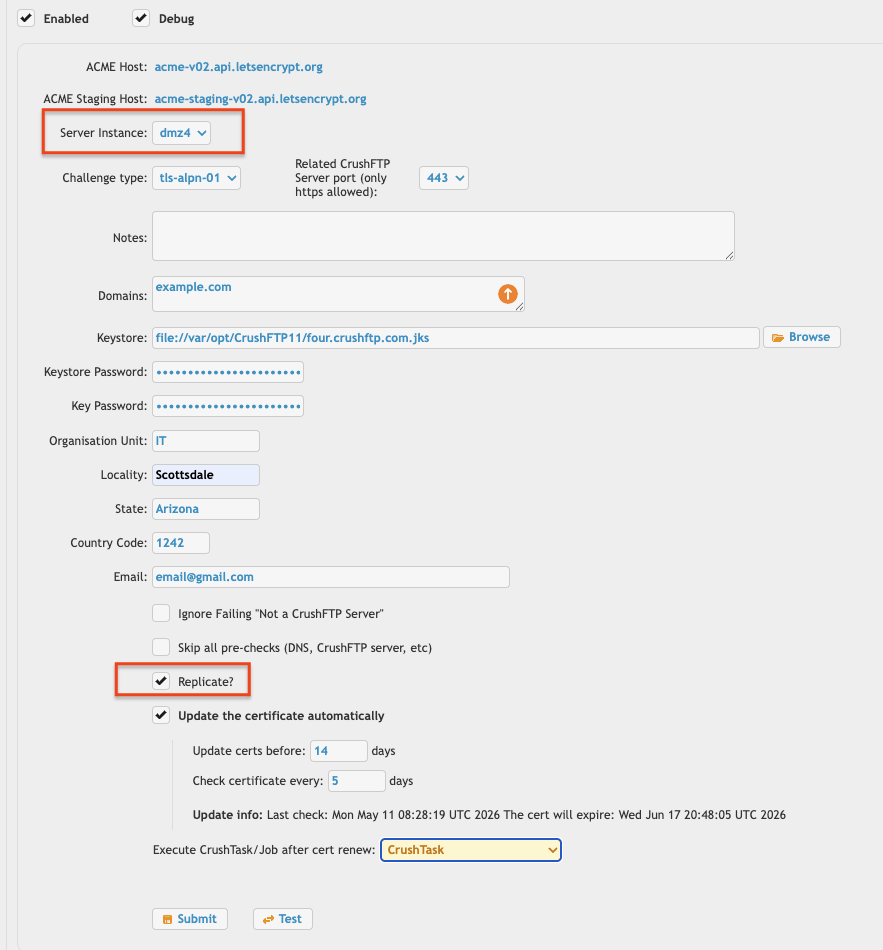
For details regarding other settings, see the main Let's Encrypt plugin page: LetsEncrypt plugin
Add new attachment
List of attachments
| Kind | Attachment Name | Size | Version | Date Modified | Author | Change note |
|---|---|---|---|---|---|---|
png |
lets_encryp_internal.png | 99.5 kB | 1 | 14-May-2026 02:03 | krivacsz | |
png |
lets_encrypt_dmz.png | 104.9 kB | 1 | 14-May-2026 02:33 | krivacsz | |
png |
lets_encrypt_high_availability... | 183.2 kB | 1 | 14-May-2026 01:32 | krivacsz |


- WebInterface
- Server Admin
- User Manager
- Client Apps
- CrushBalance Load Balancer
- High Availability
- Self Registration
- Preferences
- Email Templates
- Restrictions
- Replication
- Banning
- Logging
- Encryption
- Alerts
- Folder Monitor
- Tunnels
- Syncs
- User Config
- Search Config
- Preview
- Misc
- Plugins
- Manage Shares
- PGP
- Telnet
- FAQ
- API
- Linux Install
- Virtual Linux Server
- Server Variables
- Google Authenticator and Microsoft Authenticator
- AS2 EDI