Consumer Mode:
#
Consumer mode means the system is set up to receive messages from a messaging server, such as updates, alerts, or file notifications. It listens on a specific topic or queue and processes incoming messages as they arrive. This mode is used when the system needs to react to events or data sent by other systems.
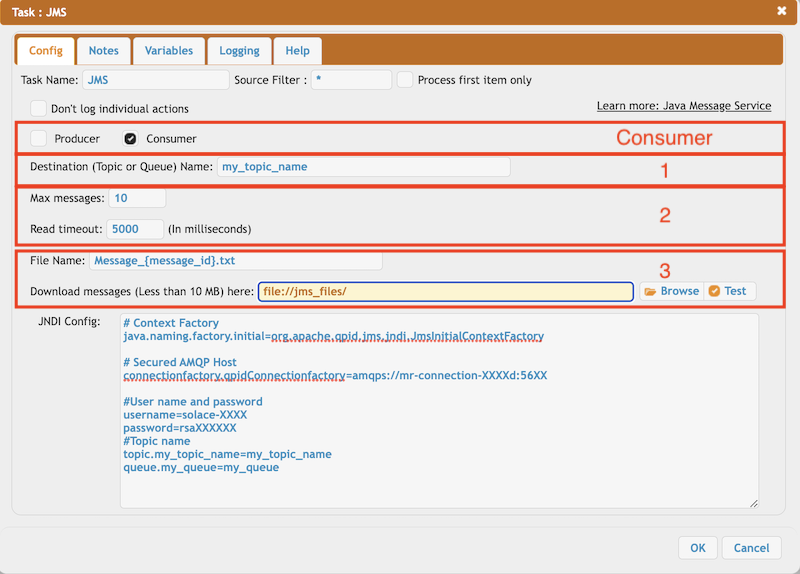
1. Destination name: It refers to the Topic or Queue that has been set up in the JNDI configuration. You can also use CrushTaskVariables to automatically insert values into the name, allowing for flexible and dynamic message routing.
2. Message settings: Configure how messages are received by setting a limit on the number of messages to process and a timeout that defines how long the system should wait for new messages. These settings help control how the system handles incoming message traffic and delays.
3. Store settings: Saves the received message (⚠️ up to 10 MB) as a file at the specified location. You need to provide a File Name, ⚠️ and it’s recommended to make it unique to prevent overwriting existing files. Variable replacement is supported for dynamic file naming.
Message-related variables:
{message_id}, {message_priority}, {message_expiration}, {message_type}, {message_correlation_id}, {message_reply_to}
Back to: JMS (Java Message Service)
Add new attachment
Only authorized users are allowed to upload new attachments.
«
This page (revision-1) was last changed on 30-Sep-2026 04:56 by krivacsz
G’day (anonymous guest)
Log in
CrushFTP11 | What's New

- WebInterface
- Server Admin
- User Manager
- Client Apps
- CrushBalance Load Balancer
- High Availability
- Self Registration
- Preferences
- Email Templates
- Restrictions
- Replication
- Banning
- Logging
- Encryption
- Alerts
- Folder Monitor
- Tunnels
- Syncs
- User Config
- Search Config
- Preview
- Misc
- Plugins
- Manage Shares
- PGP
- Telnet
- FAQ
- API
- Linux Install
- Virtual Linux Server
- Server Variables
- Google Authenticator and Microsoft Authenticator
- AS2 EDI
JSPWiki