JMS IBM MQ
#
More info at JMS IBM MQ documentation Link

⚠️ Important:
• JMSTask connects to IBM MQ with IBM's own Jakarta Messaging client, over the native IBM MQ protocol (default port 1414). This is not AMQP: set provider=ibmmq in the JNDI config. The Qpid settings from the AMQP page are not used.
• The IBM MQ client is not shipped with CrushFTP. Download com.ibm.mq.jakarta.client-<version>.jar (IBM MQ 9.3 or later) from Maven Central Link
or IBM Fix Central.• It also needs jakarta.jms-api-3.1.0.jar (part of the JMS dependency zip
 ) and json-<version>.jar (org.json, Maven Central Link).
• Place all of them in your CrushFTP Install Folder/plugins/lib. ⚠️ Restart is required to load the new jars.
• The older com.ibm.mq.allclient.jar is the javax.jms build of the IBM client and does not work here. JMSTask reports it when it finds it.
• Tested with com.ibm.mq.jakarta.client 9.4.3.0 against an IBM MQ 9.2.4 queue manager: plain, TLS and mutual TLS channels, queue and topic.
1. What you need from the IBM MQ administrator
#
• Queue manager name, e.g. QM1
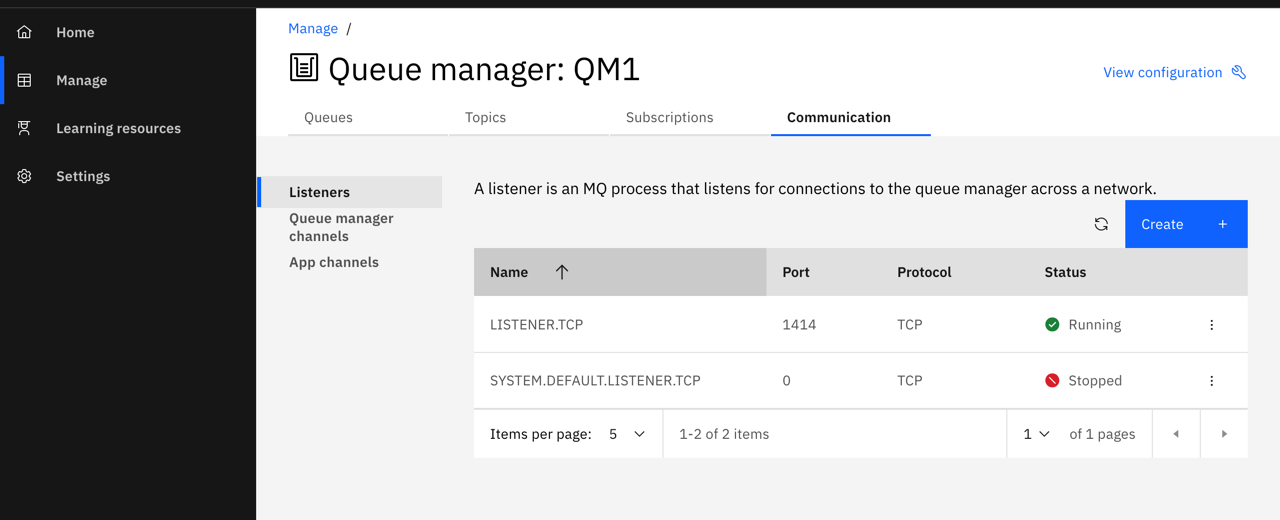
• Host name and listener port of the queue manager (default 1414)
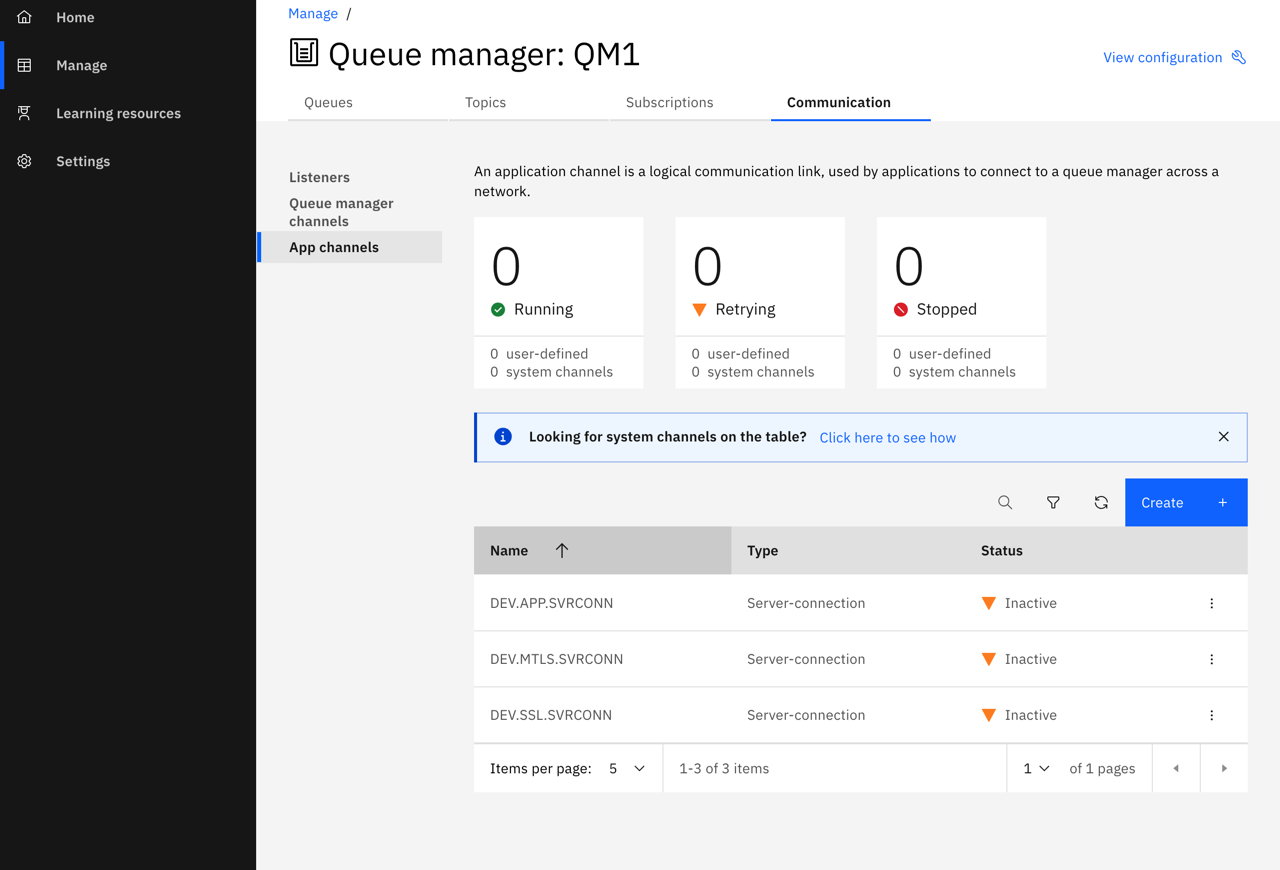
• The server-connection channel (SVRCONN) CrushFTP connects to
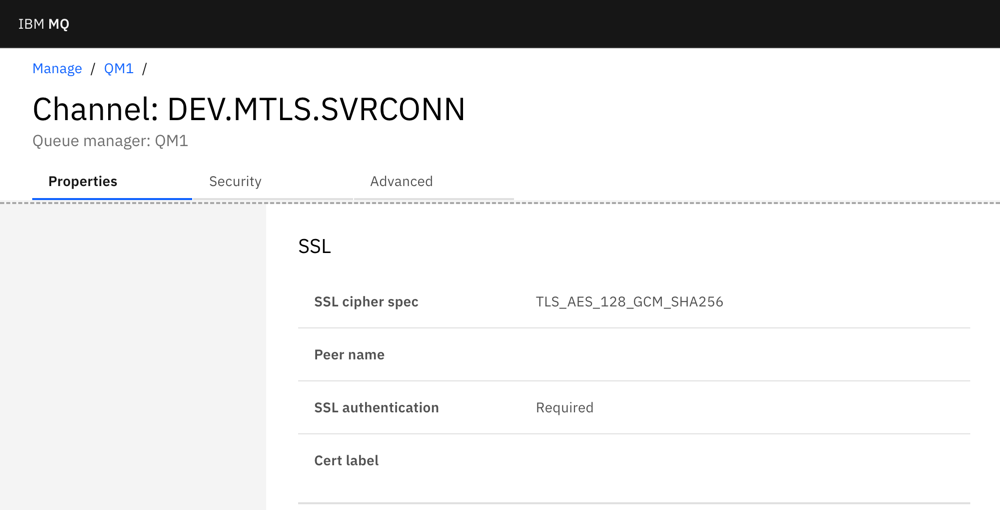
• For TLS: the channel's cipher spec (SSLCIPH), whether a client certificate is required (SSLCAUTH), and the queue manager's certificate (or its CA) for the CrushFTP trust store
• A username / password if the queue manager checks them (CONNAUTH), and authority to put/get on the queue or publish/subscribe on the topic
• The queue or topic name
Listener and port (IBM MQ Console → Manage → queue manager → Communication → Listeners):
Server-connection channels (Communication → App channels):
TLS settings of the channel (App channels → ⋮ → View configuration → SSL). SSL cipher spec must match the sslCipherSuite of the task, SSL authentication: Required means CrushFTP must present a client certificate (sslKeyStore):
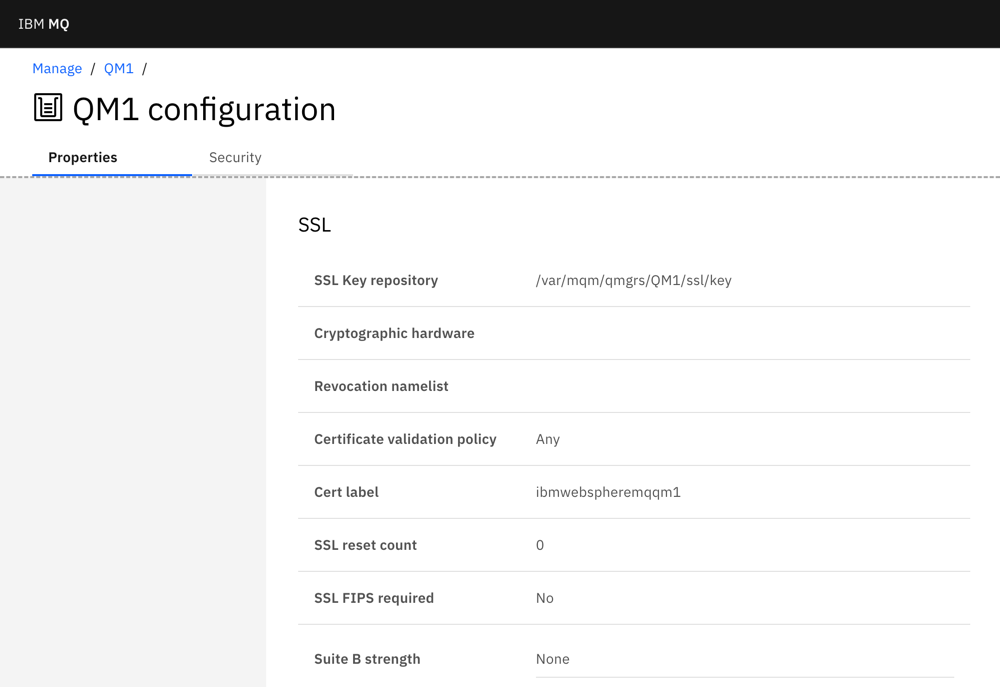
Key repository and certificate of the queue manager (View configuration → SSL):
2. IBM MQ side example (MQSC)
#
Example setup for a test queue manager, run with runmqsc QM1. ⚠️ It disables channel authentication and runs the channels as the MQ administrator (mqm) to keep the example short. Do not do that in production, see the notes below.
* Listener on port 1414
DEFINE LISTENER(LISTENER.TCP) TRPTYPE(TCP) PORT(1414) CONTROL(QMGR) REPLACE
START LISTENER(LISTENER.TCP)

* A queue, a topic, and a subscription that copies the topic's messages into a queue (handy for testing)
DEFINE QLOCAL(IBM.MQ.TEST.QUEUE) REPLACE
DEFINE TOPIC(IBM.MQ.TEST.TOPIC) TOPICSTR('ibm_mq_test_topic') REPLACE
DEFINE SUB(IBM.MQ.TEST.SUB) TOPICSTR('ibm_mq_test_topic') DEST(IBM.MQ.TEST.QUEUE) REPLACE

* TLS: key repository and certificate label of the queue manager (test only: channel authentication off)
ALTER QMGR CHLAUTH(DISABLED) SSLKEYR('/var/mqm/qmgrs/QM1/ssl/key') CERTLABL('ibmwebspheremqqm1')
REFRESH SECURITY TYPE(SSL)

* Channels: plain / TLS with server certificate only / mutual TLS (client certificate required)
DEFINE CHANNEL(DEV.APP.SVRCONN)  CHLTYPE(SVRCONN) MCAUSER('mqm') REPLACE
DEFINE CHANNEL(DEV.SSL.SVRCONN)  CHLTYPE(SVRCONN) SSLCIPH(TLS_AES_128_GCM_SHA256) SSLCAUTH(OPTIONAL) MCAUSER('mqm') REPLACE
DEFINE CHANNEL(DEV.MTLS.SVRCONN) CHLTYPE(SVRCONN) SSLCIPH(TLS_AES_128_GCM_SHA256) SSLCAUTH(REQUIRED) MCAUSER('mqm') REPLACE
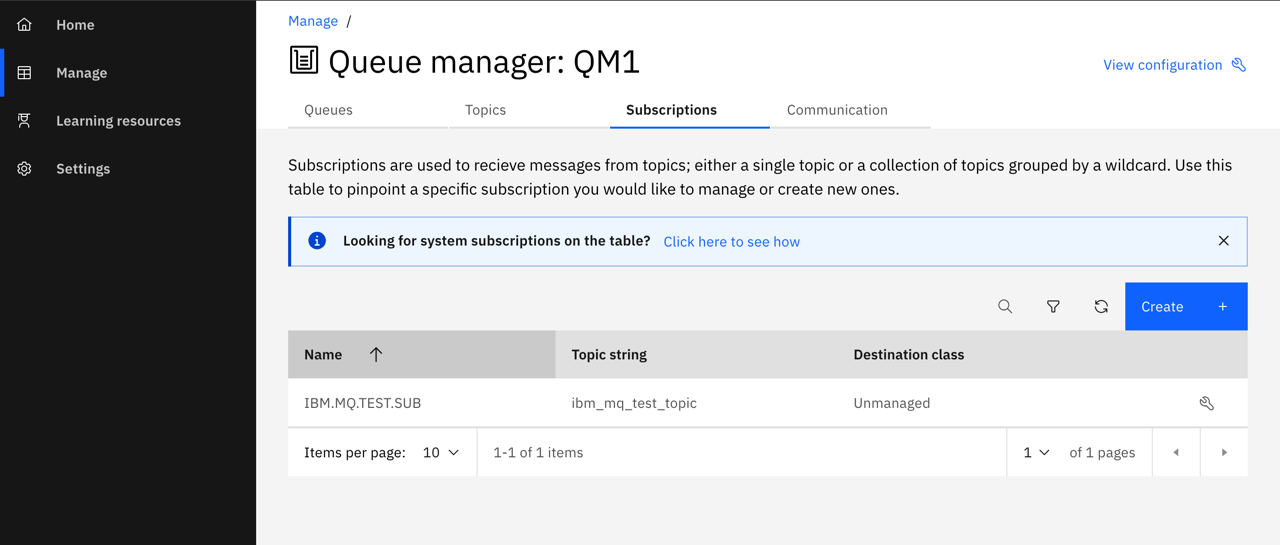
The subscription in the IBM MQ Console (Subscriptions tab). Messages published by JMSTask to the topic ibm_mq_test_topic land in the queue IBM.MQ.TEST.QUEUE:
Production notes:
• Keep channel authentication (CHLAUTH) enabled, and do not run the channel as an MQ administrator. Map the CrushFTP connection to a low-privilege user, for example with a CHLAUTH rule on the client certificate (SSLPEERMAP) or on the address (ADDRESSMAP), or with CONNAUTH username/password.
• Give that user connect/inquire authority on the queue manager, put/get on the queue and publish/subscribe on the topic (setmqaut or SET AUTHREC).
• Use a CA-signed certificate on the queue manager instead of a self-signed one.
3. TLS certificates
#
a.) On the queue manager: key repository and certificate. A self-signed certificate is shown here; in production use a CA-signed one.
runmqakm -keydb -create -db /var/mqm/qmgrs/QM1/ssl/key.kdb -pw <password> -type cms -stash
runmqakm -cert -create -db /var/mqm/qmgrs/QM1/ssl/key.kdb -stashed -label ibmwebspheremqqm1 -dn "CN=qm1.example.com,O=Example,C=US" -size 2048 -sig_alg SHA256WithRSA -expire 365
runmqakm -cert -extract -db /var/mqm/qmgrs/QM1/ssl/key.kdb -stashed -label ibmwebspheremqqm1 -target qm1.crt -format ascii
b.) On the CrushFTP server: trust store with the queue manager's certificate (use the keytool of CrushFTP's Java):
keytool -importcert -noprompt -alias qm1 -file qm1.crt -keystore mq_truststore.p12 -storetype PKCS12 -storepass <password>
c.) Only for mutual TLS (SSLCAUTH(REQUIRED)): a key pair for CrushFTP, and its certificate added to the queue manager's key repository. ⚠️ The key password must be the same as the store password.
keytool -genkeypair -alias crushftp -keyalg RSA -keysize 2048 -sigalg SHA256withRSA -validity 365 -dname "CN=crushftp,O=Example,C=US" -keystore mq_clientkey.p12 -storetype PKCS12 -storepass <password> -keypass <password>
keytool -exportcert -alias crushftp -keystore mq_clientkey.p12 -storepass <password> -rfc -file crushftp.crt

# on the queue manager:
runmqakm -cert -add -db /var/mqm/qmgrs/QM1/ssl/key.kdb -stashed -label crushftpclient -file crushftp.crt -format ascii
# then in runmqsc QM1:
REFRESH SECURITY TYPE(SSL)
4. JMSTask configuration
#
4.1 JNDI config: Variable replacement is supported.
#
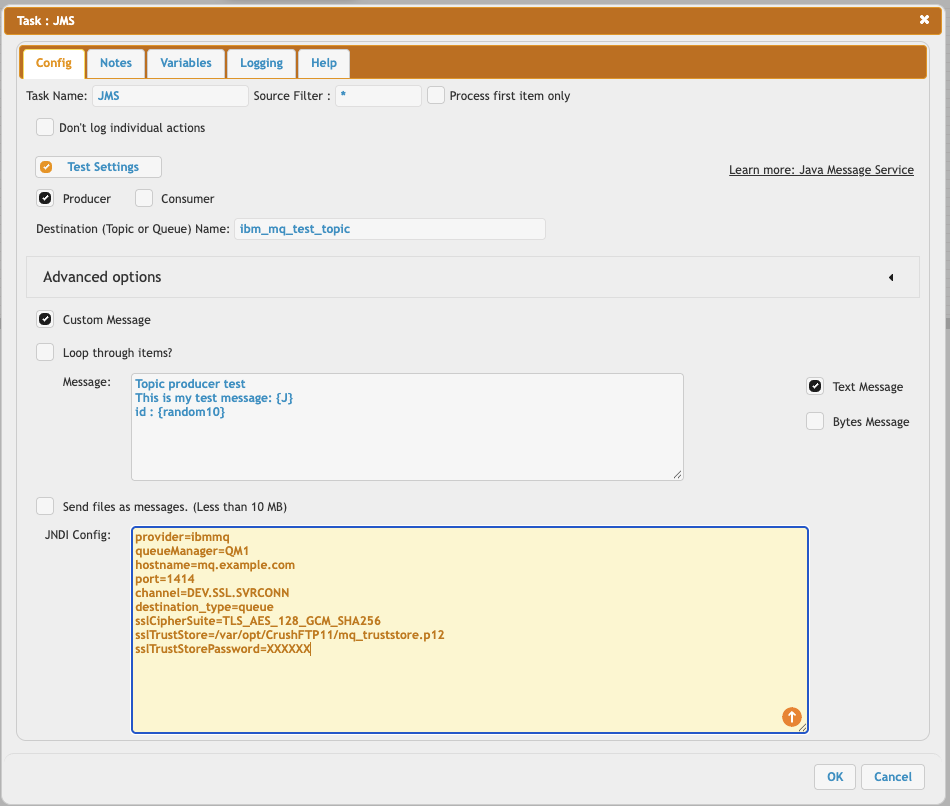
a.) Plain connection (no TLS, test only):
provider=ibmmq
queueManager=QM1
hostname=mq.example.com
port=1414
channel=DEV.APP.SVRCONN
destination_type=queue
b.) TLS, the queue manager's certificate is checked (channel with SSLCAUTH(OPTIONAL)):
provider=ibmmq
queueManager=QM1
hostname=mq.example.com
port=1414
channel=DEV.SSL.SVRCONN
destination_type=queue
sslCipherSuite=TLS_AES_128_GCM_SHA256
sslTrustStore=/var/opt/CrushFTP11/mq_truststore.p12
sslTrustStorePassword=XXXXXX
c.) Mutual TLS with username and password, publishing to a topic (channel with SSLCAUTH(REQUIRED)):
provider=ibmmq
queueManager=QM1
hostname=mq.example.com
port=1414
channel=DEV.MTLS.SVRCONN
destination_type=topic
username=mqtest
password=XXXXXX
sslCipherSuite=TLS_AES_128_GCM_SHA256
sslTrustStore=/var/opt/CrushFTP11/mq_truststore.p12
sslTrustStorePassword=XXXXXX
sslKeyStore=/var/opt/CrushFTP11/mq_clientkey.p12
sslKeyStorePassword=XXXXXX
4.2 JNDI settings
#
| Setting | Description |
|---|---|
| provider | ibmmq, required. Selects the IBM MQ client instead of AMQP or STOMP. |
| queueManager | Queue manager name, e.g. QM1. |
| hostname, port | Host and listener port of the queue manager. port defaults to 1414. |
| connectionNameList | Instead of hostname/port, for a multi-instance queue manager: host1(1414),host2(1414) |
| ccdtUrl | Instead of hostname/port/channel: a client channel definition table, e.g. file:///var/opt/CrushFTP11/ccdt.json. Channel, cipher spec and peer name then come from the CCDT. |
| channel | Server-connection channel. Default: SYSTEM.DEF.SVRCONN |
| destination_type | queue (default) or topic, for the Destination (Topic or Queue) Name field. |
| username, password | Sent to the queue manager for connection authentication (CONNAUTH). The password can be at most 256 characters. |
| sslCipherSuite | Turns TLS on. The Java cipher suite name that matches the channel's SSLCIPH, see the table below. Without it the connection is not encrypted, even if the stores are set (the task then stops with an error). |
| sslTrustStore, sslTrustStorePassword | Trust store (PKCS12) with the queue manager's certificate or its CA. |
| sslKeyStore, sslKeyStorePassword | Key store (PKCS12) with CrushFTP's own certificate. Needed when the channel has SSLCAUTH(REQUIRED). |
| sslTrustStoreType, sslKeyStoreType | Store type, default PKCS12. JKS also works. |
| sslPeerName | Optional. Checks the distinguished name of the queue manager's certificate, e.g. CN=qm1.example.com. IBM MQ does no host name check of its own. |
| clientId | Optional JMS client ID. |
| mq.<NAME>, mq_int.<NAME>, mq_bool.<NAME> | Any other IBM MQ connection factory property as a string, number or true/false, e.g. mq.XMSC_WMQ_APPNAME=CrushFTP (the application name the queue manager shows for the connection). |
Cipher suite names: sslCipherSuite uses the Java name. The IBM JRE names (SSL_...) are rejected with MQRC 2400 (MQRC_UNSUPPORTED_CIPHER_SUITE).
| Channel SSLCIPH | sslCipherSuite |
|---|---|
| TLS_AES_128_GCM_SHA256 | TLS_AES_128_GCM_SHA256 |
| TLS_AES_256_GCM_SHA384 | TLS_AES_256_GCM_SHA384 |
| ECDHE_RSA_AES_128_GCM_SHA256 | TLS_ECDHE_RSA_WITH_AES_128_GCM_SHA256 |
| ECDHE_RSA_AES_256_GCM_SHA384 | TLS_ECDHE_RSA_WITH_AES_256_GCM_SHA384 |
| ANY_TLS12_OR_HIGHER | *TLS12ORHIGHER, or any TLS 1.2 / TLS 1.3 suite above |
| ANY_TLS13_OR_HIGHER | *TLS13ORHIGHER |
4.3 Destination (Topic or Queue) Name
#
• By default the name is a queue name. With destination_type=topic it is a topic string, e.g. ibm_mq_test_topic.
• You can also write an IBM MQ URI in the field: queue:///DEV.QUEUE.1 or topic://ibm_mq_test_topic.
• If the messages are read by a non-JMS application (C, COBOL, ...), add ?targetClient=1, e.g. queue:///DEV.QUEUE.1?targetClient=1. The message is then sent without the JMS (MQRFH2) header.
4.4 Producer Mode: See at Producer Mode Link
4.5 Consumer Mode: See at Consumer Mode Link
5. Notes
#
• Time to live is in seconds. The queue manager discards a message when it expires, so use 0 (never expires) if the consumer may read it later. Enable Persistent if messages must survive a queue manager restart.
• Message size: IBM MQ allows 4 MB (MAXMSGL 4194304) by default, on the queue manager, the channel and the queue. To send larger files (JMSTask allows up to 10 MB), raise MAXMSGL on all three.
• Windows paths: use forward slashes in the JNDI config, e.g. sslTrustStore=C:/CrushFTP11/mq_truststore.p12. A backslash is an escape character there.
• sasl.enabled.mechanisms = PLAIN in the task log is added for AMQP. IBM MQ ignores it.
• The task log shows the IBM MQ steps with an IBM MQ: prefix (TLS stores loaded, connection factory, destination, sent message ID).
6. Troubleshooting
#
• IBM MQ client class com.ibm.mq.jakarta.jms.MQConnectionFactory not found: the IBM jar is missing from plugins/lib, or CrushFTP was not restarted after adding it.
• org.json not found / jakarta.jms.Connection not found: json-<version>.jar / jakarta.jms-api-3.1.0.jar is missing from plugins/lib.
• could not open sslKeyStore / sslTrustStore ... (No such file or directory): the path in the JNDI config does not exist on this server.
• MQRC 2035 (MQRC_NOT_AUTHORIZED): wrong username/password, a CHLAUTH rule blocks the connection, or the user lacks authority. The queue manager's error log (AMQERR01.LOG) has the reason.
• MQRC 2059 / 2538: the queue manager is not reachable: host, port, listener or firewall.
• MQRC 2400 (MQRC_UNSUPPORTED_CIPHER_SUITE): sslCipherSuite is not a valid Java cipher suite name (see the table above).
• MQRC 2393 / 2397, or MQRC 2009 during TLS: the certificate is not trusted, the client certificate is missing (SSLCAUTH(REQUIRED)), or sslCipherSuite does not match the channel's SSLCIPH. Check AMQERR01.LOG on the queue manager.
Back to: JMS (Java Message Service)
Add new attachment
Only authorized users are allowed to upload new attachments.
List of attachments
| Kind | Attachment Name | Size | Version | Date Modified | Author | Change note |
|---|---|---|---|---|---|---|
png |
ibm_mq_app_channels.png | 126.5 kB | 1 | 30-Sep-2026 02:40 | krivacsz | |
png |
ibm_mq_channel_ssl.png | 41.6 kB | 1 | 30-Sep-2026 02:40 | krivacsz | |
png |
ibm_mq_jndi_config.png | 97.8 kB | 1 | 30-Sep-2026 04:48 | krivacsz | |
png |
ibm_mq_listener.png | 78.4 kB | 1 | 30-Sep-2026 02:45 | krivacsz | |
png |
ibm_mq_qmgr_ssl.png | 54.7 kB | 1 | 30-Sep-2026 02:40 | krivacsz | |
png |
ibm_mq_subscription.png | 96.4 kB | 1 | 30-Sep-2026 02:40 | krivacsz |


«
This page (revision-16) was last changed on 30-Sep-2026 05:03 by krivacsz
G’day (anonymous guest)
Log in
CrushFTP11 | What's New
- WebInterface
- Server Admin
- User Manager
- Client Apps
- CrushBalance Load Balancer
- High Availability
- Self Registration
- Preferences
- Email Templates
- Restrictions
- Replication
- Banning
- Logging
- Encryption
- Alerts
- Folder Monitor
- Tunnels
- Syncs
- User Config
- Search Config
- Preview
- Misc
- Plugins
- Manage Shares
- PGP
- Telnet
- FAQ
- API
- Linux Install
- Virtual Linux Server
- Server Variables
- Google Authenticator and Microsoft Authenticator
- AS2 EDI
JSPWiki