The default copy of CrushFTP ships very secure. There are no default usernames, or passwords, etc. The default ciphers are relatively secure, but not as secure as they could be just for compatibility for people starting out using a potentially older browser for example. We also have some default ports that you may not need or want for file transfer that allow for insecure connections (FTP / HTTP).
Remove plaintext protocols
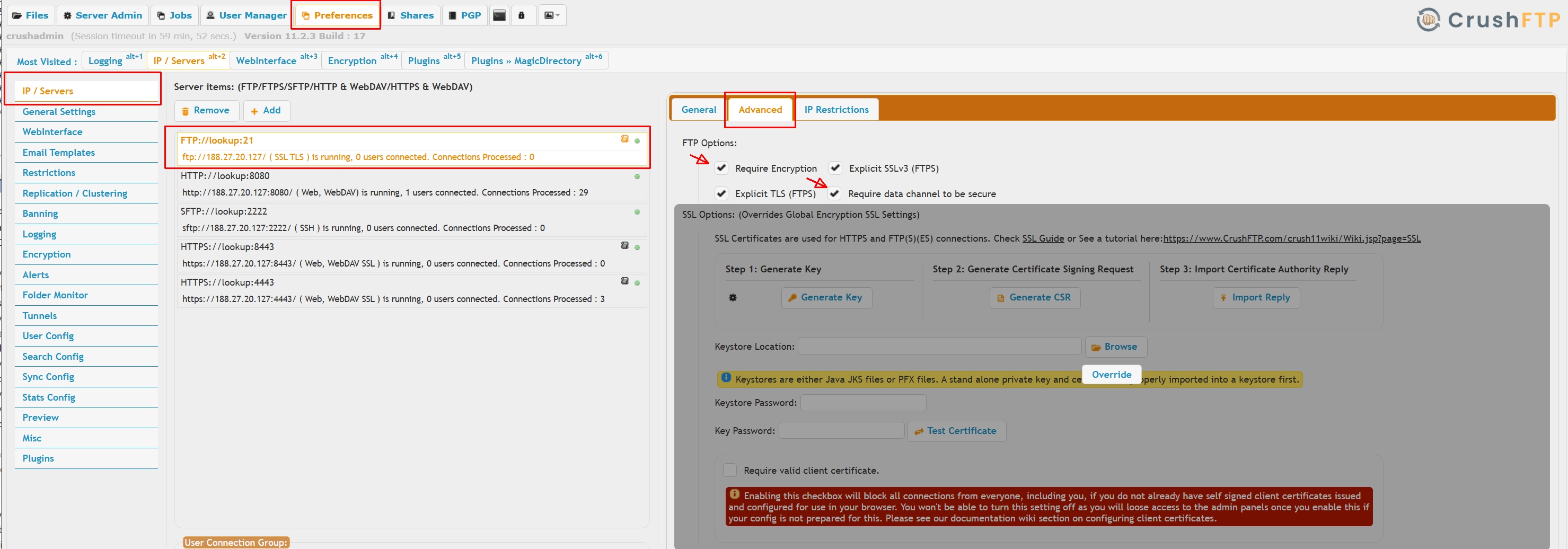
By default we ship a plain HTTP port listening on port bumber 8080 and 9090, delete these on IP Servers page. Or change the IP from "lookup" to be 127.0.0.1 making them inaccessible.
The default setup of the FTP/FTPES port does not enforce FTPES, to do so turn on encryption. Or remove the FTP port completely, if not needed.
Hardening SSL/TLS ciphers
This affects FTPS, FTPES, HTTPS and WebDAVS server mode. On Encryption->SSL page press the "All insecure ciphers" button, save the settings then restart the HTTPS server listener.
Hardening the HTTP headers
Usually resetting the WebInterface->CSP page to defaults will do. When using SAML, OAUTH, or other external IDP integration, will need to add the IDP portal domain as allowed domain.
The changes take effect instantly, no restart required.
Hardening SSH algorithms
On IP/Servers page select the SFTP server listener, select the Advanced tab, remove all weak algorithms from the list. The actual strength of various algorithms is debated, must consult your own security advisor. Usually the NIST recommended algorithms will satisfy most security assessors.
Hostkey algorithms:
Use the default RSA or enable ECDSA and/or ED25519.
Ciphers:
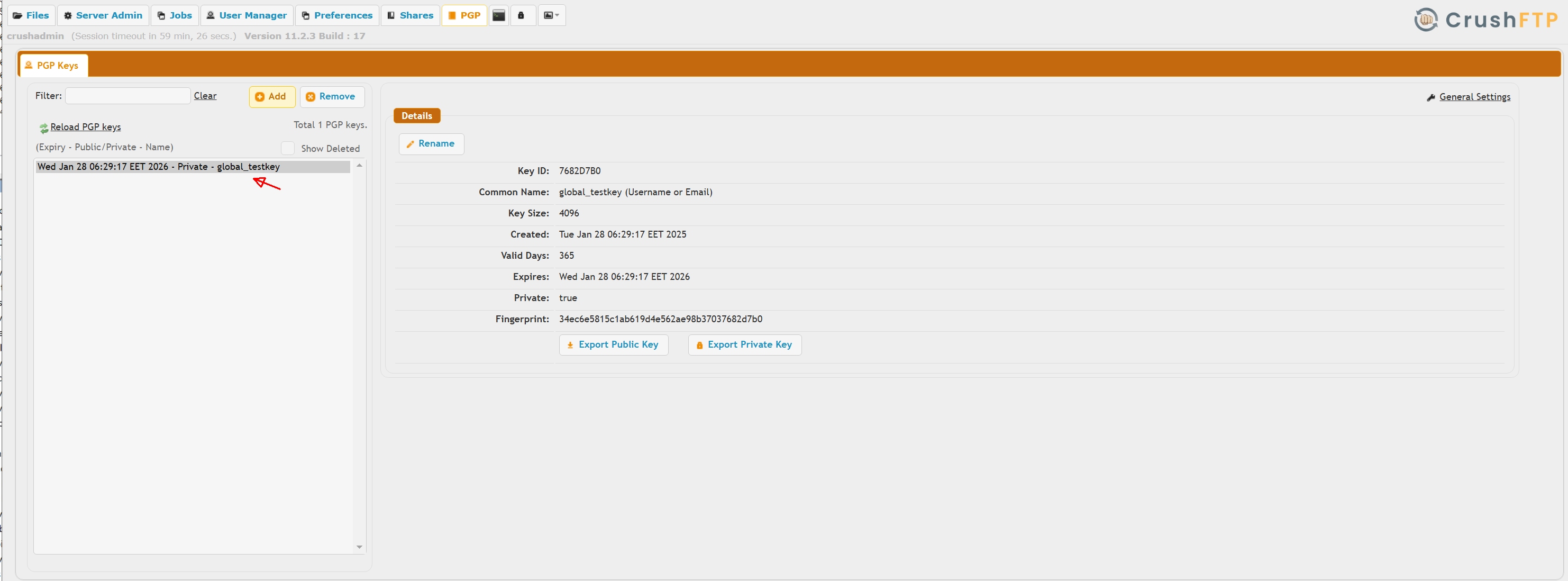
If you need data at rest encryption:
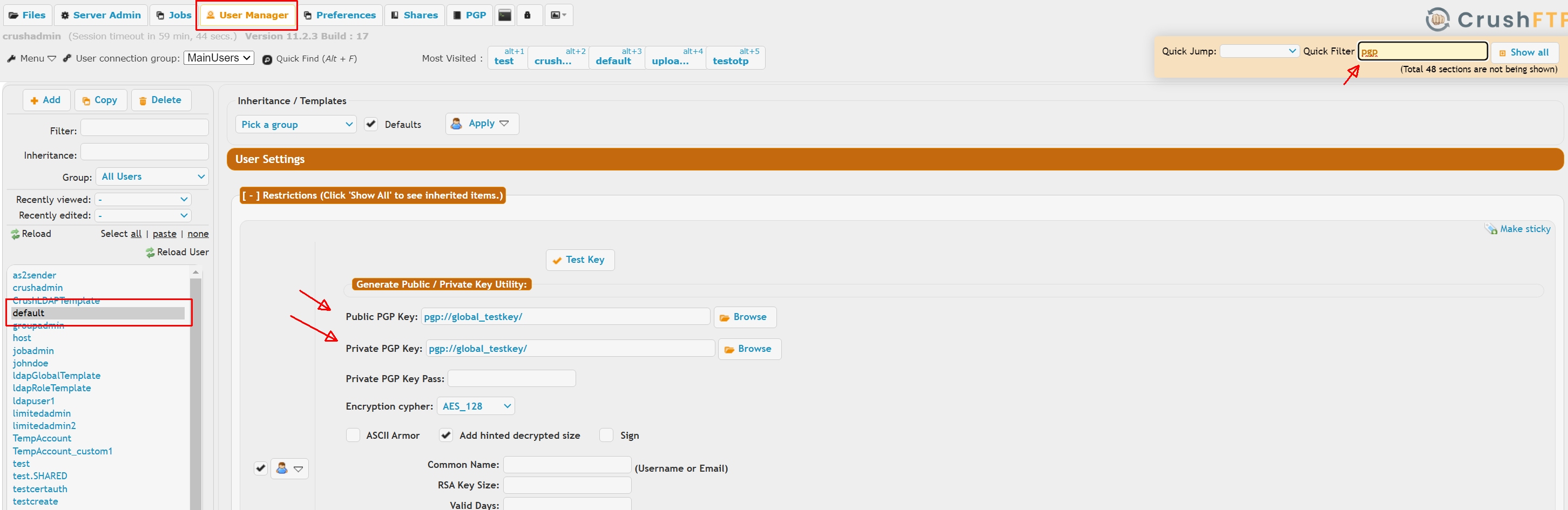
1.) Go to the User Manager, default user.
2.) Do a quick filter on "pgp".
3.) Configure a public and private key for the PGP encryption. Doing it here on the default will automatically apply to all users.
Don't give out any admin accounts that you don't want to potentially know your config.
Admin accounts, even view accounts, can see the values in preferences. This could reveal things like a password on a keystore, or password or refresh token for a SMTP server, or other areas. While they can't change them if you don't give them edit permissions, they can still get the real value, or encrypted value, which can then be reversed. The same is true for user manager admins who can see properties on items, things like an S3 access and secret key, etc. They could then use those secret items outside the scope of CrushFTP. Encryption is used to secure these items, but because the encrypted value must be reversed to be useable, the encryption is mainly cosmetic to make it non obvious what a value is as it can't be truly kept secret in an automated server. You have the option to set in prefs.XML the flag "encryption_pass_needed" to true, and that will then require an admin to login and set the "encryption password" after all updates, all restarts, etc before the server will be functional again. This isn't ideal...but it is possible to have some additional security by doing this.
IMPORTANT: Do not try to disable or remove the default user as the user cannot be used for logins and is just for applying settings.
Remove plaintext protocols
#
By default we ship a plain HTTP port listening on port bumber 8080 and 9090, delete these on IP Servers page. Or change the IP from "lookup" to be 127.0.0.1 making them inaccessible.The default setup of the FTP/FTPES port does not enforce FTPES, to do so turn on encryption. Or remove the FTP port completely, if not needed.
 |
Hardening SSL/TLS ciphers
#
This affects FTPS, FTPES, HTTPS and WebDAVS server mode. On Encryption->SSL page press the "All insecure ciphers" button, save the settings then restart the HTTPS server listener.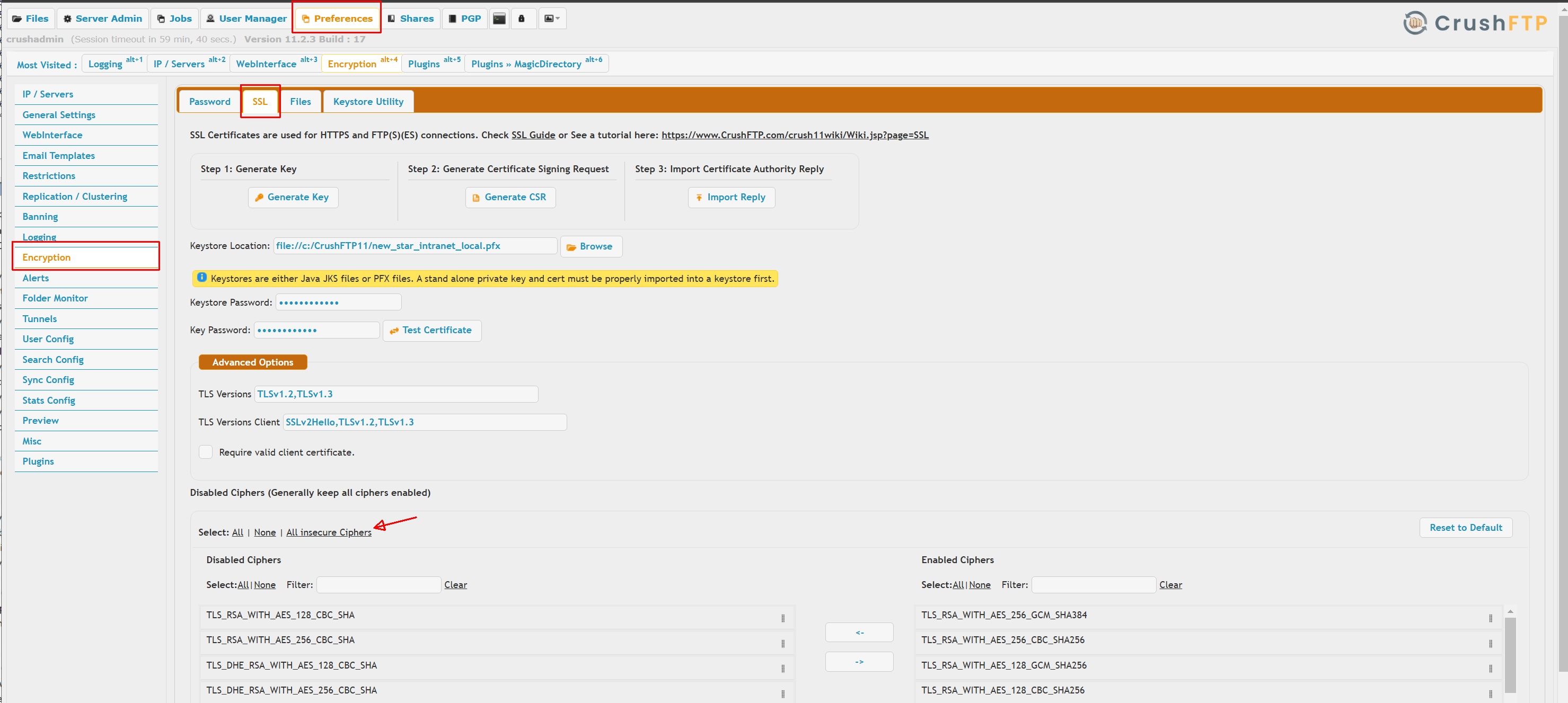 |
Hardening the HTTP headers
#
Usually resetting the WebInterface->CSP page to defaults will do. When using SAML, OAUTH, or other external IDP integration, will need to add the IDP portal domain as allowed domain.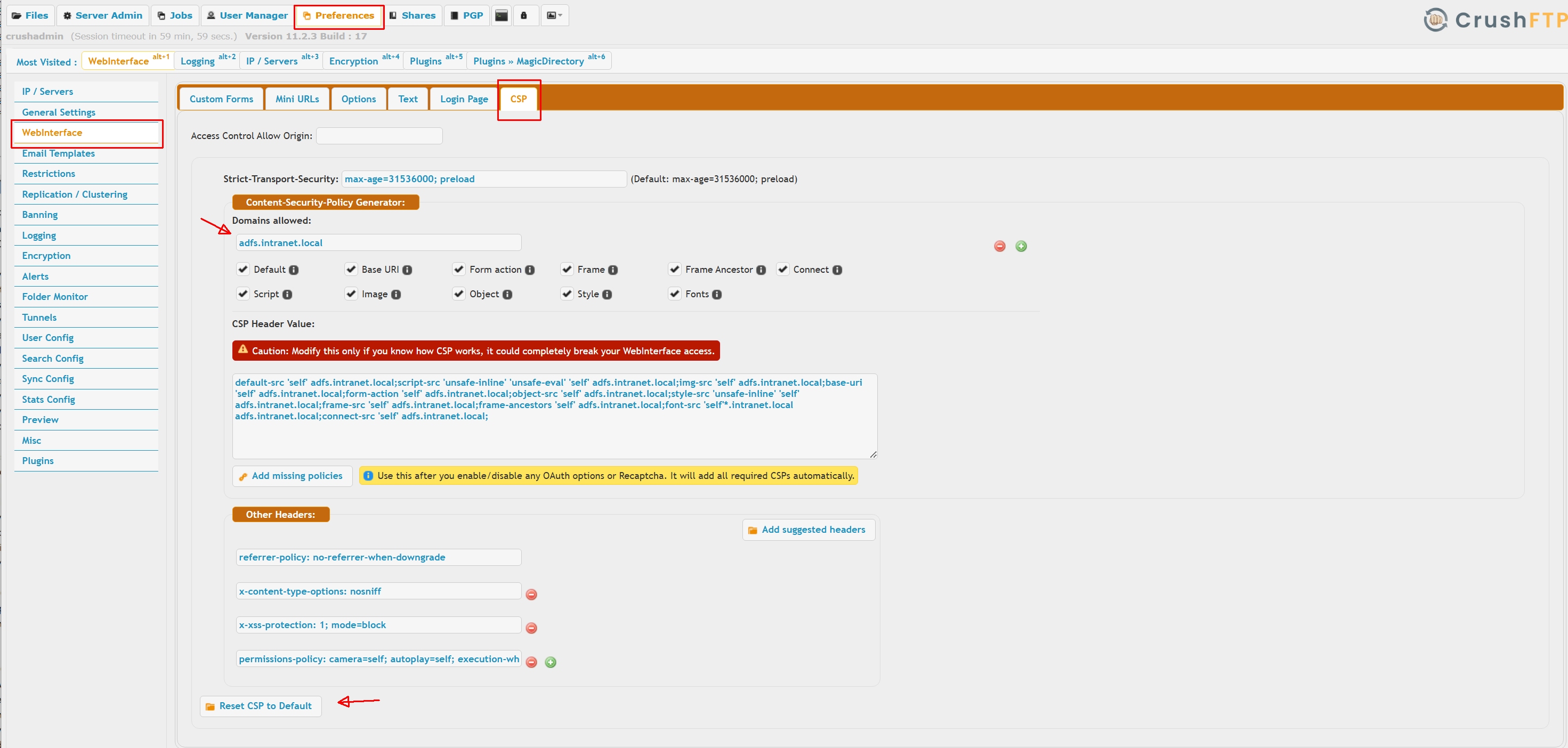 |
The changes take effect instantly, no restart required.
Hardening SSH algorithms
#
On IP/Servers page select the SFTP server listener, select the Advanced tab, remove all weak algorithms from the list. The actual strength of various algorithms is debated, must consult your own security advisor. Usually the NIST recommended algorithms will satisfy most security assessors.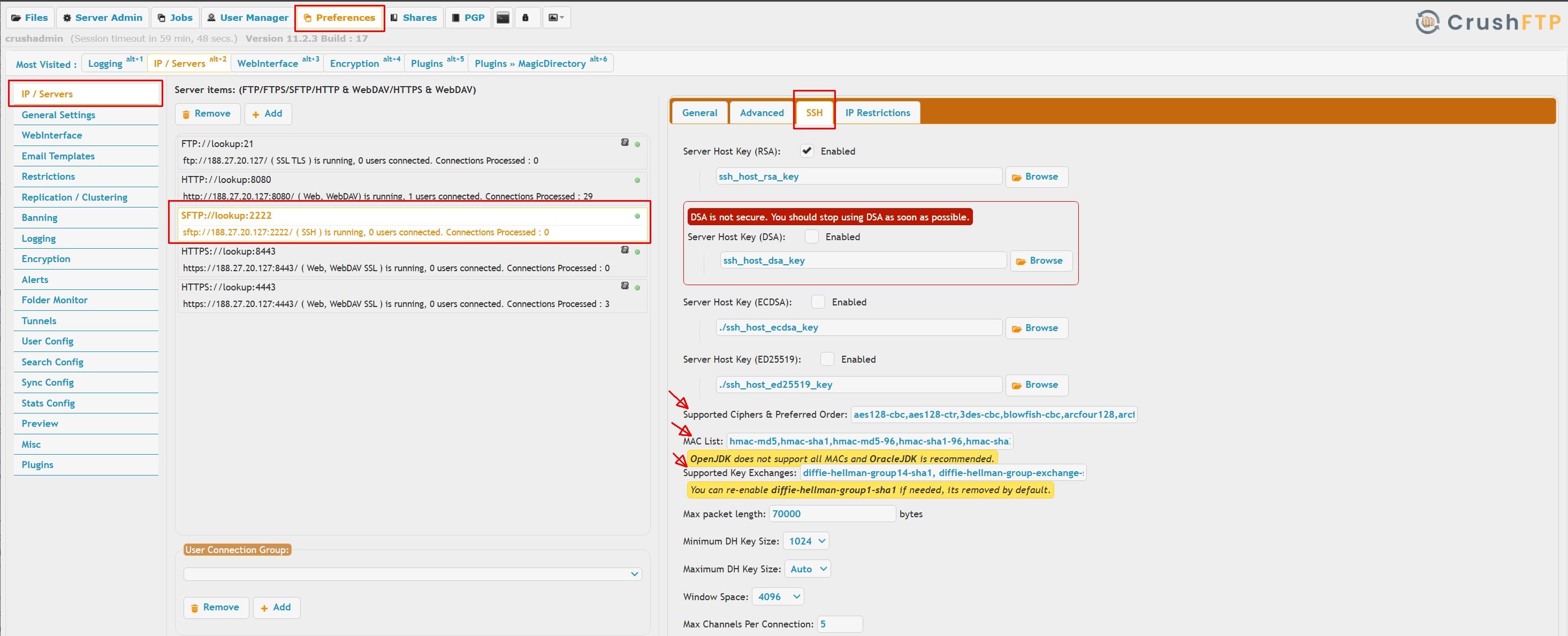 |
Hostkey algorithms:
Use the default RSA or enable ECDSA and/or ED25519.
Ciphers:
aes128-ctr,aes192-ctr,aes256-ctr,aes128-gcm@openssh.com,aes256-gcm@openssh.comKey Exchange (KEX) algorithms:
curve25519-sha2@libssh.org,curve25519-sha256@libssh.org,diffie-hellman-group18-sha512,diffie-hellman-group17-sha512,diffie-hellman-group16-sha512,diffie-hellman-group15-sha512,diffie-hellman-group14-sha256,ecdh-sha2-nistp256,ecdh-sha2-nistp384,ecdh-sha2-nistp521Message Authentication Code (MAC) algorithms :
hmac-sha256,hmac-sha2-256,hmac-sha256@ssh.com,hmac-sha2-256-etm@openssh.com,hmac-sha512,hmac-sha2-512,hmac-sha512@ssh.com,hmac-sha2-512-etm@openssh.com
If you need data at rest encryption:
1.) Go to the User Manager, default user.
2.) Do a quick filter on "pgp".
3.) Configure a public and private key for the PGP encryption. Doing it here on the default will automatically apply to all users.
 |
 |
Don't give out any admin accounts that you don't want to potentially know your config.
#
Admin accounts, even view accounts, can see the values in preferences. This could reveal things like a password on a keystore, or password or refresh token for a SMTP server, or other areas. While they can't change them if you don't give them edit permissions, they can still get the real value, or encrypted value, which can then be reversed. The same is true for user manager admins who can see properties on items, things like an S3 access and secret key, etc. They could then use those secret items outside the scope of CrushFTP. Encryption is used to secure these items, but because the encrypted value must be reversed to be useable, the encryption is mainly cosmetic to make it non obvious what a value is as it can't be truly kept secret in an automated server. You have the option to set in prefs.XML the flag "encryption_pass_needed" to true, and that will then require an admin to login and set the "encryption password" after all updates, all restarts, etc before the server will be functional again. This isn't ideal...but it is possible to have some additional security by doing this.IMPORTANT: Do not try to disable or remove the default user as the user cannot be used for logins and is just for applying settings.
Add new attachment
Only authorized users are allowed to upload new attachments.
List of attachments
| Kind | Attachment Name | Size | Version | Date Modified | Author | Change note |
|---|---|---|---|---|---|---|
jpg |
hardening_csp1.jpg | 607.6 kB | 1 | 27-Jan-2025 23:32 | Ada Csaba | |
jpg |
hardening_ftp1.jpg | 675.7 kB | 1 | 27-Jan-2025 23:33 | Ada Csaba | |
jpg |
hardening_pgp1.jpg | 298.0 kB | 1 | 27-Jan-2025 23:33 | Ada Csaba | |
jpg |
hardening_pgp2.jpg | 406.7 kB | 1 | 27-Jan-2025 23:33 | Ada Csaba | |
jpg |
hardening_sftp1.jpg | 637.1 kB | 1 | 28-Jan-2025 00:31 | Ada Csaba | |
jpg |
hardening_ssl.jpg | 587.1 kB | 1 | 27-Jan-2025 23:33 | Ada Csaba |
«
This page (revision-42) was last changed on 23-Jun-2026 11:05 by Ben Spink
G’day (anonymous guest)
Log in
CrushFTP11 | What's New


- WebInterface
- Server Admin
- User Manager
- Client Apps
- CrushBalance Load Balancer
- High Availability
- Self Registration
- Preferences
- Email Templates
- Restrictions
- Replication
- Banning
- Logging
- Encryption
- Alerts
- Folder Monitor
- Tunnels
- Syncs
- User Config
- Search Config
- Preview
- Misc
- Plugins
- Manage Shares
- PGP
- Telnet
- FAQ
- API
- Linux Install
- Virtual Linux Server
- Server Variables
- Google Authenticator and Microsoft Authenticator
- AS2 EDI
JSPWiki