This guide will cover 64 bit Linux installation only.
1.) First update the repo cache, then install the NSS package on the host#
RHEL6/7 family:
yum update
yum install nss-pkcs11-devel
Debian 8 family:
apt-get update
apt install libnss3-tools
2.) Create the FIPS-140 compliant PKCS-11 cryto provider and security token#
The "token" practically is a database, we'll use this in Crush as the SSL cert store (in opposite to normal operation mode PKCS12 compliant "file" ). In case the Crush process isn't running as root, will need to change the ownership and permissions on the database folder accordingly.
mkdir -p /var/opt/nss/crush-nssdb
modutil -create -dbdir /var/opt/nss/crush-nssdb
Now enable FIPS mode on the token
modutil -fips true -dbdir /var/opt/nss/crush-nssdbshould get a confirmation message prompt, indicating all operations until this step were successful.
At this point, we can set the password on the token
modutil -changepw "NSS FIPS 140-2 Certificate DB" -dbdir /var/opt/nss/crush-nssdbwhen prompted for , enter a password or just hit Enter for blank, will need to use the password in Crush later, if set. In the below steps, no password was used.
3.) Import or issue FIPS-140 compliant certificate#
If you have a JKS keystore, convert it first to a p12 formatted keystore.
/var/opt/CrushFTP11/Java/bin/keytool -importkeystore -srckeystore intranet_local.jks -destkeystore intranet_local.p12 -srcstoretype JKS -deststoretype PKCS12
Certutil allows any regular PKI operations to generate key pair and issue certs, import, etc. By this example will just import from a PKCS12 cert store, most real life-like scenario, for an existing cert
pk12util -i intranet_local.p12 -d /var/opt/nss/crush-nssdbIf the .p12 file was password protected, there will be a prompt to enter the password.
Check if key and cert chain in place
certutil -K -d /var/opt/nss/crush-nssdb
certutil -L -d /var/opt/nss/crush-nssdb
4.) Configure Java crypto bridge for FIPS-140 mode#
Can modify the server wide Java environment, though, for easy switching (or emergency reversal) between FIPS and non-FIPS mode, it's recommended to use a Java alternative installation for CrushFTP only. Edit the java.security config file:
vi /var/opt/CrushFTP11/Java/conf/security/java.security
Find this line
"# List of providers and their preference orders"
We need to add SunPKCS11 to the security providers if its not there. You will probably need to add a #12 or #13 line to the list. See item #12 is the example below:
security.provider.1=SUN
security.provider.2=SunRsaSign
security.provider.3=SunEC
security.provider.4=SunJSSE
security.provider.5=SunJCE
security.provider.6=SunJGSS
security.provider.7=SunSASL
security.provider.8=XMLDSig
security.provider.9=SunPCSC
security.provider.10=JdkLDAP
security.provider.11=JdkSASL
security.provider.12=SunPKCS11
5.) Configure CrushFTP settings#
Edit the main server config file prefs.XML
vi /var/opt/CrushFTP11/prefs.XML
Find the "fips140" and ""fips140_sftp_client" and "fips140_sftp_server" flag and change them from false to true. The plain "fips140" applies to SSL things like FTPS/FTPES/HTTPS. The others apply to SFTP client and server items. See bottom of this guide for more SFTP items that must be done.
6.) Modify prefs.XML
#
You must also adjust the paths of "fips140_nss_library_dir" (nssLibraryDirectory) and "fips140_nss_secmod_dir" (nssSecmodDirectory) if they are not correct for your OS.IMPORTANT: On Debian/Ubuntu the NSS libraries are located at /usr/lib/x86_64-linux-gnu/nss instead. It may be different on various versions of same operating system, best to locate the "libnss3.so" kernel module , the "fips140_nss_library_dir" path has to point to it's parent directory.
<fips140_nss_library_dir>/usr/lib64</fips140_nss_library_dir>
<fips140_nss_secmod_dir>/var/opt/nss/crush-nssdb</fips140_nss_secmod_dir>
-or-
<fips140_nss_library_dir>/usr/lib/x86_64-linux-gnu/nss</fips140_nss_library_dir>
<fips140_nss_secmod_dir>/var/opt/nss/crush-nssdb</fips140_nss_secmod_dir>
After this step, before restarting the service, log in into the WebInterface as the main admin, navigate to Preferences->Encryption->SSL page, and enter into the "Keystore Location" field the "PKCS11" literal value (without the quotes). Enter the PKCS11 token password, if any set in Step 2.
In both "TlS versions" fields leave only "TLSv1.2,TLSv1.3". Save.
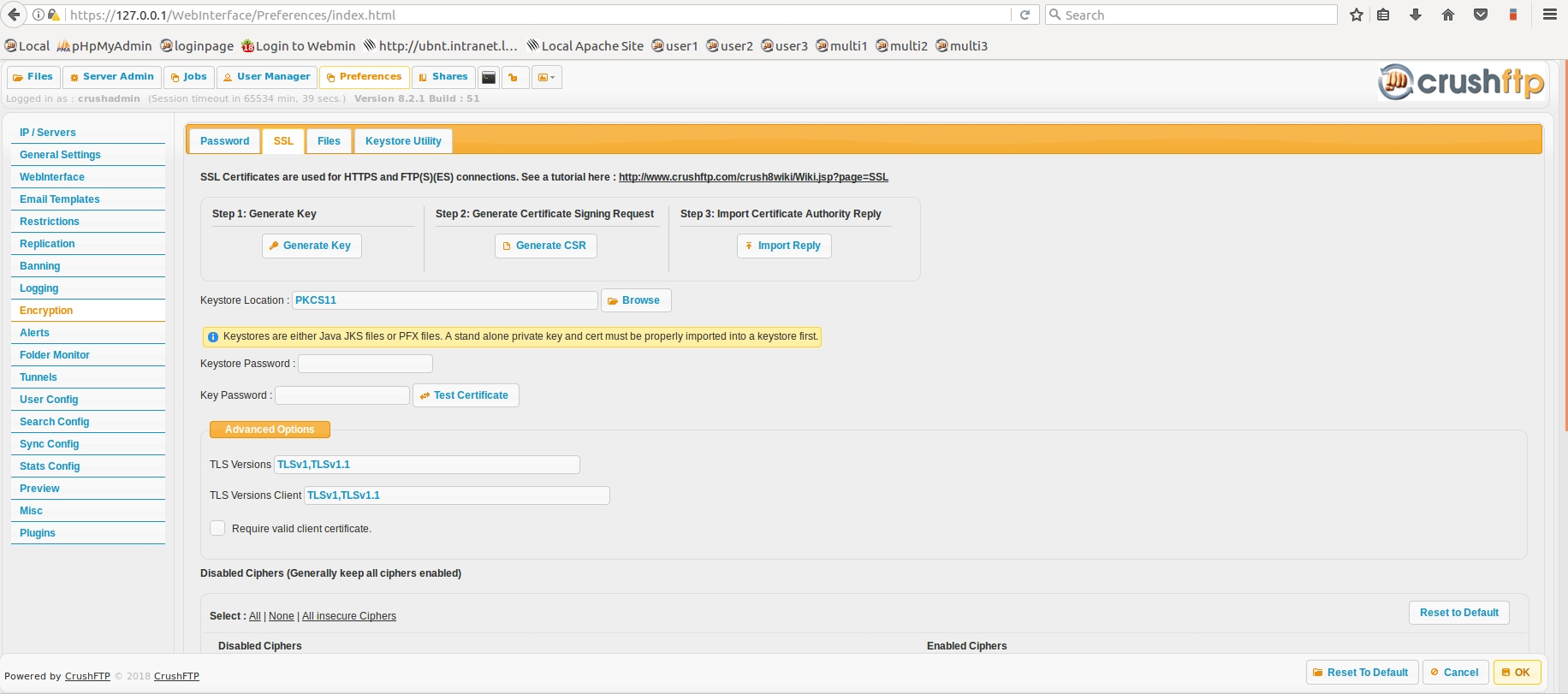
Restart the Crush service afterwards
systemctl restart crushftpNormally, all SSL ports should come online after this step ( HTTPS, FTPES, FTPS ), can test with a client application. SSL cypher assessment should reveal now only FIPS-140-2 compliant ciphers.
Warning: At this point the HTTPS port may go offline, if token password was incorrect, or the PKCS11 token bad, etc., make sure there is an plain HTTP port available for administration. In case the java.security config file has syntax errors, the Crush service may not come on line at all.
Running in FIPS mode has a few drawbacks:
- online updates won't work, since our server is not running in FIPS compliant mode, can only use the manual update method ( from file)
- server to server connections against a non-FIPS compliant server won't work either, when using VFS proxy or CrushTask.
- ldaps:// connections for the SAML or LDAP Group plugin don't work as well unless the directory controller is also set to FIPS mode, the trusted cert needs to be imported into the PKCS11 trust store; plain ldap:// will work just fine
- some web browsers may not work with the FIPS compliant cipher set
- SSL cypher strength assessment will never give the server "A" or close rating, only a few of the FIPS compliant ciphers are "B"-rated, or lower.
Known issues:#
- later builds of Oracle Jre/JDK 8 have a bug , require the presence of secmod.db in the NSS DB folder, have to create a dummy file manually
touch /var/opt/nss/crush-nssdb/secmod.db
then add to crushftp_init.sh , before launching the Jvm (the beginning of the script will do)
export NSS_DEFAULT_DB_TYPE=sql
SFTP FIPS additional work#
To get FIPS modules for SFTP, you need the BouncyCastle libraries added to the plugins/lib folder of CrushFTP.https://www.bouncycastle.org/download/bouncy-castle-java-fips/#latest

These are files like:
bc-fips-1.0.2.jar
bcmail-fips-1.0.1.jar
bcpg-fips-1.0.3.jar
bcpkix-fips-1.0.3.jar
bcpqc-addon-fips-1.0.0.jar
bctls-fips-1.0.9.jar
The SFTP port will *only* enable FIPS compatible algorithms when the port starts, and it will fail if these jars aren't there and it is unable to do so. You can no longer control your KEX and such as its locked down to the FIPS enabled items only, no controls for the server admin.
KEX: diffie-hellman-group-exchange-sha256,diffie-hellman-group18-sha512,diffie-hellman-group17-sha512,diffie-hellman-group16-sha512,diffie-hellman-group15-sha512,diffie-hellman-group14-sha256,diffie-hellman-group-exchange-sha1,diffie-hellman-group14-sha1,ecdh-sha2-nistp256,ecdh-sha2-nistp384,ecdh-sha2-nistp521
KEY FORMATS: ecdsa-sha2-nistp256,ssh-rsa,ecdsa-sha2-nistp384,ecdsa-sha2-nistp521
Add new attachment
List of attachments

- WebInterface
- Server Admin
- User Manager
- Client Apps
- CrushBalance Load Balancer
- High Availability
- Self Registration
- Preferences
- Email Templates
- Restrictions
- Replication
- Banning
- Logging
- Encryption
- Alerts
- Folder Monitor
- Tunnels
- Syncs
- User Config
- Search Config
- Preview
- Misc
- Plugins
- Manage Shares
- PGP
- Telnet
- FAQ
- API
- Linux Install
- Virtual Linux Server
- Server Variables
- Google Authenticator and Microsoft Authenticator
- AS2 EDI