CrushFTP 11.3.3_8+ can handle a custom form that is defined by a task that is run to lookup from elements on demand. You may use this to build a custom form based on the current username or other criteria. (lookupFormField)
Go to your jobs and make a job named "db_form". This job will be passed a pretend "file://" URL with a path referencing the name of the field we are looking up.
Now your Job can do some logic to find items or build some list and return them. As long as the items being returned have either a field anmed "val" and "key" or "item_val" and "item_key" then these will be displayed in the form.
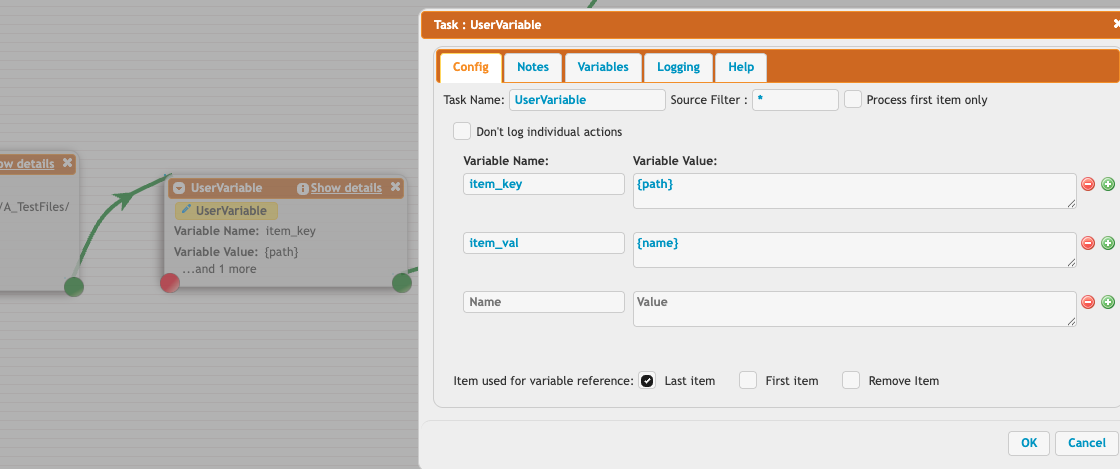
You will also have variables for the user_name in this fake file item you get passed.
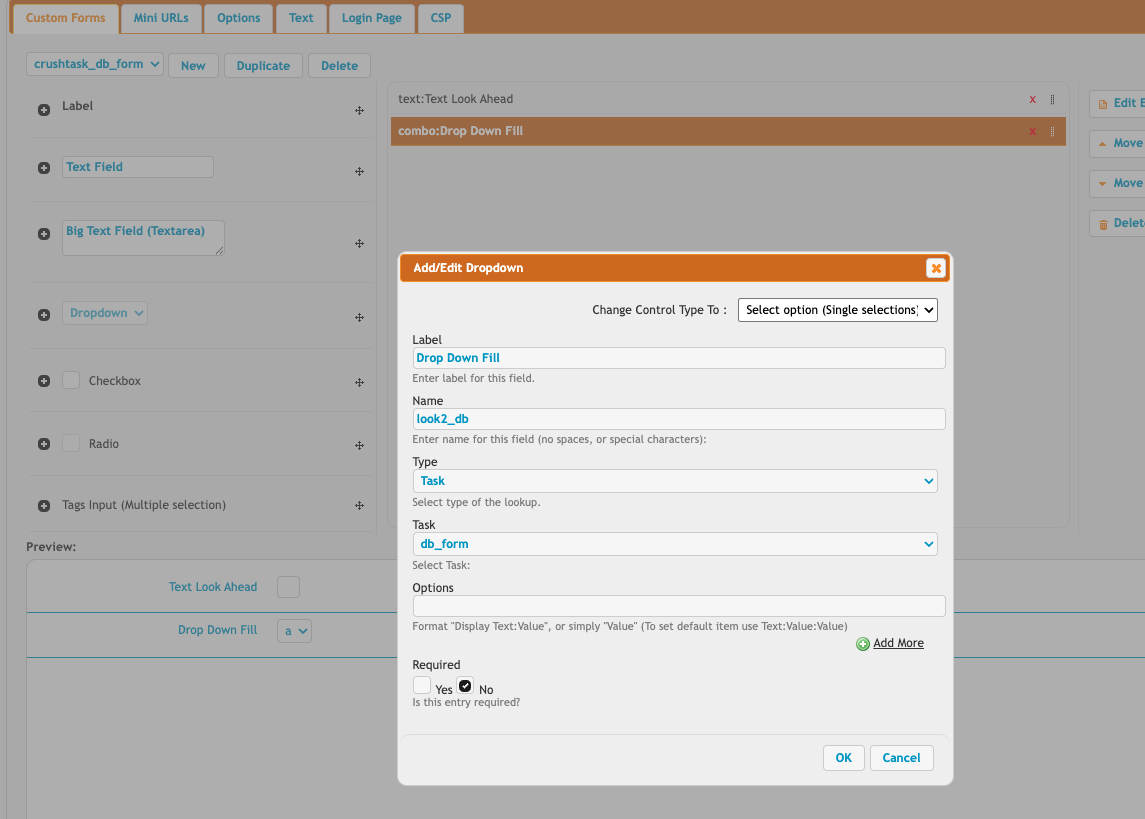
To configure this scenario, in your Preferences, WebInterface, Custom Forms, set the entry's name to end with "_db"...and then set the type to "Task" instead of text. You can do this on a drop down combobox for example.
Then below that, set the task to use and choose a job you have created for this. In my example...my job is "db_form".
Add new attachment
Only authorized users are allowed to upload new attachments.
List of attachments
| Kind | Attachment Name | Size | Version | Date Modified | Author | Change note |
|---|---|---|---|---|---|---|
png |
field_names.png | 70.8 kB | 1 | 06-Jun-2025 09:03 | Ben Spink | |
png |
form_config.png | 98.9 kB | 1 | 06-Jun-2025 09:04 | Ben Spink |
«
This page (revision-6) was last changed on 04-Nov-2025 03:56 by Ben Spink
G’day (anonymous guest)
Log in
CrushFTP11 | What's New


- WebInterface
- Server Admin
- User Manager
- Client Apps
- CrushBalance Load Balancer
- High Availability
- Self Registration
- Preferences
- Email Templates
- Restrictions
- Replication
- Banning
- Logging
- Encryption
- Alerts
- Folder Monitor
- Tunnels
- Syncs
- User Config
- Search Config
- Preview
- Misc
- Plugins
- Manage Shares
- PGP
- Telnet
- FAQ
- API
- Linux Install
- Virtual Linux Server
- Server Variables
- Google Authenticator and Microsoft Authenticator
- AS2 EDI
JSPWiki