Trust prompts#
Before CrushClient sends your password to a server it has not seen before, it checks who the server is. When it cannot be sure, it asks you. The pane shows Waiting for you until you answer.
SSH host keys (SFTP)#
Every SFTP server has a key that identifies it. The first time you connect, CrushClient shows the key's fingerprint:
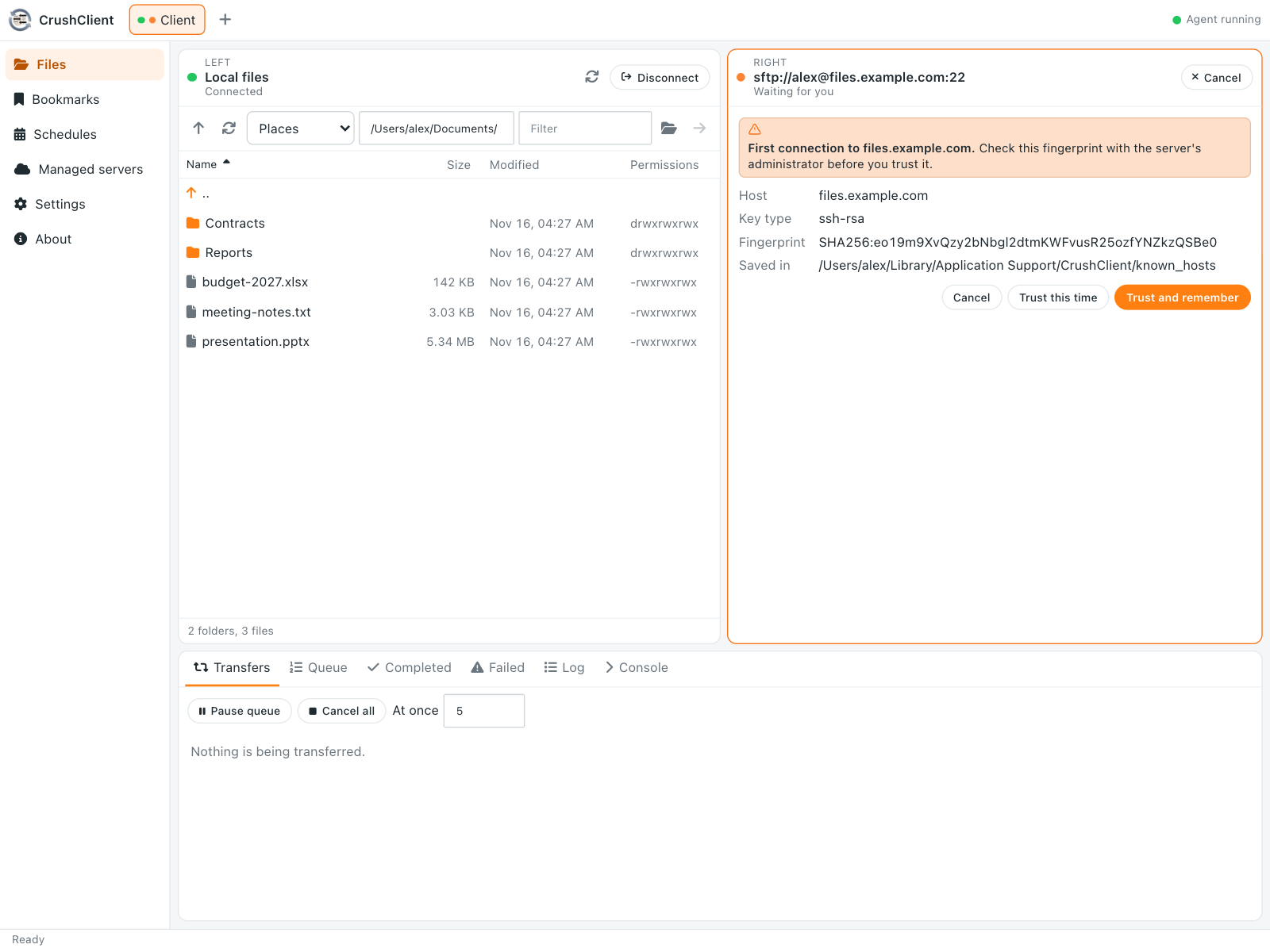
Check the fingerprint with the server's administrator. It is the same value ssh-keygen -l prints on the server.
| Button | What it does |
|---|---|
| Trust and remember | saves the key. Later connections to this server are not asked about again while the key stays the same. |
| Trust this time | connects now, and asks again next time |
| Cancel | does not connect |
When a saved key changes, CrushClient shows a red warning with the old and the new fingerprint. A changed key can mean the server was reinstalled, or that something is in between you and the server. Ask the administrator before you go on; replacing the saved key takes a deliberate extra step.
Saved keys are in the known_hosts file in CrushClient's settings folder (Files and folders), in the usual OpenSSH format.
Certificates (HTTPS, FTPS, FTPES, WebDAV over TLS, S3-compatible servers)#
A certificate signed by a known authority for the server's name is accepted without a question. For any other certificate, CrushClient shows its subject, issuer, names, dates, SHA-256 fingerprint and why it is not trusted: expired, self-signed, made for another name, or signed by an unknown authority.
| Button | What it does |
|---|---|
| Trust and remember | pins this certificate for this server. Later connections are accepted while the certificate stays the same. |
| Trust this time | accepts it for this connection only |
| Cancel | does not connect |
A pinned certificate that later changes is shown with the old and the new one, and replacing the pin takes a deliberate extra step.
"Do not check the server's certificate" in a connection's advanced options turns the check off for that connection alone. The pane then carries a warning. Prefer Trust and remember, which still protects you if the certificate changes.
Seeing and forgetting what you trusted#
Settings › Trusted servers lists the saved SSH host keys and the trusted certificates, each with Forget. After Forget, the next connection asks again.
Schedules and the command line#
Nobody is there to answer a question when a schedule runs. A schedule that meets an unknown host key or certificate fails and says so in its log. Connect to the server once in the window and choose Trust and remember; the schedule then runs.
One-time codes and passwords#
- A server that wants a one-time code makes CrushClient ask for it.
- A bookmark without a saved password asks for the password, with the choice to remember it.