Listener editor#
Listeners › Edit opens one listener. The top shows its name, mode, state, live connections, its id (with a copy button), Stop or Start, and View connections. Below are four tabs. Changes are saved together with the Save button in the bar at the bottom.
Every field has its explanation on the page and a Default or Reset to default button. The exact types, ranges and defaults are in Listener keys and Endpoint keys.
General#
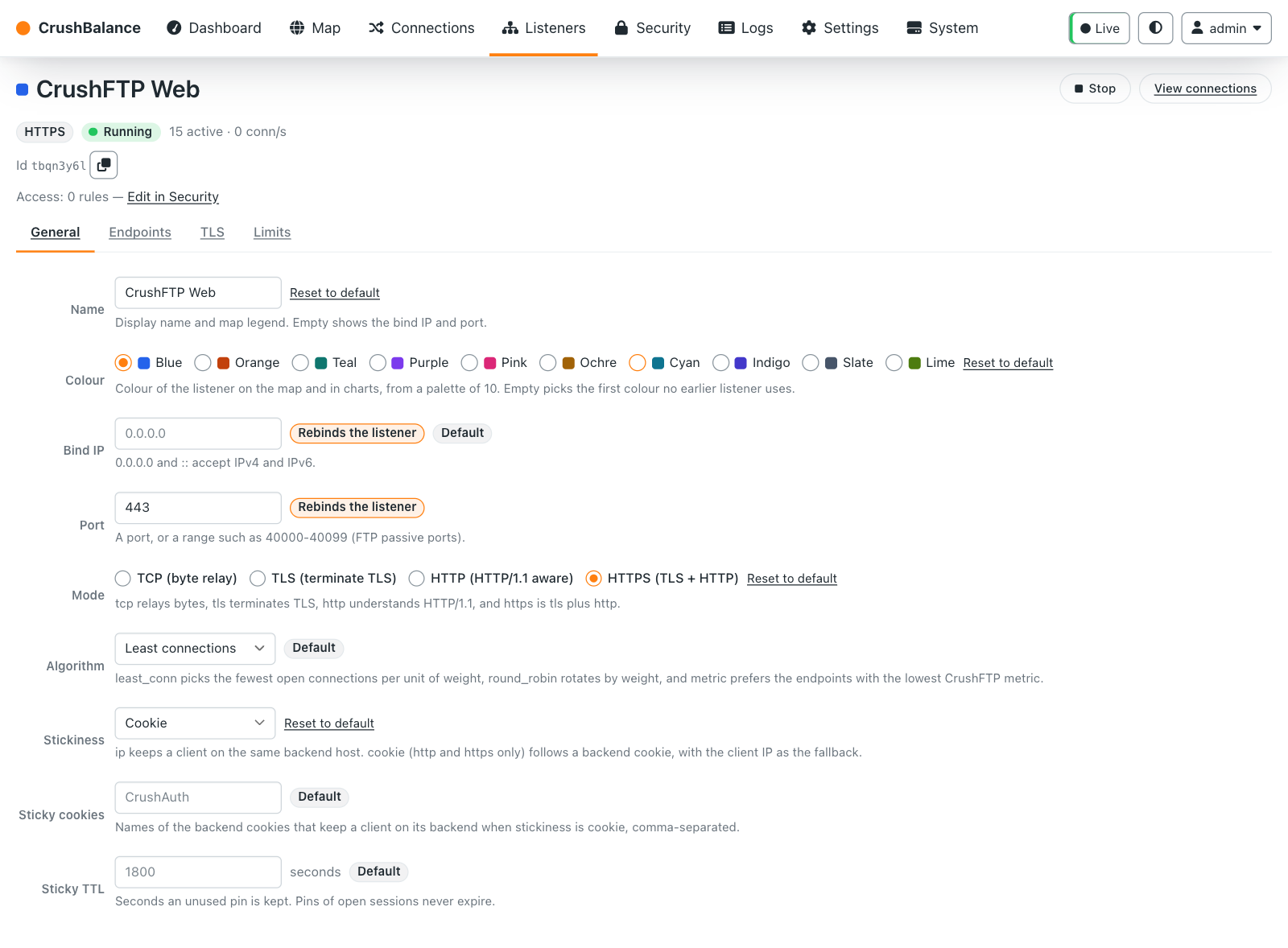
| Field | What it is |
|---|---|
| Name | shown in lists, charts and the map legend. Empty shows the address and port. |
| Colour | the listener's colour on the map and in charts, from ten |
| Bind IP | the address to listen on. 0.0.0.0 and :: accept IPv4 and IPv6 on every interface. |
| Port | one port, or a range such as 40000-40099 for FTP passive ports |
| Mode | TCP relays bytes unchanged; TLS ends TLS here and relays plain data; HTTP understands HTTP/1.1; HTTPS is TLS plus HTTP. See Concepts. |
| Algorithm | Least connections, Round robin, or CrushMFT metric (the server with the lowest load; needs the CrushMFT health check). See Health checks and balancing. |
| Stickiness | None; Client IP keeps a client address on the same server; Cookie (HTTP and HTTPS only) follows a server cookie, with the client address as the fallback |
| Sticky cookies | the cookie names to follow; CrushAuth for CrushMFT |
| Sticky TTL | how many seconds an unused pin is kept. Pins of open sessions never expire. |
Changing Bind IP or Port closes and reopens the port ("Rebinds the listener"); open sessions continue.
Endpoints#
The CrushMFT servers behind this listener, with their live state.
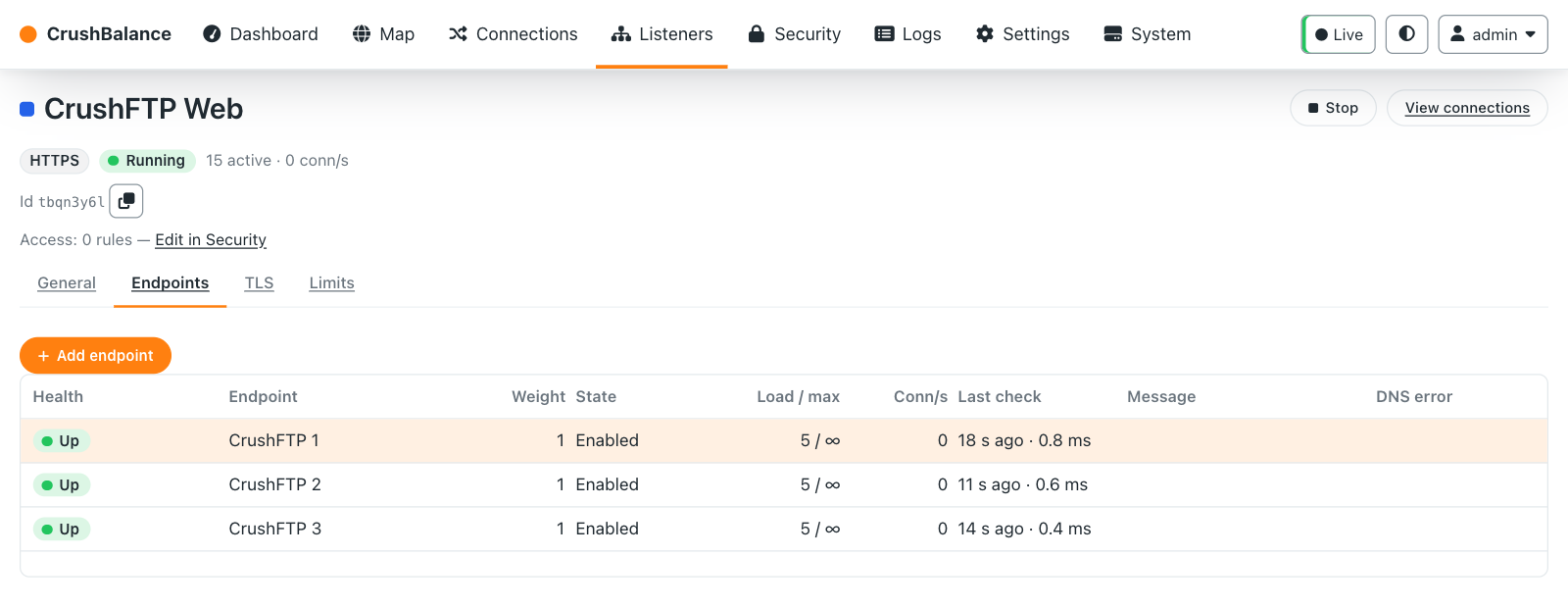
| Column | Shows |
|---|---|
| Health | Up, Down, Unknown (not checked yet, or no check), or Up with a warning |
| Endpoint | its name, or host and port |
| Weight | its share of new connections relative to the others |
| State | Enabled, Draining (only clients already pinned to it) or Disabled |
| Load / max | open sessions, and its limit (∞ = none) |
| Conn/s | new sessions per second |
| Last check | how long ago, and how long the check took |
| Message, DNS error | why a check failed, or why the host name does not resolve |
Add endpoint adds a server. Click a row to open it.
The endpoint dialog#
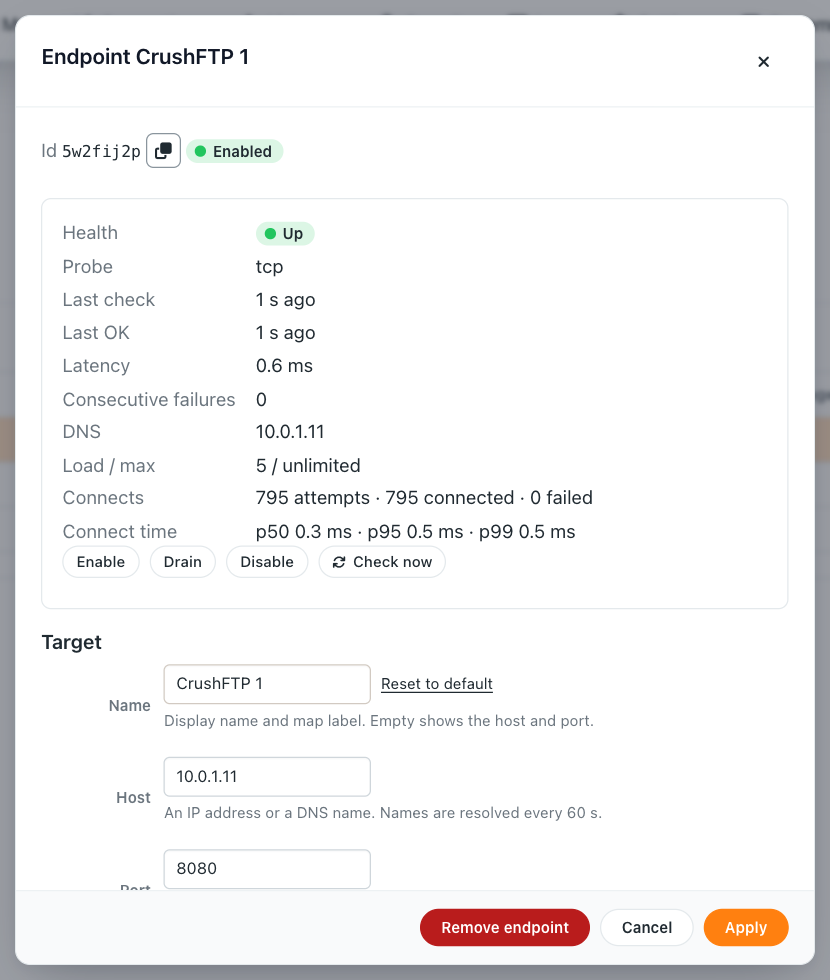
The top card is live: health, the kind of check, the last check and the last good one, latency, failures in a row, the address the host name resolved to, load, connection attempts and failures, and connect times.
| Button | What it does |
|---|---|
| Enable | new connections may go to this server |
| Drain | no new clients; clients already pinned to it continue. Use it before maintenance. |
| Disable | no new connections at all |
| Check now | runs the health check at once |
These four act at once, without Save, and never cut open sessions.
The settings below are saved with the listener:
| Section | Fields |
|---|---|
| Target | Name, Host (an IP address or a DNS name, resolved again every 60 seconds), Port. On a port range, the port is the server's port for the first port of the range. |
| Traffic | Weight; Max connections (0 = unlimited; a full server is skipped) |
| PROXY | PROXY header: None, v1 or v2. It must match the CrushMFT port's setting. See PROXY headers. |
| Backend TLS | Connect to the backend with TLS (on TLS, HTTP and HTTPS listeners): CrushBalance encrypts again towards CrushMFT. Check certificate shows the server's certificate and whether it is trusted; Trust this certificate pins it. See Template: HTTPS for CrushMFT WebInterface. |
| Health check | Probe: TCP connect, HTTP GET, CrushMFT login and metrics, or None; the interval and timeout; for HTTP and CrushMFT the URL, and for CrushMFT the user and password. See Health checks and balancing. |
| Map location | the server's position on the Map as lat,lon. Empty looks up a public address, or draws it at the balancer. |
Apply puts the changes into the listener (save the listener to keep them), Cancel drops them, and Remove endpoint takes the server out. The line "Access: … rules — Edit in Security" opens this endpoint's IP rules on the Security page.
TLS#
For TLS and HTTPS listeners: the certificate clients see.
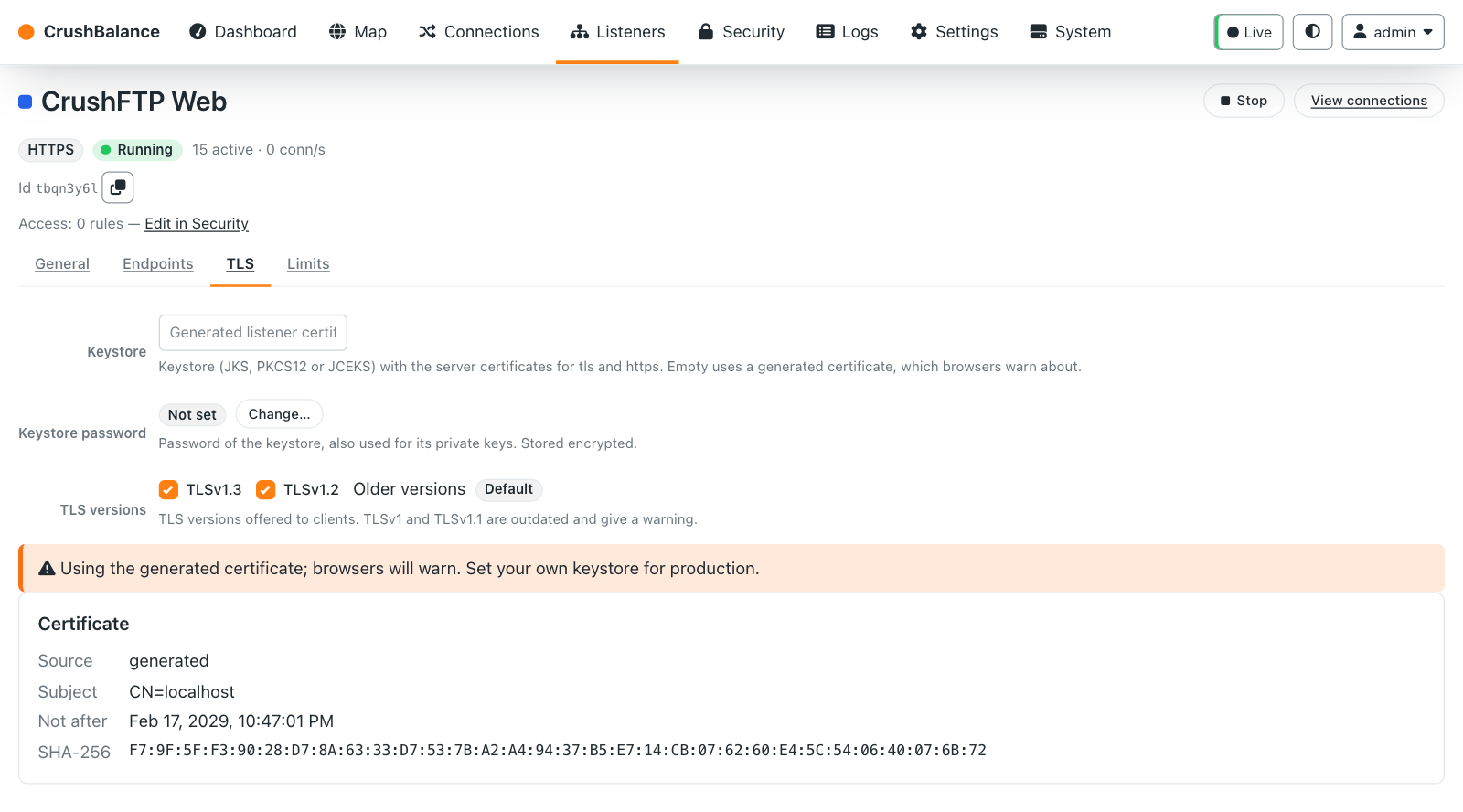
| Field | What it is |
|---|---|
| Keystore | the path of a keystore file (JKS, PKCS12 or JCEKS) with your certificate. Empty uses a certificate CrushBalance generated, which browsers warn about. A keystore with several certificates serves the one that matches the name the client asks for. |
| Keystore password | the password of the keystore and its keys. It is stored encrypted and never shown again. |
| TLS versions | TLSv1.3 and TLSv1.2 by default. The older versions are outdated and give a warning. |
The Certificate card shows what is in use: its source, subject, expiry date and SHA-256 fingerprint, or the error when the keystore cannot be read. A changed keystore file is read again within 60 seconds.
Limits#
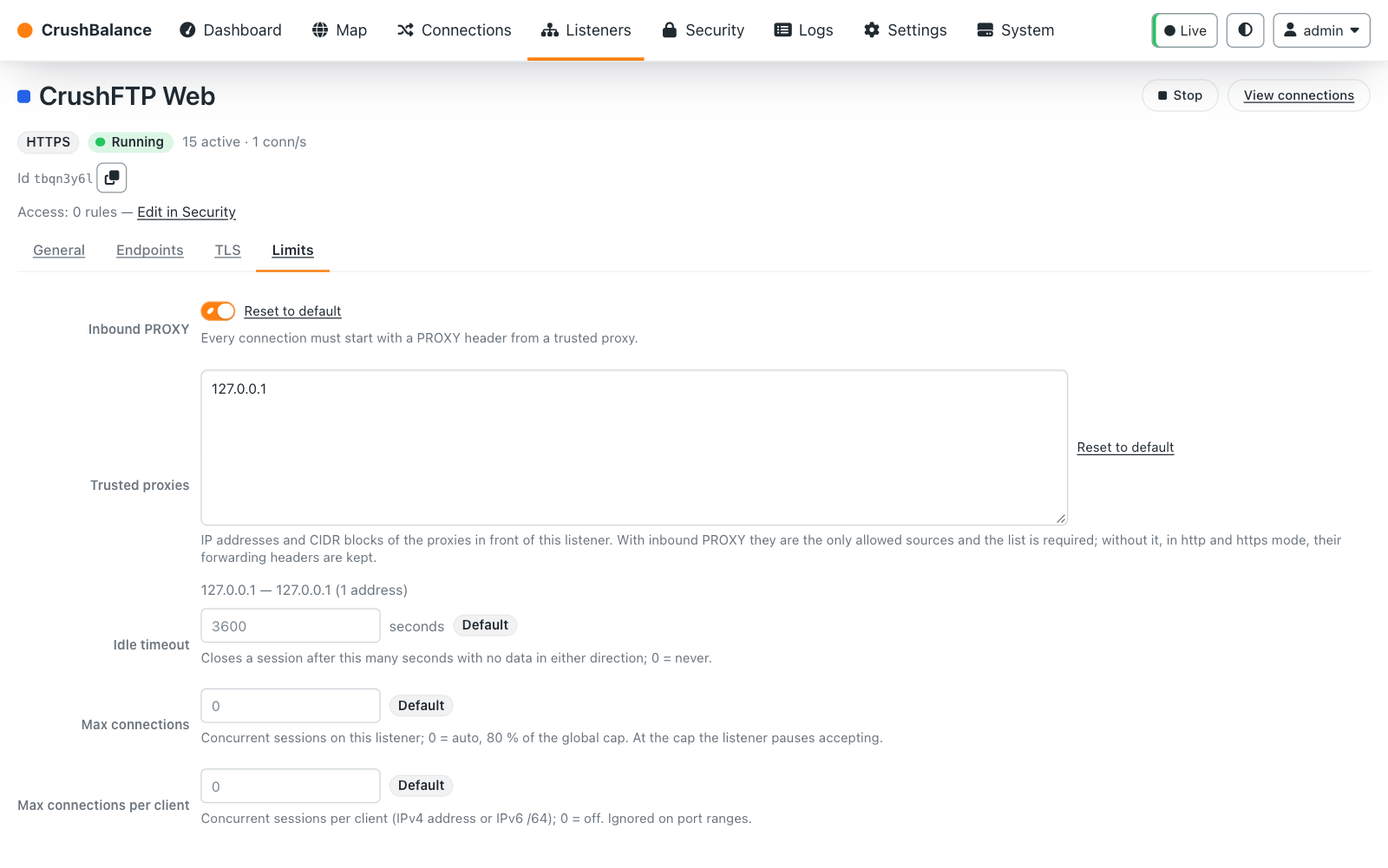
| Field | What it is |
|---|---|
| Inbound PROXY | on when another load balancer sits in front of CrushBalance and sends the client's address in a PROXY header. Every connection must then start with that header. |
| Trusted proxies | the addresses of those load balancers. With Inbound PROXY they are the only sources allowed, and the list is required. See PROXY headers. |
| Idle timeout | closes a session after this many seconds without data in either direction; 0 = never |
| Max connections | sessions on this listener at once; 0 = automatic, 80 % of the global limit. At the limit the listener pauses accepting. |
| Max connections per client | sessions per client address at once; 0 = off. See Access control. |
In the picture, Inbound PROXY is on because the example balancer sits behind another load balancer. Most installations leave it off.