🛑 IMPORTANT: due to the security updates since CrushFTP version 10.5.2+ any JDBC driver jar file needs to be placed into the CrushFTP10/plugins/lib/ directory, or it won't load.
Download the latest mysql connector J for you mysql server from their website.
https://dev.mysql.com/downloads/connector/j/
Choose the 'platform independent' type download, and extract the archive. There will be a jar file inside that extracted folder.
I suggest placing the mysql-connector-java-8.0.28.jar file from this in the plugins/lib folder of CrushFTP and giving it the name "mysql.jar".
Then go to Preferences, stats config and set the following items:
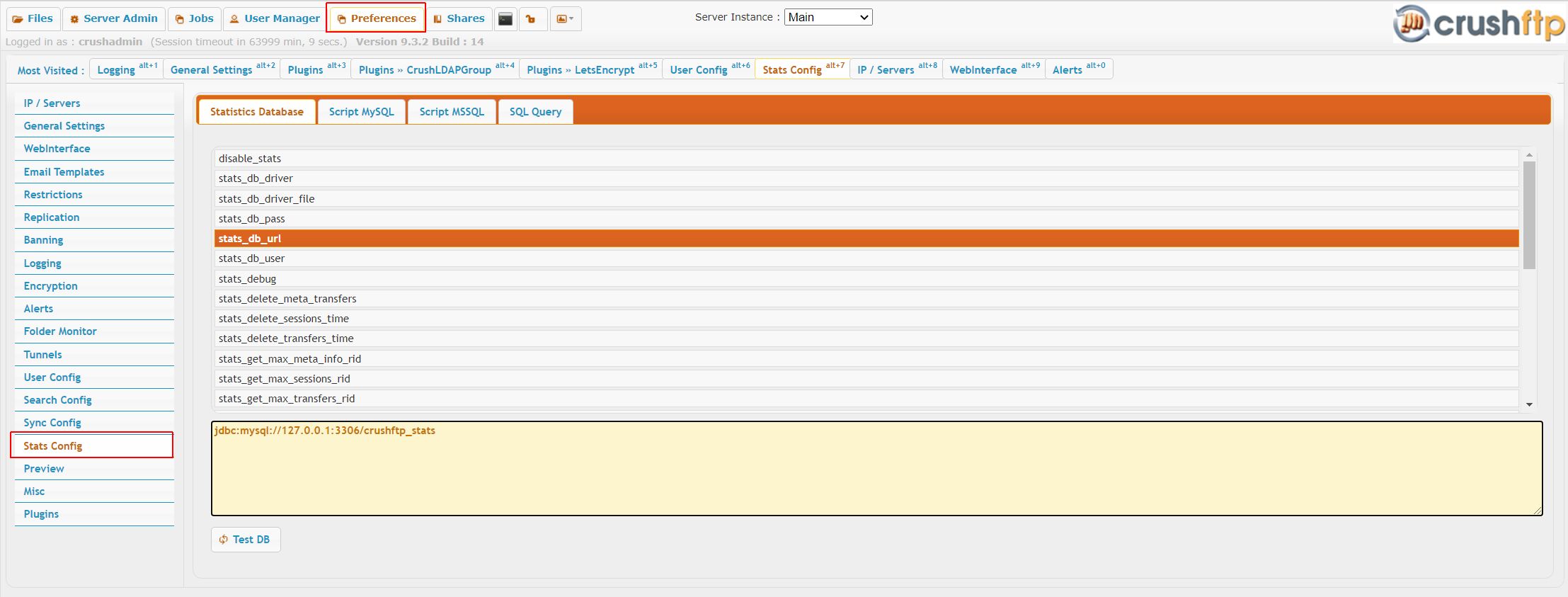 |
stats_db_url: jdbc:mysql://127.0.0.1:3306/crushftp_stats
stats_db_driver: com.mysql.cj.jdbc.Driver
stats_db_user: root
stats_db_driver_file: plugins/lib/mysql.jar
Use MySQL Workbench and make a new DB with the name "crushftp_stats" (or adjust the URL above to reference the name you choose.) Below is the schema to put in it:
CREATE TABLE META_INFO(RID DOUBLE NOT NULL PRIMARY KEY,SESSION_RID DOUBLE NOT NULL,TRANSFER_RID DOUBLE NOT NULL,ITEM_KEY VARCHAR(100) DEFAULT NULL,ITEM_VALUE VARCHAR(2000) DEFAULT NULL);

CREATE TABLE SESSIONS(RID DOUBLE NOT NULL PRIMARY KEY,SESSION VARCHAR(100) DEFAULT NULL,SERVER_GROUP VARCHAR(50) DEFAULT NULL,USER_NAME VARCHAR(100) DEFAULT NULL,START_TIME DATETIME DEFAULT NULL,END_TIME DATETIME DEFAULT NULL,SUCCESS_LOGIN VARCHAR(10) DEFAULT NULL,IP VARCHAR(50) DEFAULT NULL);

CREATE TABLE TRANSFERS(RID DOUBLE NOT NULL PRIMARY KEY,SESSION_RID DOUBLE NOT NULL,START_TIME DATETIME DEFAULT NULL,DIRECTION VARCHAR(8) DEFAULT NULL,PATH VARCHAR(255) DEFAULT NULL,FILE_NAME VARCHAR(2000) DEFAULT NULL,URL VARCHAR(2000) DEFAULT NULL,SPEED INTEGER DEFAULT NULL,TRANSFER_SIZE DOUBLE DEFAULT NULL,IGNORE_SIZE VARCHAR(1) DEFAULT NULL);

ALTER TABLE `TRANSFERS` ADD INDEX  (`SESSION_RID`,`TRANSFER_SIZE`,`DIRECTION`,`IGNORE_SIZE`,`START_TIME`);
Indexes:#
CREATE INDEX idx_sessions_time_user ON SESSIONS (START_TIME, END_TIME, USER_NAME);
CREATE INDEX idx_sessions_success_user ON SESSIONS (SUCCESS_LOGIN, USER_NAME);
CREATE INDEX idx_sessions_server_group_time ON SESSIONS (SERVER_GROUP, START_TIME);

CREATE INDEX idx_transfers_session_time ON TRANSFERS (SESSION_RID, START_TIME);
CREATE INDEX idx_transfers_direction_time ON TRANSFERS (DIRECTION, START_TIME);
CREATE INDEX idx_transfers_names ON TRANSFERS (FILE_NAME(100), PATH(255), DIRECTION);
That is it. Now the statistics data should be going to the MySQL tables, and reports will automatically run against those tables too.
Setup Auto increment primary keys#
🛑 Enabling auto-increment for the primary key (RID) instructs the database to automatically assign a unique, sequential identifier to every new record rather than relying on the application to generate one. This setting is critical to prevent race conditions and data loss when multiple internal threads or multiple CrushFTP nodes attempt to log data at the exact same time. Without it, simultaneous database inserts will collide and fail, resulting in permanently lost or highly inaccurate server statistics.
1. Update the Database Schema:
Change the RID column (on META_INFO, SESSIONS and TRANSFERS table) to be auto incremented and data type from DOUBLE to BIGINT.
ALTER TABLE `META_INFO` CHANGE COLUMN `RID` `RID` BIGINT(20) NOT NULL AUTO_INCREMENT;

ALTER TABLE `SESSIONS` CHANGE COLUMN `RID` `RID` BIGINT(20) NOT NULL AUTO_INCREMENT;

ALTER TABLE `TRANSFERS` CHANGE COLUMN `RID` `RID` BIGINT(20) NOT NULL AUTO_INCREMENT;
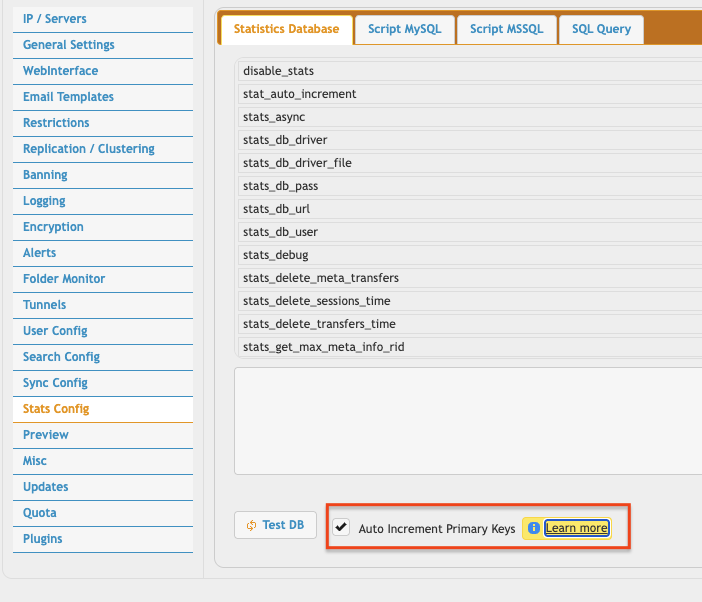
⚠️ Version 11.4.5_18+: Check the flag Auto Increment Primary Keys. This will automatically adjust the SQL insert commands for you.
Manual Configuration:
1. On prefs.XML (find it at CrushFTP install folder) change the tag value "stat_auto_increment" to true.
2. Adjust insert queries. Remove the RID value from all insert query.
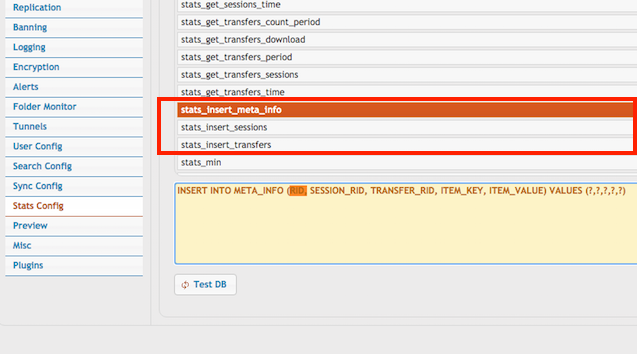
Change stats_insert_meta_info from:
INSERT INTO META_INFO (RID, SESSION_RID, TRANSFER_RID, ITEM_KEY, ITEM_VALUE) VALUES (?,?,?,?,?)
to:
INSERT INTO META_INFO (SESSION_RID, TRANSFER_RID, ITEM_KEY, ITEM_VALUE) VALUES (?,?,?,?)
stats_insert_sessions from:
INSERT INTO SESSIONS (RID, SESSION, SERVER_GROUP, USER_NAME, START_TIME, END_TIME, SUCCESS_LOGIN, IP) VALUES (?,?,?,?,?,?,?,?)
to:
INSERT INTO SESSIONS (SESSION, SERVER_GROUP, USER_NAME, START_TIME, END_TIME, SUCCESS_LOGIN, IP) VALUES (?,?,?,?,?,?,?)
stats_insert_transfers from:
INSERT INTO TRANSFERS (RID, SESSION_RID, START_TIME, DIRECTION, PATH, FILE_NAME, URL, SPEED, TRANSFER_SIZE, IGNORE_SIZE) VALUES (?,?,?,?,?,?,?,?,?,'N')
to:
INSERT INTO TRANSFERS (SESSION_RID, START_TIME, DIRECTION, PATH, FILE_NAME, URL, SPEED, TRANSFER_SIZE, IGNORE_SIZE) VALUES (?,?,?,?,?,?,?,?,'N')
Add new attachment
Only authorized users are allowed to upload new attachments.
List of attachments
| Kind | Attachment Name | Size | Version | Date Modified | Author | Change note |
|---|---|---|---|---|---|---|
png |
insert_methods.png | 112.2 kB | 1 | 05-Dec-2023 05:32 | krivacsz | |
jpg |
sql_stats1.jpg | 163.2 kB | 1 | 05-Dec-2023 05:32 | Ada Csaba | |
png |
stats_auto_increment.png | 76.6 kB | 1 | 14-May-2026 02:57 | krivacsz |


«
This page (revision-55) was last changed on 14-May-2026 03:10 by krivacsz
G’day (anonymous guest)
Log in
CrushFTP11 | What's New
- WebInterface
- Server Admin
- User Manager
- Client Apps
- CrushBalance Load Balancer
- High Availability
- Self Registration
- Preferences
- Email Templates
- Restrictions
- Replication
- Banning
- Logging
- Encryption
- Alerts
- Folder Monitor
- Tunnels
- Syncs
- User Config
- Search Config
- Preview
- Misc
- Plugins
- Manage Shares
- PGP
- Telnet
- FAQ
- API
- Linux Install
- Virtual Linux Server
- Server Variables
- Google Authenticator and Microsoft Authenticator
- AS2 EDI
JSPWiki