How syncing works#
Starting a sync#
When a sync starts, CrushSync compares your folder with the server: what is new, changed or gone on either side since it last ran, including everything that happened while your computer was off or offline. The card shows "Scanning for changes" with the number of local and remote items it has compared.
When the comparison is done and both sides are the same, the sync is active.
While it is active#
CrushSync watches the folder through the operating system. The moment a file is created, changed, renamed or deleted, it passes that change to the server.
The server writes every change into the folder's journal: what happened, to which file, and from which computer. Every few seconds each computer asks the server for the journal entries it does not have yet and repeats them locally. A computer is never sent its own changes back.
So a change travels: your computer → the server → everyone else's computer, usually within seconds. Changes made on the server in any other way, by FTP, SFTP, the WebInterface or a job, go into the same journal and reach the computers the same way.
Where the server keeps the journal, and how long, is the administrator's side: The journal on the server.
Large files#
Of a large file that changed, only the changed parts are transferred, not the whole file again. Over long distances the transfer can use the server's high speed tunnel (Server setup).
When you are offline#
Keep working. CrushSync notes that it cannot reach the server and keeps trying. When the connection is back, it sends what you changed and asks the server for everything in the journal since the last entry it has.
The server keeps the journal for a number of days, 30 unless the administrator changed it (Server setup). A computer that was away longer still gets every new and changed file, because CrushSync compares the two folders when it starts. What it is no longer told is what others deleted or renamed in the days that are gone from the journal: such files can come back from that computer. After a long absence, look the folder over before you start the sync again.
When two people change the same file#
The server keeps revisions: earlier versions of each file, as many as the administrator set (three or more are recommended).
With every change, the journal also holds the fingerprint (MD5) of the version that was replaced. When a change arrives for a file your computer also has, CrushSync looks at your copy:
- Your copy is a version the server knows: the one that was replaced, an earlier one, or the one the server has now. Then nothing of yours can be lost, and CrushSync takes the server's version.
- Your copy is none of those. Then it was changed on your computer too, and that is a conflict.
On a conflict CrushSync tells the server, the server tells every computer that syncs the folder, and nothing is overwritten. For a file Report.docx you get:
| File | What it is |
|---|---|
Report.conflict0.docx |
the copy this computer had |
Report.conflict1.docx |
the newest earlier version on the server |
Report.conflict2.docx |
the version before that |
Open them, keep what you need under the real name, and delete the others. Right after a conflict the file is only there as these copies; the server's current version comes back under the real name the next time the sync starts. A file without an extension is not set aside this way; its earlier versions are still on the server.
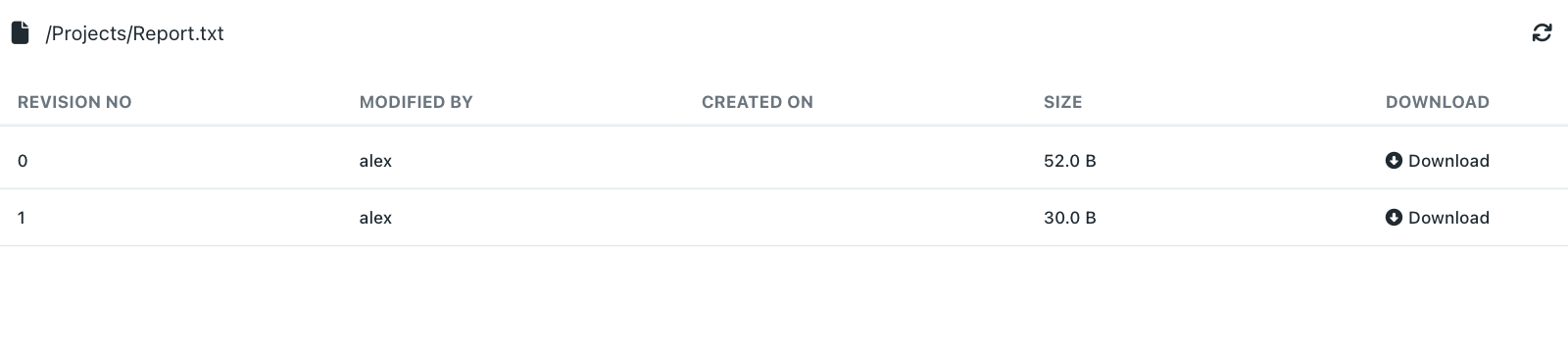
Earlier versions can also be listed and downloaded in the WebInterface, where the administrator has given you the Show History button:
Read only syncs#
A sync marked Read only only receives. Files changed or deleted on that computer are not sent to the server, and the server's versions come back on the next comparison.
Scheduled syncs#
A sync with set times does not watch the folder all the time. It compares and transfers at those times, and when you choose Sync now.
What is transferred, and how#
Everything goes over HTTPS to your CrushMFT server, with your own login. The server applies its usual permissions: a user who may not delete on the server cannot delete there through a sync either.