# The event editor
The editor is the lower part of the [Events](Users-Events.md) tab of a user. It shows the event that is selected in the list, in four parts: what happens, on what, where, and when.
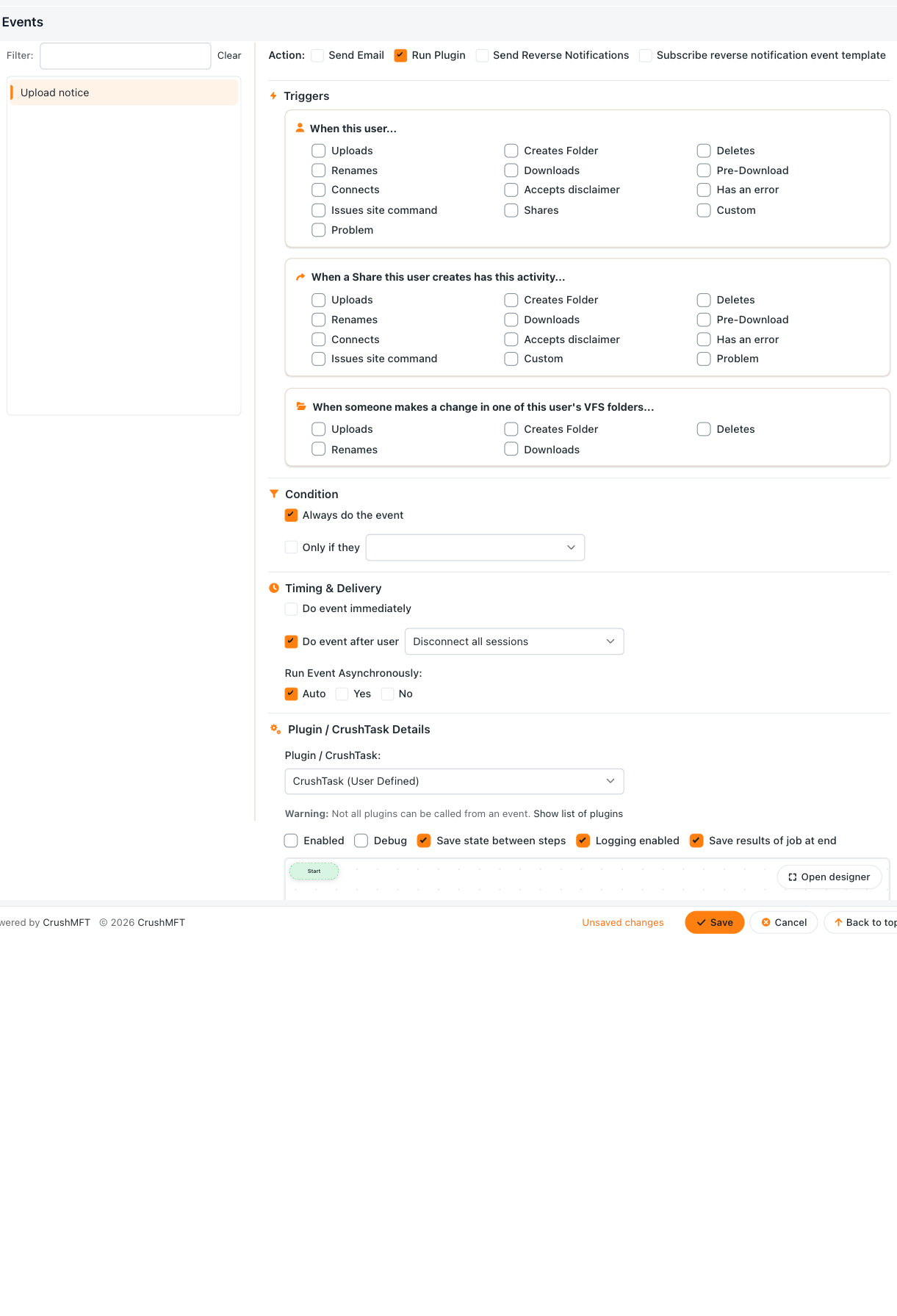
## Action
What the event does. Choose one:
| Action | What happens |
|---|---|
| **Send Email** | a mail is sent, see below |
| **Run Plugin** | a plugin or a job is started with the files of the event: [Running a job from an event](Users-Events-Plugin-Designer.md) |
| **Send Reverse Notifications** | the other users of the folder are told: [Reverse events](Users-Events-Reverse.md) |
| **Subscribe reverse notification event template** | the event is the pattern for the notices users subscribe to themselves in the web interface |
### Send Email
The mail has From, To, CC, BCC, a subject and a body. A template from [Email Templates](Prefs-Email-Templates.md) can be loaded into them. Both the addresses and the text can use variables:
| Variable | Is replaced by |
|---|---|
| `{user_name}` | the user who did it |
| `{user_email}` | their mail address, from the Setup tab |
| `` … `` | the text between the two is repeated for every file of the event |
| `{the_file_name}`, `{the_file_path}` | name and folder of a file, inside `` |
| `{the_file_size}`, `{the_file_size_formatted}` | its size in bytes, and as a readable size such as "1.2 MB" |
| `{the_file_speed}`, `{the_file_error}` | the speed of the transfer, and the error if it failed |
| `{url}` | where the file really is |
| `{user_time}` | the time the event ran |
A mail to `{user_email}` so becomes a receipt for the user: "you uploaded these files". A mail needs a working mail server in [SMTP](Prefs-General-SMTP.md).
An event with **Send Email** and no To, CC or BCC sends nothing to anybody; the server treats it as a reverse notice.
## Triggers
On what the event runs. There are three groups.
**When this user…**
| Trigger | Runs when the user |
|---|---|
| **Uploads** | has uploaded a file |
| **Creates Folder** | made a folder |
| **Deletes** | deleted a file or folder |
| **Renames** | renamed or moved one |
| **Downloads** | has downloaded a file |
| **Pre-Download** | is about to download: the event runs first, see [Pre-download events](Users-Events-Pre-Download.md) |
| **Connects** | logged in |
| **Accepts disclaimer** | accepted the welcome text of the web interface |
| **Has an error** | ran into an error, such as a refused upload |
| **Issues site command** | sent a `SITE` command, or the web interface's equal of it |
| **Shares** | shared a file or folder |
| **Custom** | pressed a custom button: [Custom events](Users-Events-Custom.md) |
| **Problem** | reported a problem with the web interface's **Report A Problem** button |
**When a Share this user creates has this activity…** has the same triggers, except Shares. These run for what the **receivers** of the user's shares do: "tell me when somebody downloads what I shared".
**When someone makes a change in one of this user's VFS folders…** has Uploads, Creates Folder, Deletes, Renames and Downloads. These run for what **other** users do in folders this user also has: see [Reverse events](Users-Events-Reverse.md).
Several triggers can be ticked in one event.
## Condition
| Choice | Means |
|---|---|
| **Always do the event** | every time a trigger happens |
| **Only if they** … | only for one kind of activity, and for some of them only in one folder |
The list after **Only if they**:
| Entry | Narrow to |
|---|---|
| **Upload in any directory**, **Download from any directory** | uploads only, or downloads only, anywhere |
| **Upload in below directory**, **Download from below directory**, **Delete from below directory**, **Rename from below directory**, **Make directory from below directory** | that activity in the folder named below, and its subfolders. The folder is picked from the user's own folders. |
| **Do activity in real URL** | anything in one storage location, named by its real address rather than by the user's folder name. The fields that then appear describe the connection. |
## Timing & Delivery
| Choice | The event runs |
|---|---|
| **Do event immediately** | once per file, as each file is done |
| **Do event after user** … | once, with all files together |
The list after **Do event after user**:
| Entry | Runs when |
|---|---|
| **Disconnect** | this session ends |
| **Disconnect all sessions** | the user's last session has ended. Programs that open several connections at once then cause one event, not several. It is the usual choice. |
| **Complete the batch** | the web interface says that an upload or download of several files is complete |
| **is idle for 30 seconds**, **is idle for 60 seconds** | the user did nothing for that long |
One mail with a list of twenty files is better than twenty mails: for mails, choose one of the "after" entries.
**Run Event Asynchronously** decides whether the user waits for the event:
| Value | Means |
|---|---|
| **Auto** | the server decides: it waits where the user's next step depends on the result |
| **Yes** | never wait: the event runs beside the user's session |
| **No** | always wait until the event is done |
## Saving
An event is part of the user. Changes in the editor are saved with **Save** of the User Manager, like every change of the user. Test an event by doing the thing as the user: upload a file with the test account, and look in the server log for lines with `EVENT`.